Getting Started
Page 2 Mitel
®
5360 IP Phone User Guide – , April 2013
5360 IP Phone Features
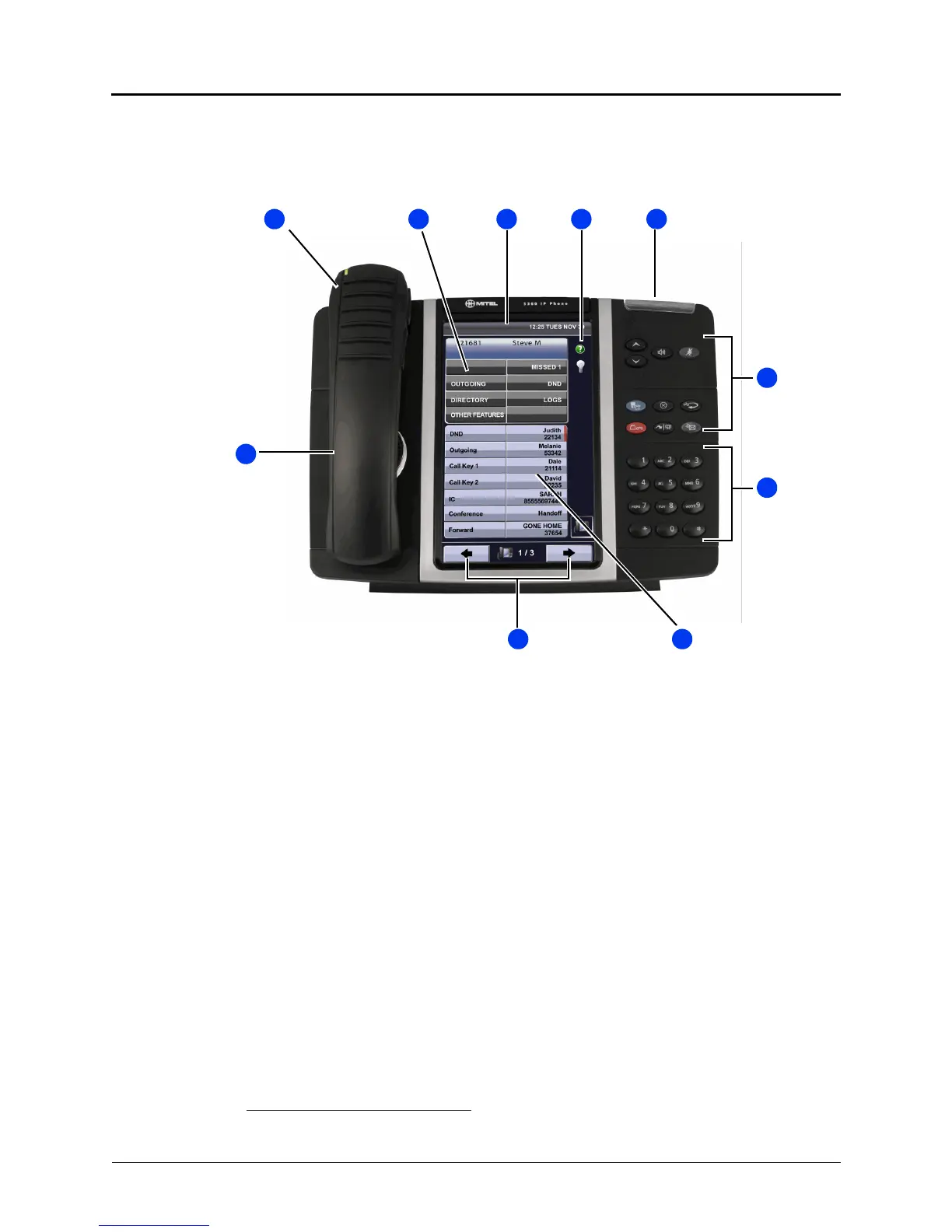
The 5360 IP Phone is shown here.
1
See “Phone Feature Descriptions” below for more
information about the phone features.
1. This image is an example of how your phone may be programmed.
1 1
8 1
2 1 5 1
6 1
7 1
9 1
10
1
3 1 4 1
1 – Handset (see page 5) 6 – Feature buttons (see page 7)
2 – Display and Softkeys (see page 5) 7 – Dialpad buttons (see page 7)
3 – Status Bar (see page 5) 8 – Programmable buttons (see page 8)
4 – Gadget Sidebar (see page 5) 9 – Navigation buttons (see page 8)
5 – Ring/Message Indicator (see page 5) 10 – External Speaker (see page 8)



 To Next Page