Instructions for use
CLIMACELL EVO_np_en_1401_mmm_V1.01 27
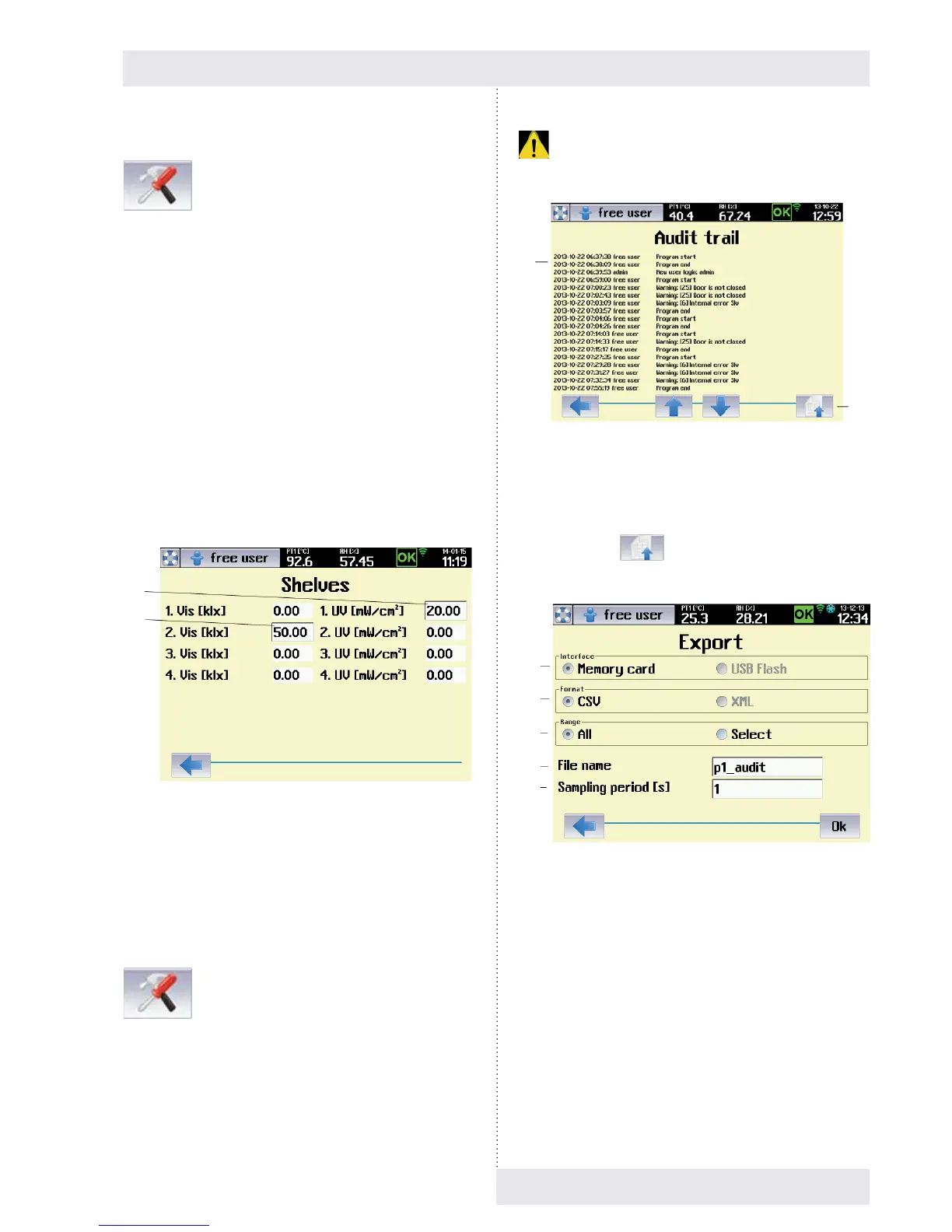
8.3.10.4 RACK
→ Rack
This service menu serves for entering the value of VIS and
UV light intensity under individual light racks in case that
the device is not equipped with sensors for light intensity
measuring (optional equipment, see 6.11).
The procedure is as follows:
1. The relevant rack is lit to maximal intensity (100 %).
2. The user uses an external measuring gauge for
measuring the intensity of visible light IVIS [k.lx],
respectively intensity of UV radiation IUV [mW/cm2]
below the relevant rack, on the exposed material
position.
3. The measured value is entered to the menu according to
Fig. 46 and it is saved in the device memory.
4. The saved value of light intensity will be used for
calculation of exposition time in programs with light
exposition (8.4.4.1).
Fig. 46
(1) Intensity of UV radiation measured below the fi rst UV
rack.
(2) Intensity of visible light measured below the second
rack.
8.3.10.5 AUDIT TRAIL
→ Audit trail
The audit trail contains a chronological record of all action
performed using the device. The minimum length of each
recorded section is ten years, although this may be longer
depending on the frequency of the work. Once the memory
capacity allocated for the audit trail reaches 90 %, a warning
. is issued. A service call-out is required to restore full
capacity.
Fig. 47
(1) Audit trail records.
(2) Button for export.
The push button
displays a menu for the audit trail
export.
Fig. 48
(1) Memory medium selection.
- USB fl ash disk is allowed only with devices with
communication module, see 6.15.
(2) Record format.
- Format CSV is suitable for export to the
application Microsoft Excel.
- XML is a universal format supported by many
applications.
(3) Export range.
- Everything – there is performed the export of
complete audit trail.
- Selection - export starts from the fi rst record on
current page. Number of exported records is set
by the item (5).
(1)
(2)
(1)
(2)
(1)
(2)
(3)
(4)
(5)


 To Next Page