10.4 ACCUMULATION OF CONDENSED WATER STEAM
When the incubator is operated under specifi c conditions (high humidity), condensate may accumulate in the space between
the glass door and outer door. The condensate is collected below the glass door and it is taken away to the waste vessel placed
below the device.
10.5 DEVICE CLEANING AND DECONTAMINATION
Clean only cold and mains disconnected device!
Clean inner walls (removable) with water with detergent, respectively use suitable chemical means. You can use the same
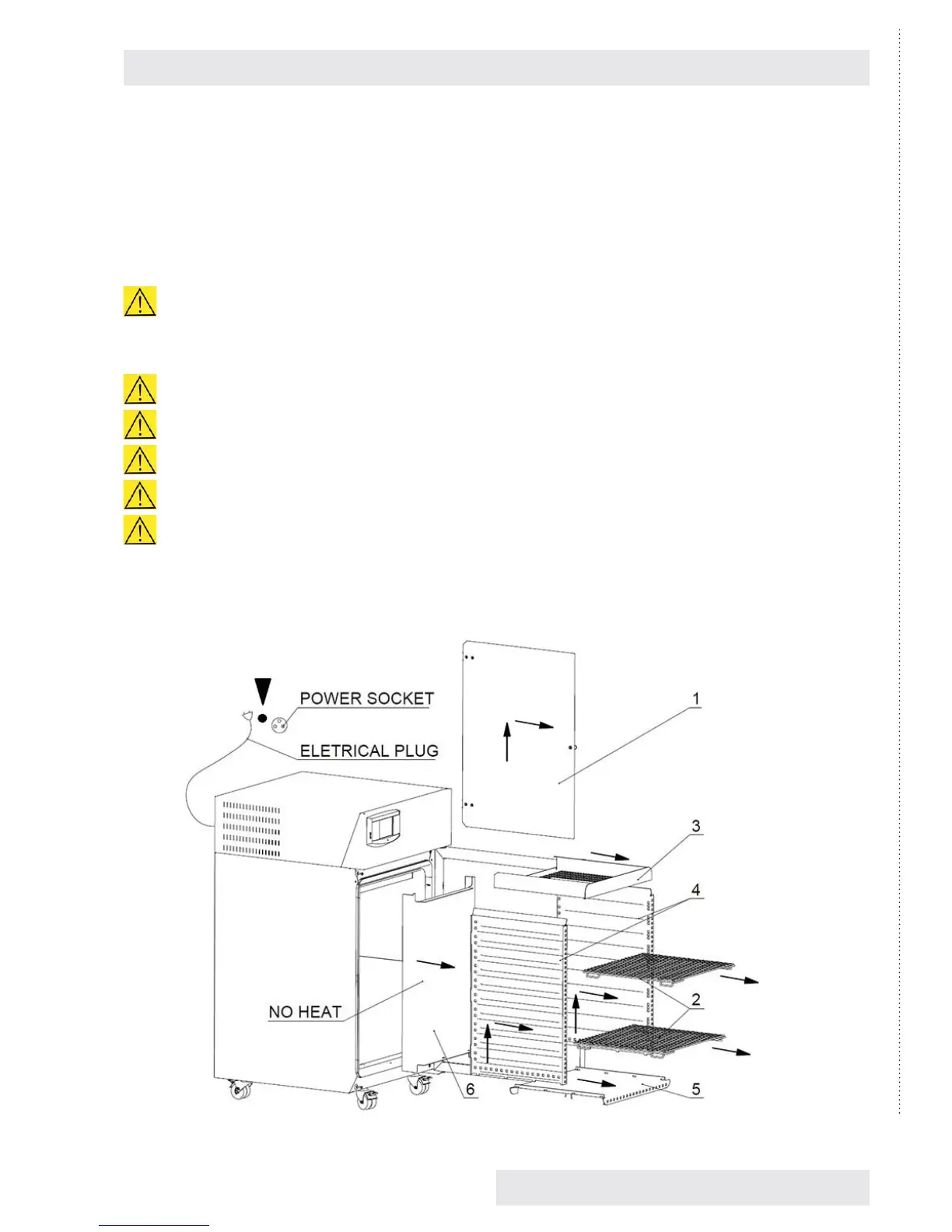
means for cleaning the interior of the chamber after removal of inner walls - see Fig. 77.
Clean the external surface of the device shell only with cloth dampened with water and detergent.
Take care for water not to fl ow behind the control panel.
Clean the touch screen with screen-cleaning means only.
Do not use any abrasive cleaning means – they may cause sheet scratching.
While handling the inner sheets in the chamber take extreme care not to cut the chamber sealing.
When disconnecting the waste vessel connector hold the female connector and pull the male connector.
Dismantling of internal walls – according to arrows
(1) – glass door, (2) – screens, (3) – upper wall, (4) – side walls, (5) – bottom, (6) – rear wall
You can assemble the chamber by reverse procedure. Take care for all the stops to fi t each other.
Fig. 78
Instructions for use
CLIMACELL EVO_np_en_1401_mmm_V1.01 43


 To Next Page