Instructions for use
34 CLIMACELL EVO_np_en_1401_mmm_V1.01
- d – it has the meaning of the number of passed
days
(19) End of displayed time interval.
(20) Movement upwards / downwards.
- Based on touch, the displayed fi eld of the graph
moves in the direction of negative (positive) axis y.
(21) Push buttons for setting the vertical axis scale.
(22) Identifi cation number of the device.
- See 8.3.7.
(23) Information on device operation.
8.4.7.1 RUNNING PROGRAM GRAPH
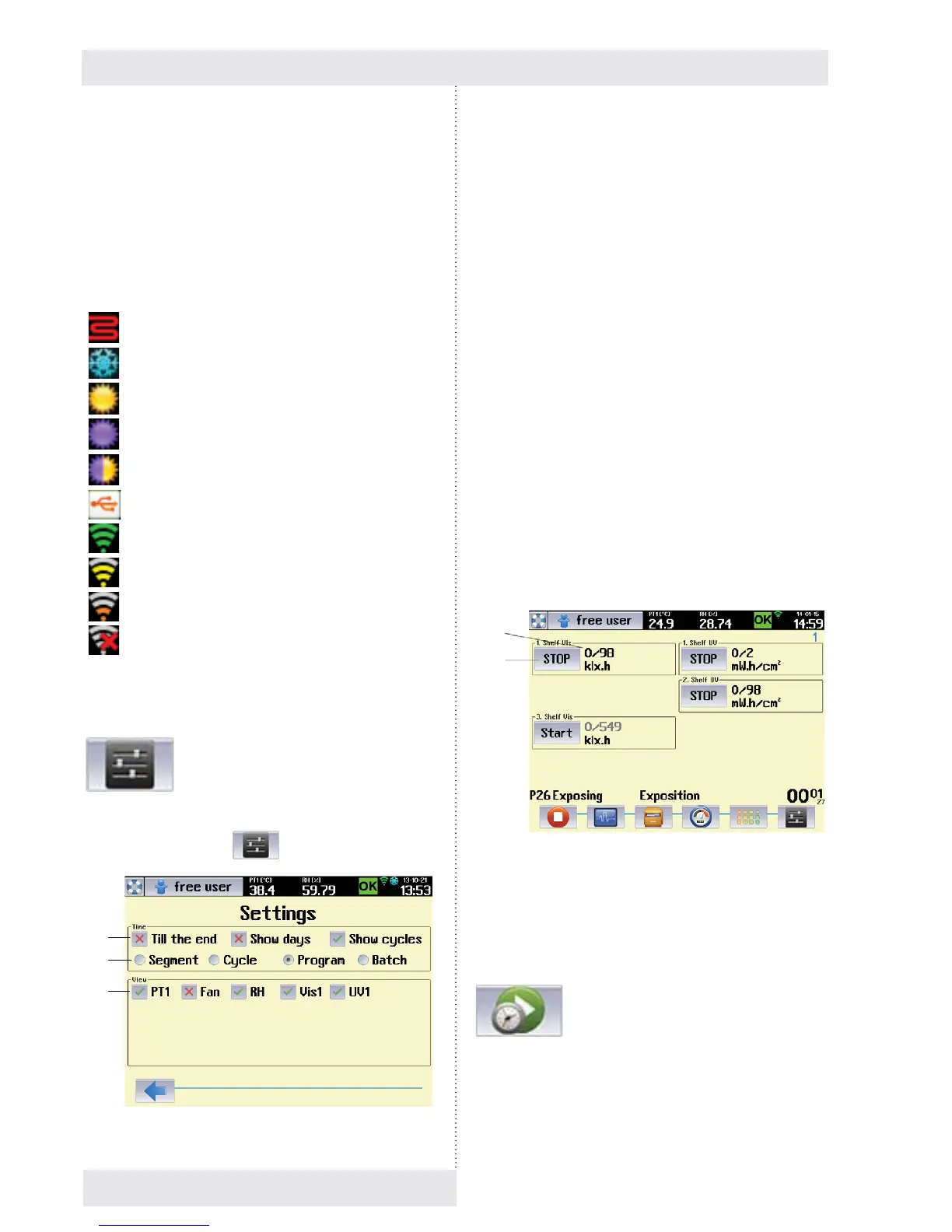
The parameters of the running program graph can be set
after clicking on the icon
Fig. 61.
Fig. 62
- heating
- cooling
- visible light
- UV
- visible light + UV
- USB device connected
- Wifi – full signal
- Wifi – weak signal
- Wifi – very weak signal
- Wifi – no signal
(1) Options for time displaying
- „BY END“ – it displays the time remaining by the
end of selected part of the program.
- „display days“ – it shows passed days.
- „display cycles“ – it shows passed cycles.
- Time is displayed in format HHHHH:MM:SS.
Maximal time that can be displayed is 65535
hours.
- In case of selection „Display days“ the time is
displayed in the format DDDDD:HH:MM:SS.
Maximal time that can be displayed is 65535 days.
(2) Part of the program, to which the time information
relates.
- A batch means chaining of several programs one
after the other.
(3) Displayed items selection.
- The offer in this fi eld depends on concrete
confi guration of the device.
8.4.7.2 RUNNING THE PROGRAM WITH LIGHT
EXPOSITION
In case of programs with light exposition the information
about the program is displayed in a different format
compared to other programs (exposition programs - see
8.4.4.1.).
Fig. 63
(1) Current light dose in given time.
(2) Push button for manual switch on (off) of light racks.
8.4.7.3 POSTPONED START OF PROGRAM
Postponed start of the program allows automatic start of the
program in set time. It is possible to start the program in any
point of the cycle (program, segment).
(1)
(2)
(3)
(1)
(2)


 To Next Page