Instructions for use
CLIMACELL EVO_np_en_1401_mmm_V1.01 31
8.4.4 SEGMENT SETTINGS
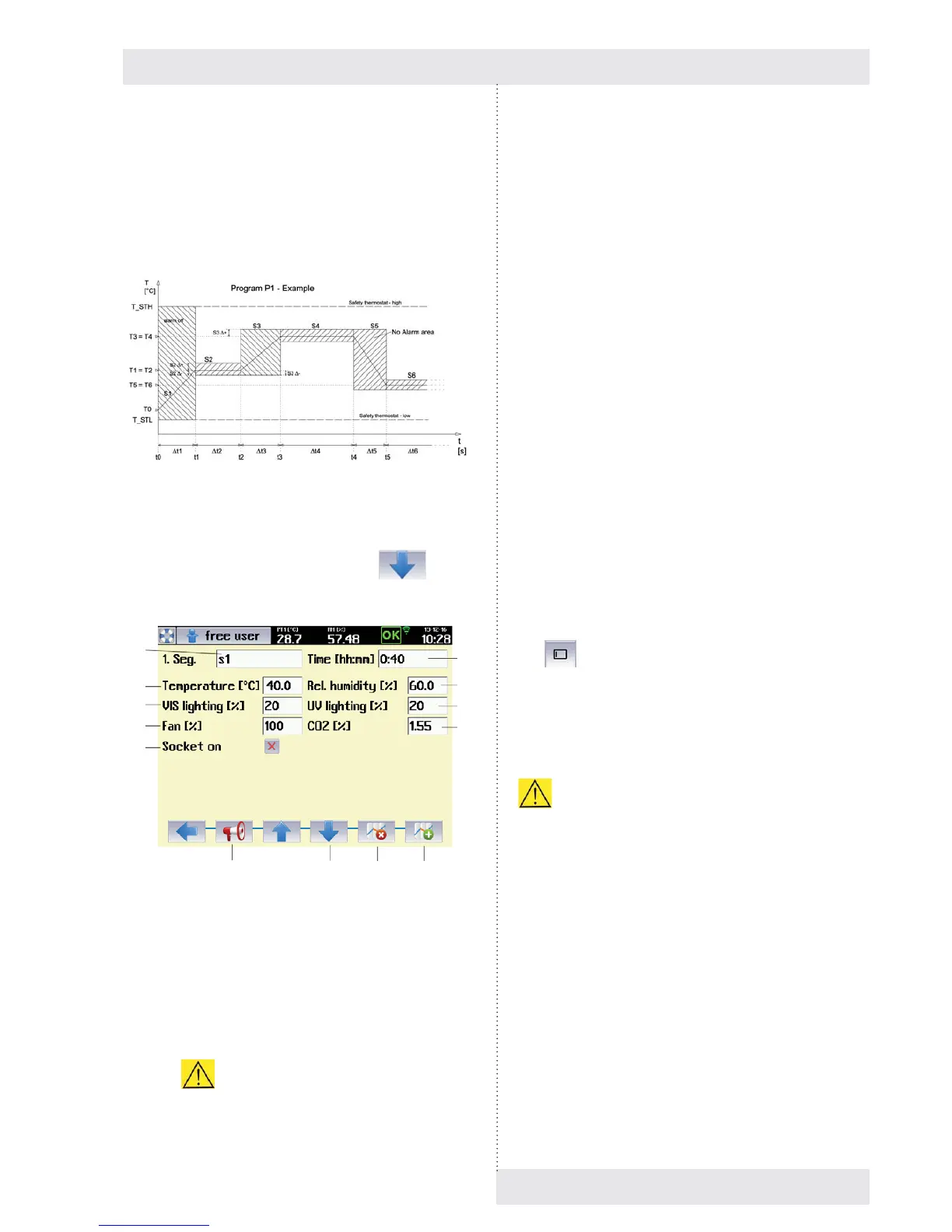
The next step is to set the program sub-segments. Fig. 55
shows the example of temperature regulation program P1,
which consists of six segments, S1 to S6. Each segment
has a defi ned time and temperature that is to be attained
within that specifi c time.
Fig. 55
The parameters of each segment can be set in the segment
editing menu, which is reached by pressing
(Fig. 56).
Fig. 56
(1) Segment name.
(2) Required temperature at end of segment.
- Temperature to be attained at the end of the
segment.
(3) Required VIS lighting intensity at end of segment.
- Only on devices with light racks, see 6.10.
(4) Required fan speed at end of segment.
-
Decrease of revolutions may have negative
effect on precision of temperature regulation
and relative humidity regulation as well as to
space thermo homogeneity in the chamber of the
incubator.
- For optimal regulation we recommend setting to
100 %.
(5) Switching on the internal socket.
- See 6.9.
- The socket may be switched on (off) within the
segment.
(6) Length of segment
(7) Required humidity at end of segment.
(8) UV lighting intensity at the end of the segment.
- Only on devices with light racks, see 6.10.
(9) The required CO
2
concentration at the end of the
segment..
- Only on devices with CO
2
regulation, see 6.14.
(10) Alarm settings.
- See 8.4.4.2.
(11) Switch to next segment.
(12) Delete segment.
(13) Add segment.
Notes:
- The target value of the horizontal segment is the
same as the target value of the previous segment. For
example, the required temperature for segment S2
(Fig. 55) is the same as for the previous segment (S1),
and it is therefore horizontal.
- If a blank character is inserted into the variable target
value column (i.e. the column is cleared by pressing
), that variable will not be regulated in that
segment. If, for example, no value is entered for any of
the variables in the 1st segment, the device will not be
regulated at all for the defi ned period of time. This can
be used to move the start of the program by any time
period.
Allowed combinations of temperature, relative
humidity and lighting are specifi ed in chapter 8.4.5.
8.4.4.1 SETTING OF PROGRAMS WITH LIGHT
EXPOSITION
Programs with light exposition have only one segment,
in which the material under an appropriate rack faces
the infl uence of UV (VIS) light. The intensity of lighting of
all the racks is set during material exposition to maximal
value (100 %). The user sets the required exposition in the
menu for segment setting (Fig. 57). The exposition starts
automatically after reaching the required parameters in
the device chamber (temperature, humidity and possibly
others). The light intensity below the relevant rack is
measured by a sensor. After exposition time expiration the
lighting is switched off.
(6)
(7)
(8)
(9)
(1)
(2)
(3)
(4)
(5)
(10) (11) (12) (13)


 To Next Page