Instructions for use
CLIMACELL EVO_np_en_1401_mmm_V1.01 37
8.4.7.7 POWER SUPPLY OUTAGE
In case of power supply network outage in the course of the
program ruin, all the running program settings are preserved
and even the real time clock goes on in the course of the
outage.
The device behaviour during an outage depends on setting
of the condition for the segment fi nishing (see 8.4.2):
- Temperature + time or batch
o after power supply restoration the program will
continue exactly from the point of the segment where
it was interrupted.
- Time
o after power supply restoration there will continue
exactly the time that passed from the program start.
The part of the program that should have been
performed in the course of the outage is omitted.
8.5 HISTORY OF PROTOCOLS
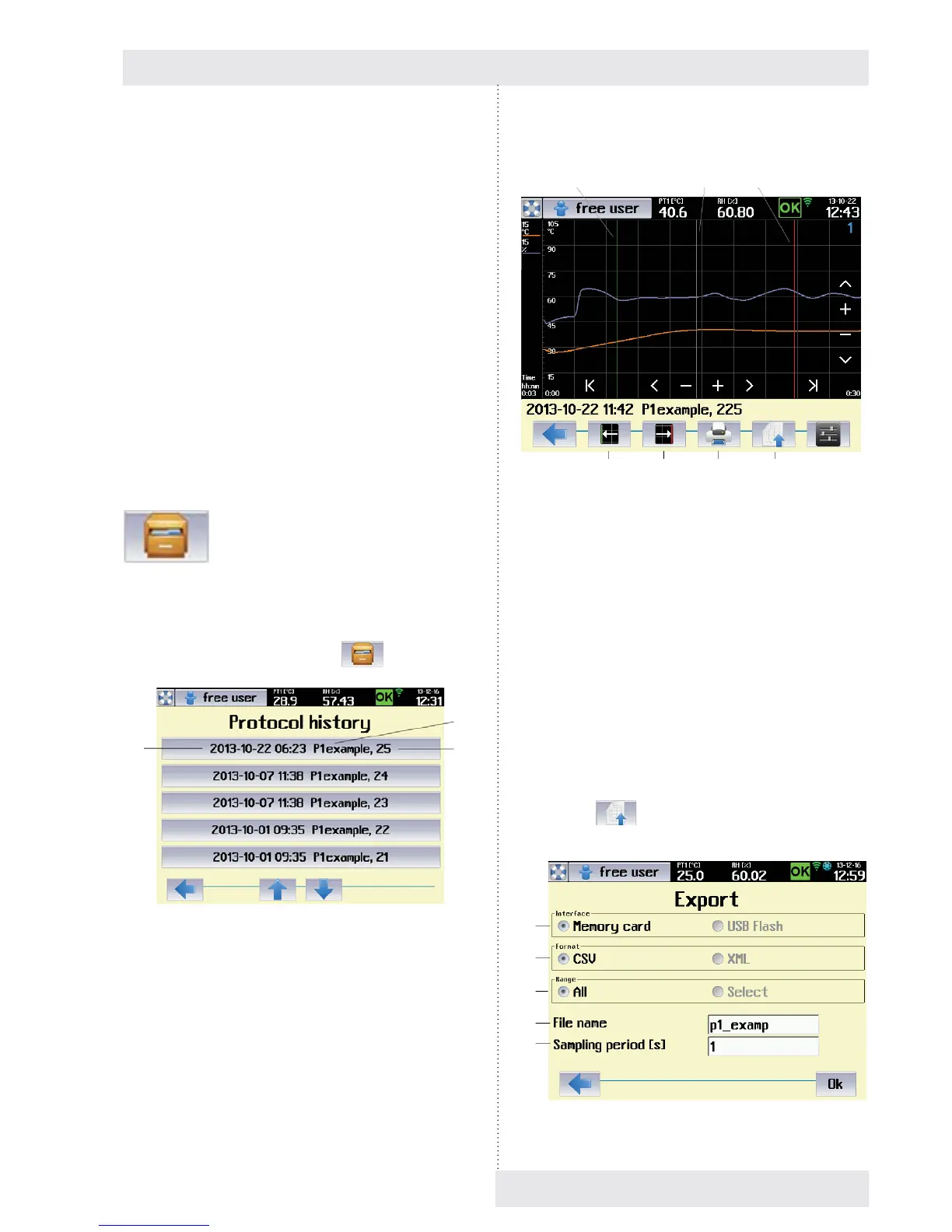
The history of protocols keeps information on programs run
in recent 30 days. In the protocol there are saved samples
of all the program items with a period of 1 s. The history of
protocols is displayed using the icon
, Fig. 12.
Fig. 71
(1) Date and time of program running.
(2) Program name.
(3) Protocol order in the history.
(1)
(2)
(3)
A relevant graph is displayed after selection of an item from
the list:
Fig. 72
(1) Lower limit of selection
- When touching any point of the graph, a white
cursor is displayed in the touch point.
- The push button changes the cursor colour to
green. The green cursor marks the lower limit of
the selection.
(2) Upper limit of selection (export).
- The push button changes the cursor colour to
red. The red cursor marks the upper limit of the
selection.
(3) Protocol printing.
(4) Protocol export.
(5) Cursor for lower limit of the range.
(6) Cursor for current value
(7) Cursor for upper limit of the range.
Push button
(Fig. 72) displays the menu for
protocol export.
Fig. 73
(5) (6) (7)
(1) (2) (3) (4)
(1)
(2)
(3)
(4)
(5)



 To Next Page