C-75 Installation Guide
10
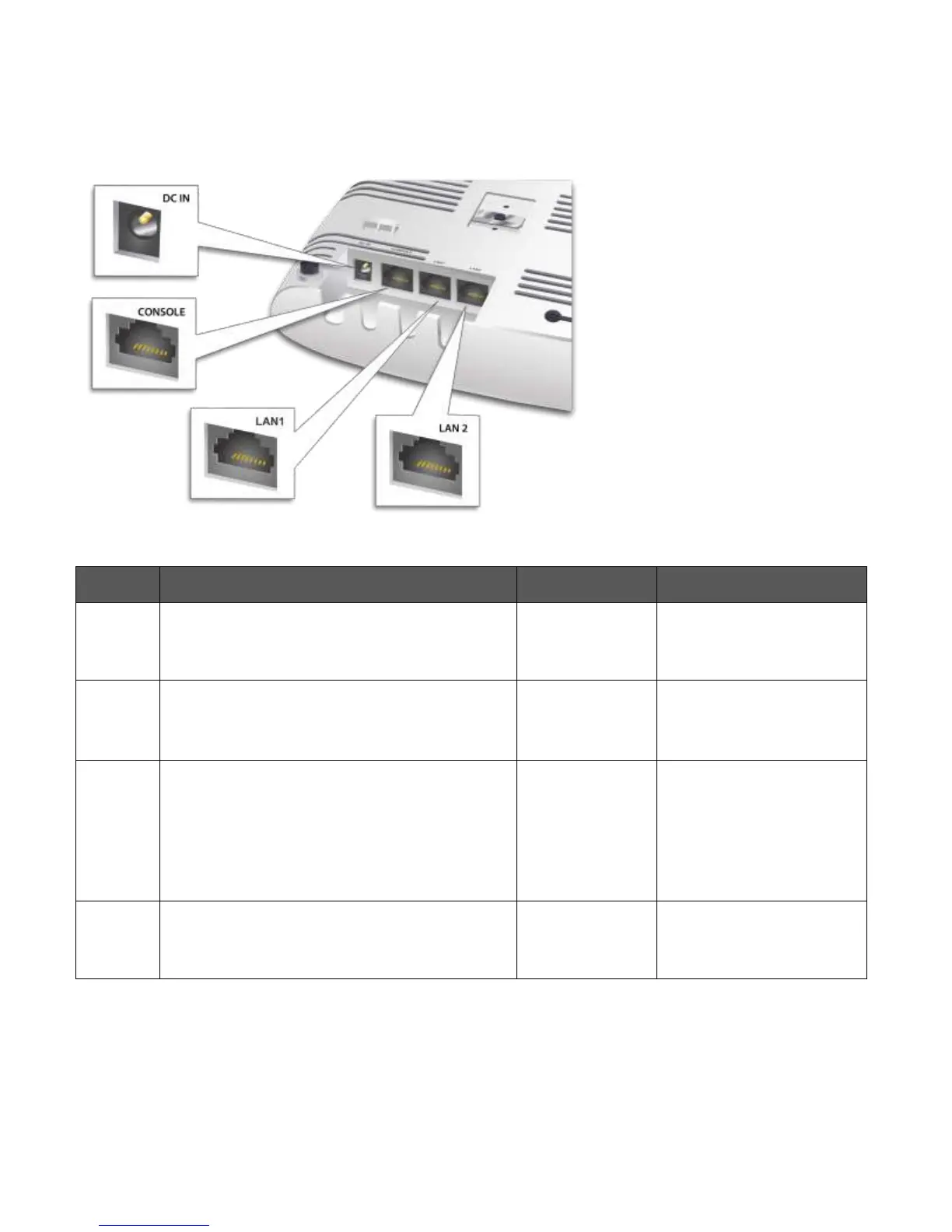
The rear panel of the C-75 has an Ethernet port labelled LAN1, that enables you to connect the device a wired
LAN through a switch or a hub and provides the power for the device by using the 802.3af standard.
Figure 0-2 Rear Panel of C-75
Table 0-3 Rear Panel Port Settings for C-75
Enables you to connect to and power on device
using 12 V DC power with 2.5 ampere.
Enables you to access the AP through a dumb
terminal interface irrespective of the AP state.
Baud rate to be set to
115200
Enables you to connect the device to a wired
LAN through a switch or a hub. The device can
then communicate with the server.
This port also provides the power for the device
using the 802.3af standard
10/100/1000 Mbps
Ethernet
Power over Ethernet
Can be used for advanced AP features.
10/100/1000 Mbps
Ethernet


 To Next Page