C-75 Installation Guide
15
Power on C-75
A C-75 device can be powered on by 802.3af Class 0 Power Over Ethernet (PoE) of Nominal input voltage 48V
DC. You can connect the device to the network using PoE or a power adapter.
Connect C-75 to the Network
To connect C-75 to the network, perform the following steps.
1. Ensure that a DHCP server is already available on the network to enable network configuration of
the C-75.
2. Add the DNS entry wifi-security-server on all DNS servers. This entry should point to the IP address
of the server.
3. Ensure that DHCP is running on the subnet to which the device will be connected.
Important
:
If DHCP is not enabled on a subnet, the device cannot connect to that subnet with zero-
configuration. If the DNS entry is not present on the DNS servers or you do not have the DHCP server running
on the subnet, you must manually configure the device. Refer to
Manually Configuring C-75
for further details.
Using C-75 with PoE
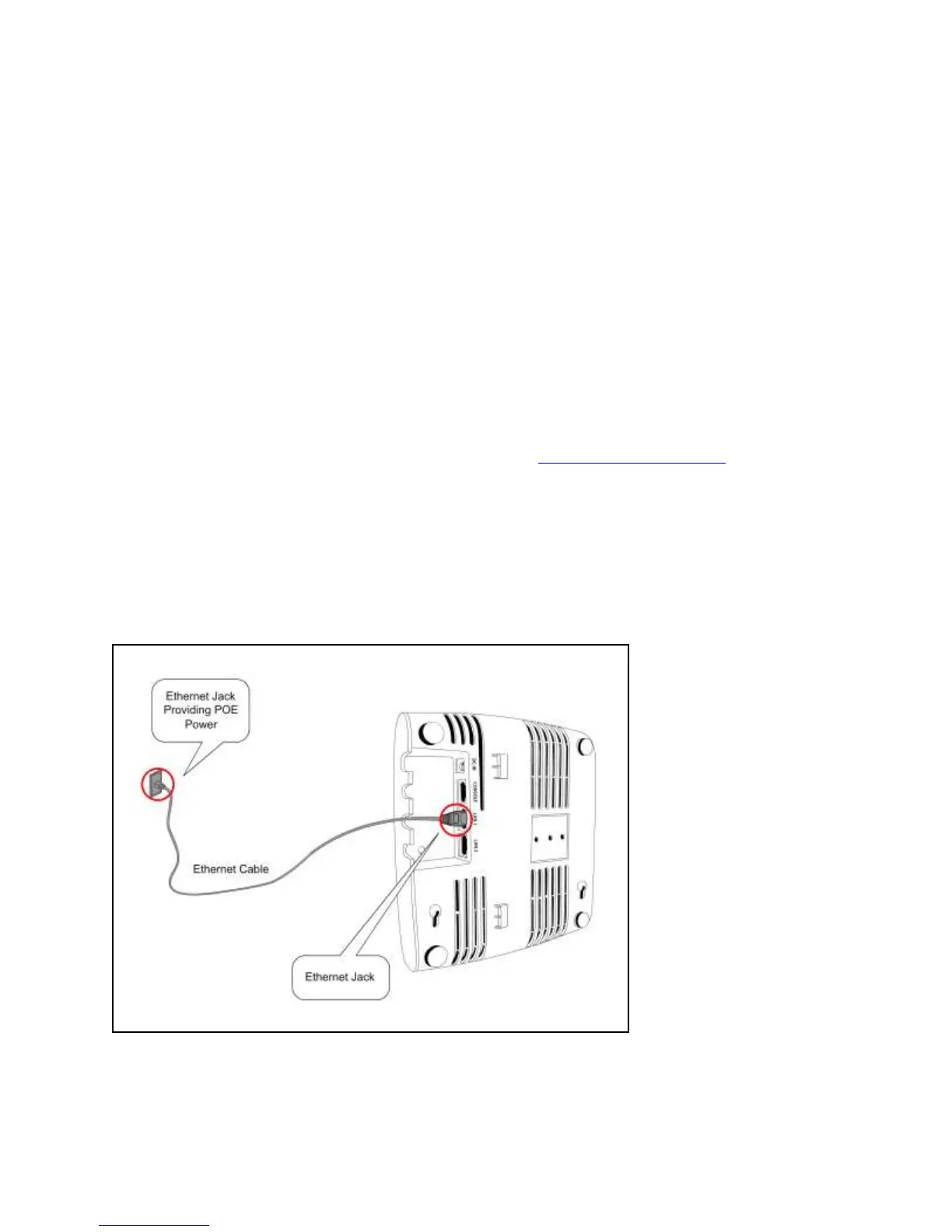
To power on and connect C-75 to the network using PoE, do the following:
1. Connect one end of the network interface cable to the Ethernet port at the rear of the C-75.
2. Connect the other end of the network interface cable to the Ethernet jack that provides PoE power.
Figure 0-3. Power Up and Connect C-75 using PoE
Using C-75 with power adapter
To power up the device, perform the following steps:
1. Plug the power cable into the DC power receptacle at the rear of the device.


 To Next Page