C-75 Installation Guide
11
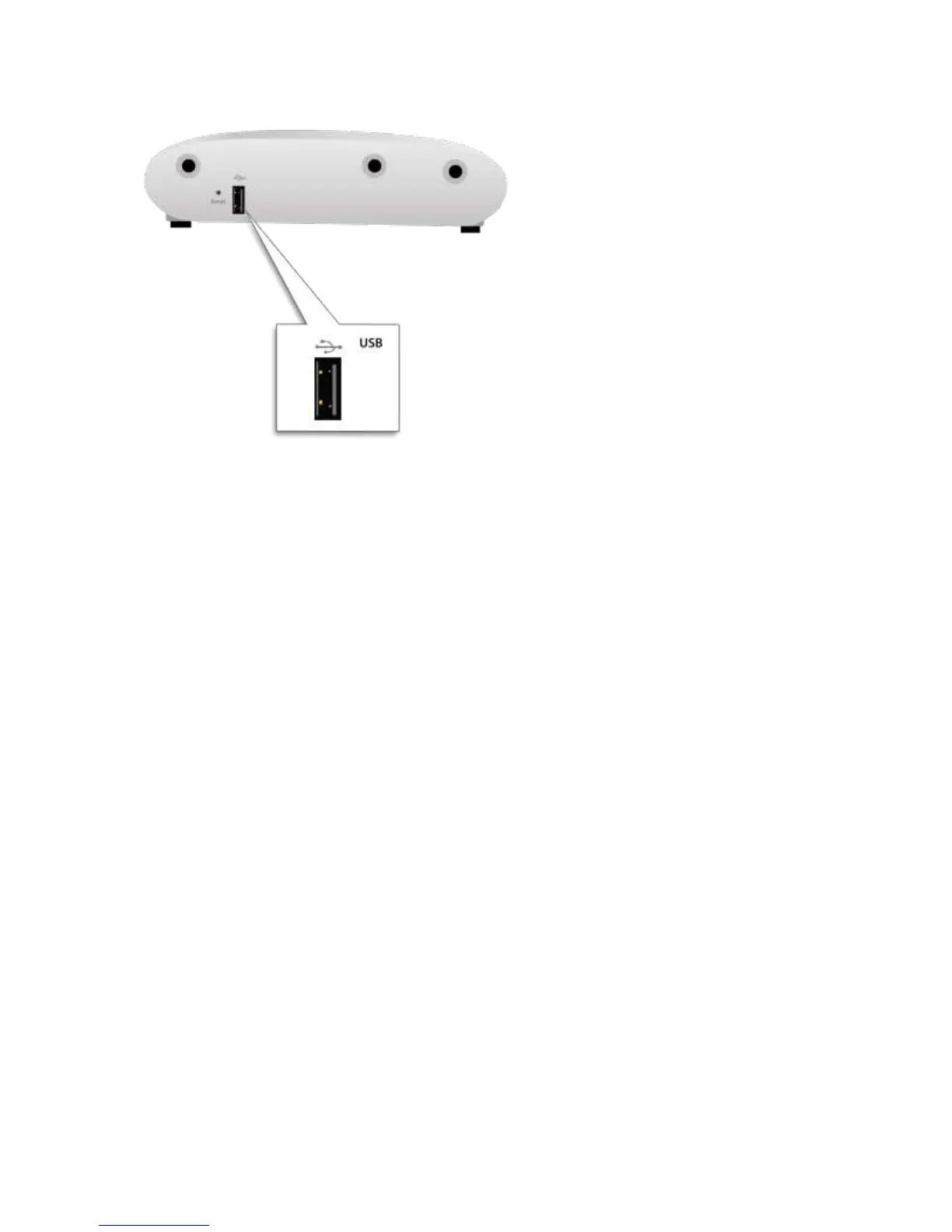
Figure 0-3. Right side of C-75
The Reset Pin Hole and the USB port are on the right side of the device as shown in the figure above. The Reset
Pin Hole resets the C-75 device to factory defaults. To reset the device, power cycle the device (remove the
power cable once and connect it back again) and while plugging the power cable back into the power source,
press and hold down the Reset Pin Hole for 45 seconds until the power, LAN1, 2.4 GHz LEDs go green. Pressing
the Reset Pin Hole while the device is running will not have any effect. When you reset the device, the following
settings are reset:
Config shell password is reset to config.
Server discovery value is erased and changed to the default, wifi-security-server.
All the VLAN configurations are lost.
Device mode is changed to Sensor Only.
If static IP is configured on the device, the IP address is erased and DHCP mode is set. The factory
default IP address of the device is 169.254.11.74.
After reset, all the LEDs will blink once, indicating that the reset is successful, and the system boot sequence is
initiated.
.The USB port connects the C-75 to a USB device. If you are using the cellular activity detection device to detect
cellular activity, you must plug it in to the USB port.


 To Next Page