5. Setting up the device
23
Menu level Parameterisation level
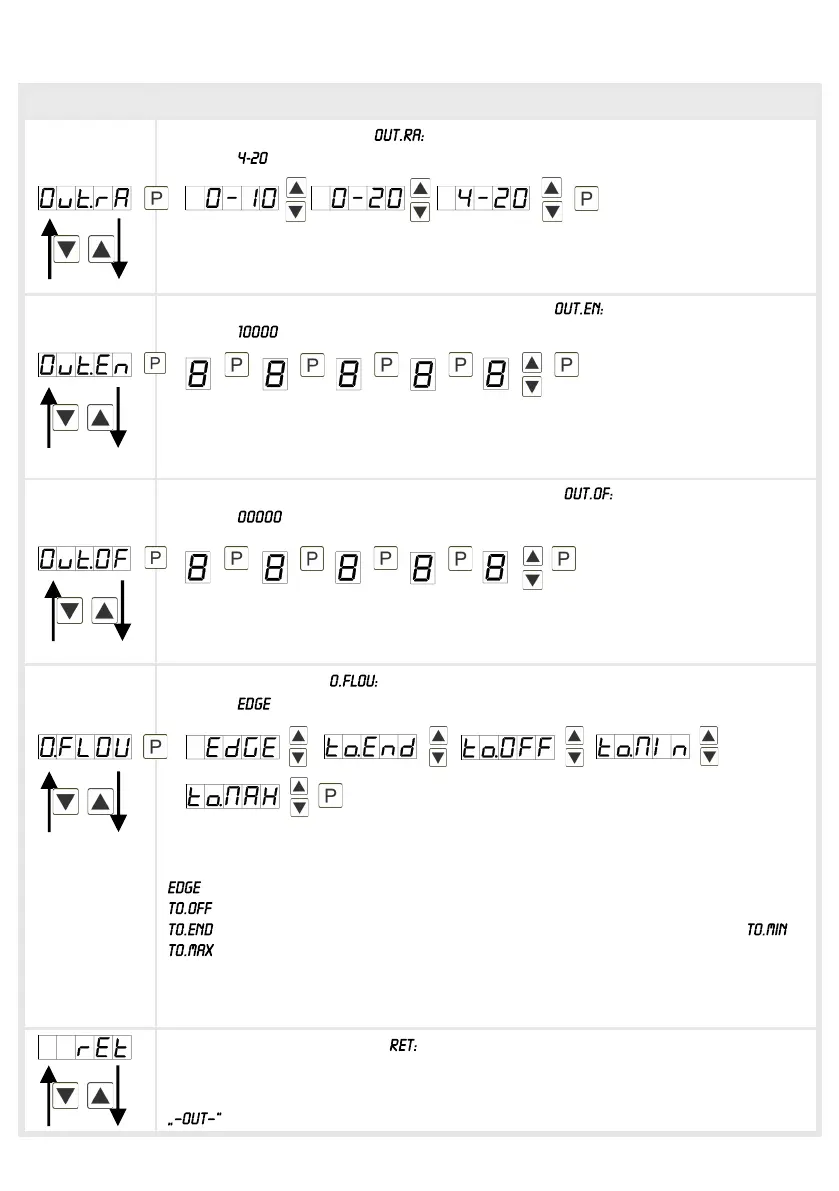
Selection analog output,
Default:
Availabe are 3 output signals: 0-10 VDC, 0-20 mA and 4-20 mA. With this function
the demanded signal can be selected.
Setting up the final value of the analog output,
Default:
The final value can be adjusted from the smallest to the largest digit with [▲] [▼].
Confirm each digit with [P]. A minus sign can only be parameterized on the
highest value digit. After the last digit, the display switches back to the menu level.
Setting up the initial value of the analog output,
Default:
The initial value can be adjusted from the smallest to the largest digit with [▲] [▼].
Confirm each digit with [P]. A minus sign can only be parameterized on the
highest value digit. After the last digit, the display switches back to the menu level.
Overflow behavior,
Default:
To recognise and evaluate faulty signals, e.g. by a controller, the overflow
behaviour of the analog output can be defined. As overflow can be seen either
, that means the analog output runs on the set limits e.g. 4 mA and 20 mA, or
(input value smaller than initial value, analog output changes on e.g. 4 mA),
(higher than final value, analog output changes on e.g. 20 mA). If or
is set, the analog output changes on the smallest or highest possible binary
value. This means that values of e.g. 0 mA, 0 VDC or values higher than 20 mA or
10 VDC can be reached. With [P] the selection is confirmed and the device
changes into menu level.
Back to menu group level,
With [P] the selection is confirmed and the device changes into menu group level
.


 To Next Page