5. Setting up the device
16
5.4.2. General device parameters
Menu level Parameterisation level
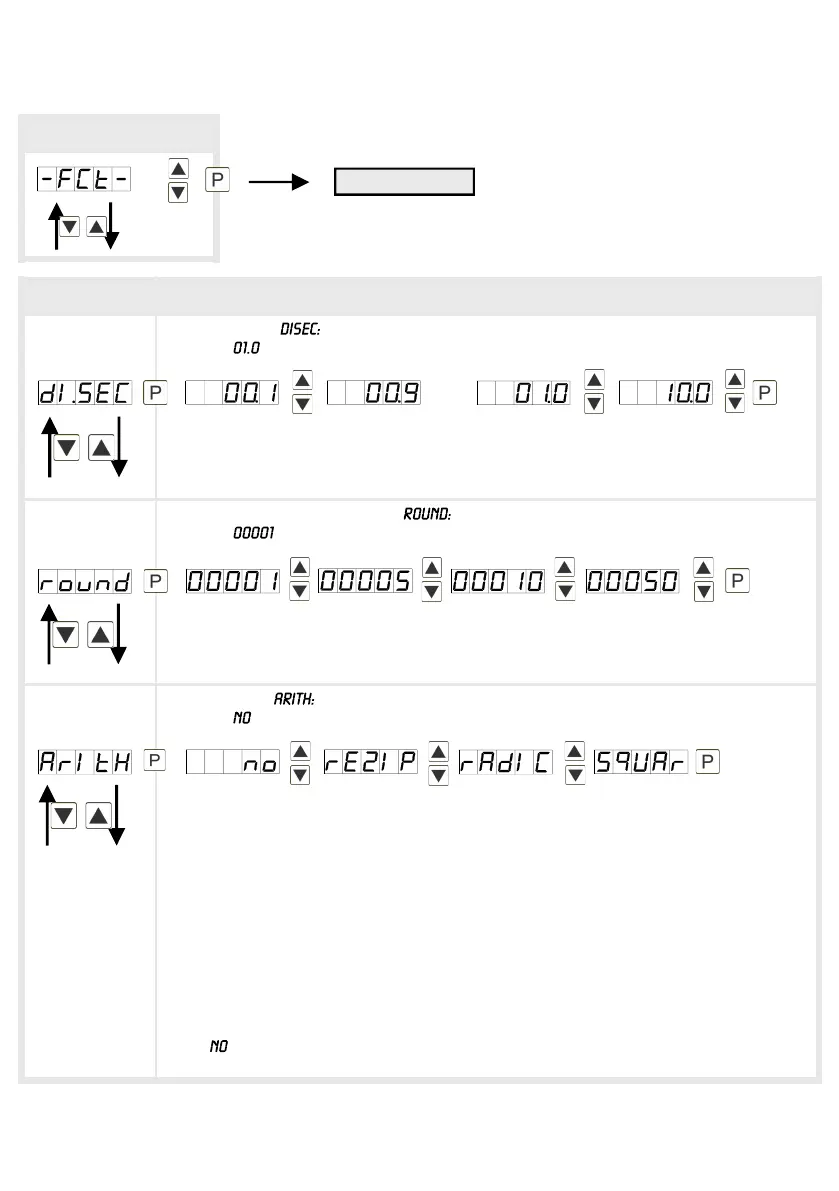
Display time,
Default:
The display time is set up with [▲] [▼]. Thereby switch up to 1 second in
increments of 0.1 and up to 10.0 seconds in increments of 1.0. With [P] the
selection is confirmed and the device changes into menu level.
Rounding of display values,
Default:
This function is for instable display values, where the display value is changed in
steps of 1, 5, 10 or 50. This does not affect the resolution of the optional outputs.
With [P] the selection is confirmed and the device changes into menu level.
Arithmetics,
Default:
With this function the calculated value, not the measurand, is shown in the display.
Calculation types
rEZIP = (Final value*Final value)/Display value
rAdiC = Root(Display value*Final value)
SqUAr = (Display value)²/Final value
Advice: The denominator of fractions should not be 0 because a division by 0 is
not possible. It creates an undefined state and the display goes into the overflow.
With , no calculation is deposited. With [P] the selection is confirmed and the
device changes into menu level.
Menu group level
Menu level
then
Reciprocal
Root extraction
Square


 To Next Page