6. Reset to factory settings
30
Menu level Parameterisation level
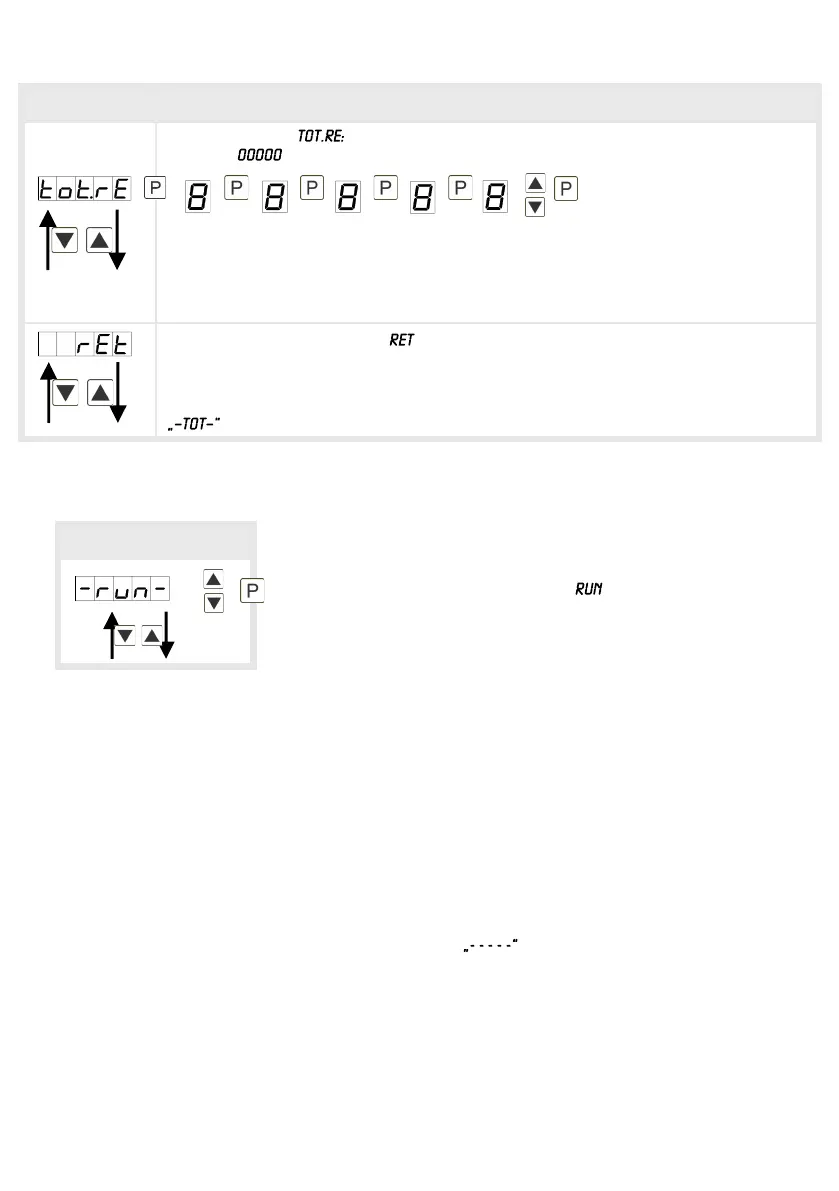
Totaliser reset,
Default:
The reset value is adjusted from the smallest to the highest digit with the
navigation keys [▲] [▼] and digit per digit confirmed with [P]. After the last digit,
the display switches back to the menu level. The activator for the reset is
parameter driven via the 4
th
key or via the optional digital input.
Back to menu group level, :
With [P] the selection is confirmed and the device changes into menu group level
.
Menu-group level
Programming interlock:
To return the unit to a defined basic state, a reset can be carried out to the default values.
The following procedure should be used:
• Switch off the power supply
• Press [P]-button
• Switch on voltage supply and press [P]-button until is shown in the display.
With reset, the default values of the program table are loaded and used for subsequent
operation. This sets the unit back to the state in which it was supplied.
Caution! All application-related data are lost.
6. Reset to factory settings
Description see page 12, menu-level


 To Next Page