5. Setting up the device
17
Menu level Parameterisation level
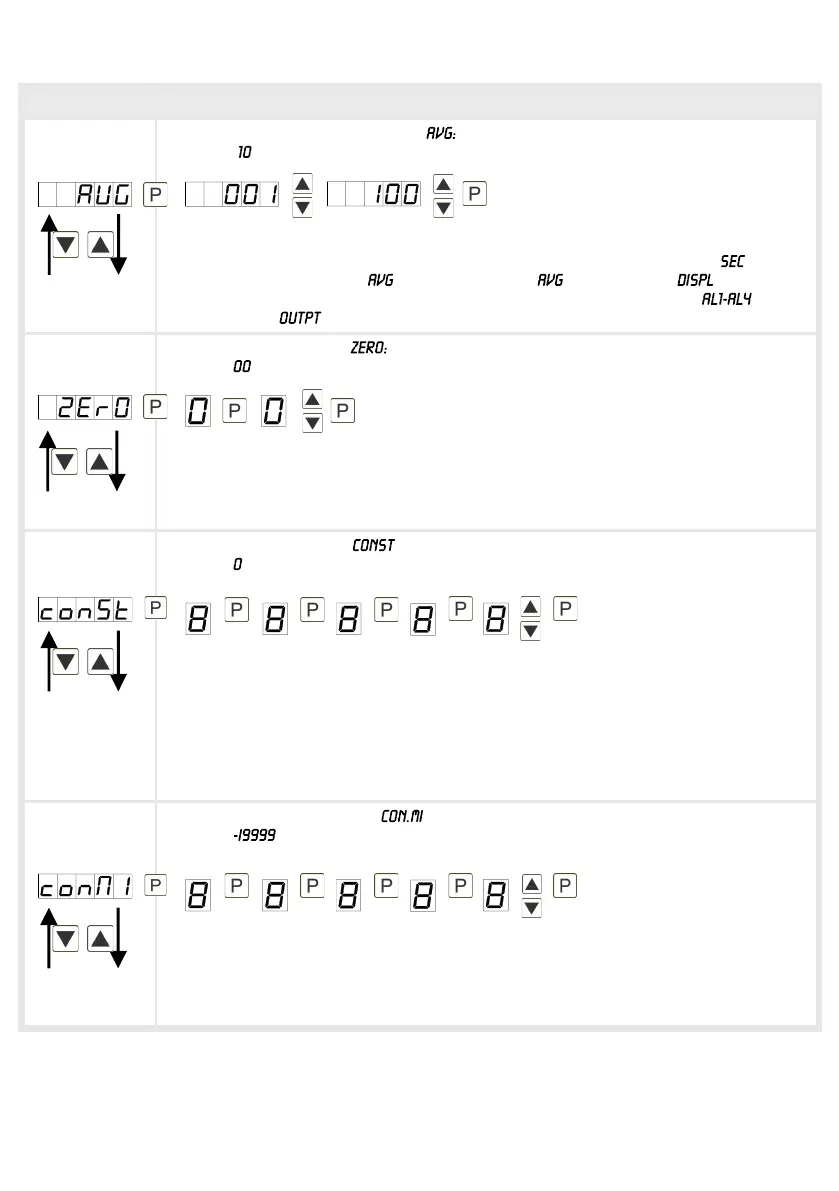
Sliding average determination,
Default:
Under this menu item, the number of measurements that need to be averaged are
preset. The averaging time results from the product of measuring time and the
averaged measurements . With selection of in menu level the result is
shown in the display and evaluated when entered in the alarm or the
analog output .
Zero point slowdown,
Default:
At the zero point slowdown, a value range around the zero point can be preset, so
the display shows a zero. If e.g.10 is set, the display would show a zero in the
value range from -10 to +10; below continue with -11 and beyond with +11. The
maximum adjustable range of value is 99.
Solid contstant value, :
Default:
The constant value can be evaluated like the current measurand via the alarms or
the analog output. The decimal place cannot be changed for this value and is
taken over from the current measurand. So, with this value a setpoint generator
can be realised via the analog output. Furthermore it can be used as calculated
difference. At this the constant value needs to be subtracted from the current
measurand and the difference is evaluated in the alerting or via the analog output.
Thus regulation can be displayed quite easy with this parameterisation.
Minimum constant value, :
Default:
The minimum constant value is selected and adjusted from the smallest to the
highest digit with [▲] [▼] and confirmed digit per digit with [P]. A minus sign can
only be adjusted on the highest digit. After the last digit the display changes back
into menu level.


 To Next Page