5. Setting up the device
18
Menu level Parameterisation level
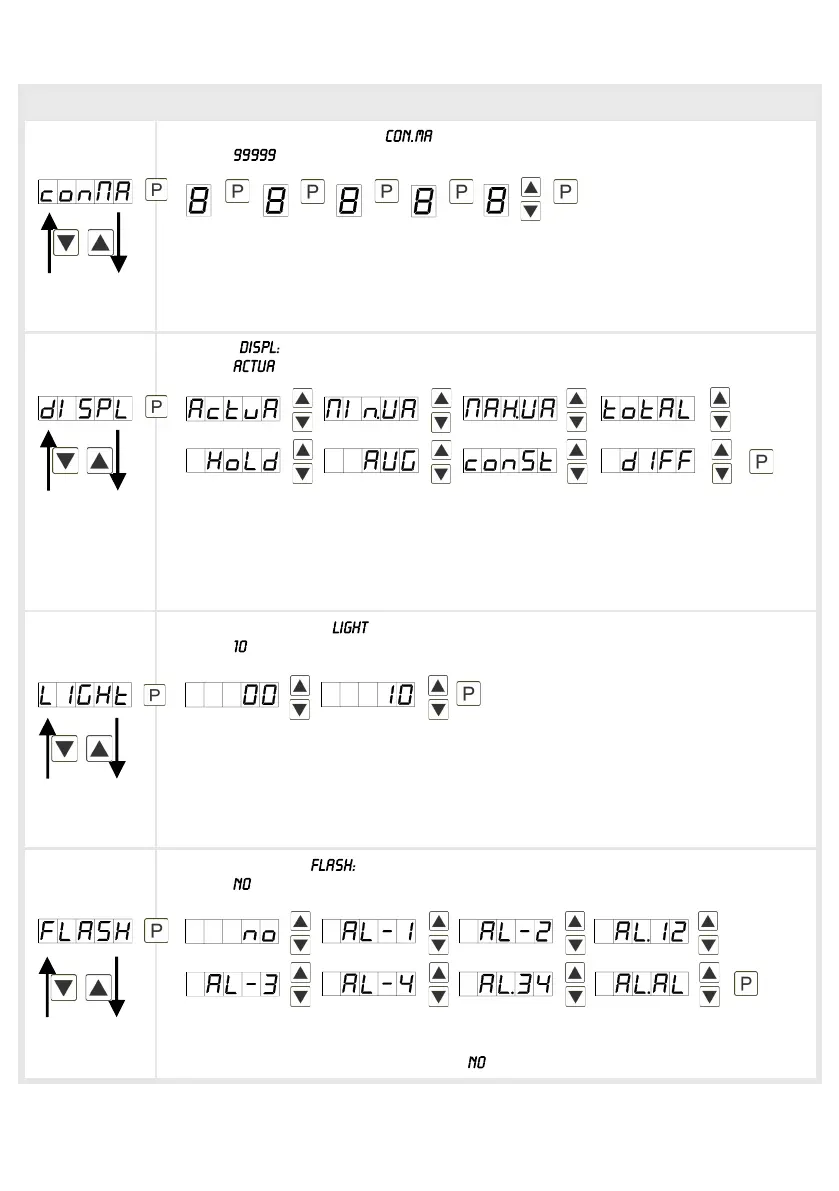
Maximum constant value, :
Default:
The maximum constant value is selected and adjusted from the smallest to the
highest digit with [▲] [▼] and confirmed digit per digit with [P]. A minus sign can
only be adjusted on the highest digit. After the last digit the display changes back
into menu level.
Display,
Default:
With this function the current measurand, the min/max-value, the totaliser, the
process-controlled hold-value, the sliding average value, the constant value or the
difference between constant value and current value can be allocated to the
display. With [P] the selection is confirmed and the device changes into menu
level.
Brightness control, :
Default:
The brightness of the display can be adjusted in 11 levels from 00 = very dark, to
10 = very bright via this parameter or alternatively via the navigation keys from the
outside. During the start of the device the level that is deposited under this
parameter will always be used, even though the brightness has been changed via
the navigation keys in the meantime.
Display flashing,
Default:
A display flashing can be added as additional alarm function either to single or to a
combination of off-limit condition. With , no flashing is allocated.


 To Next Page