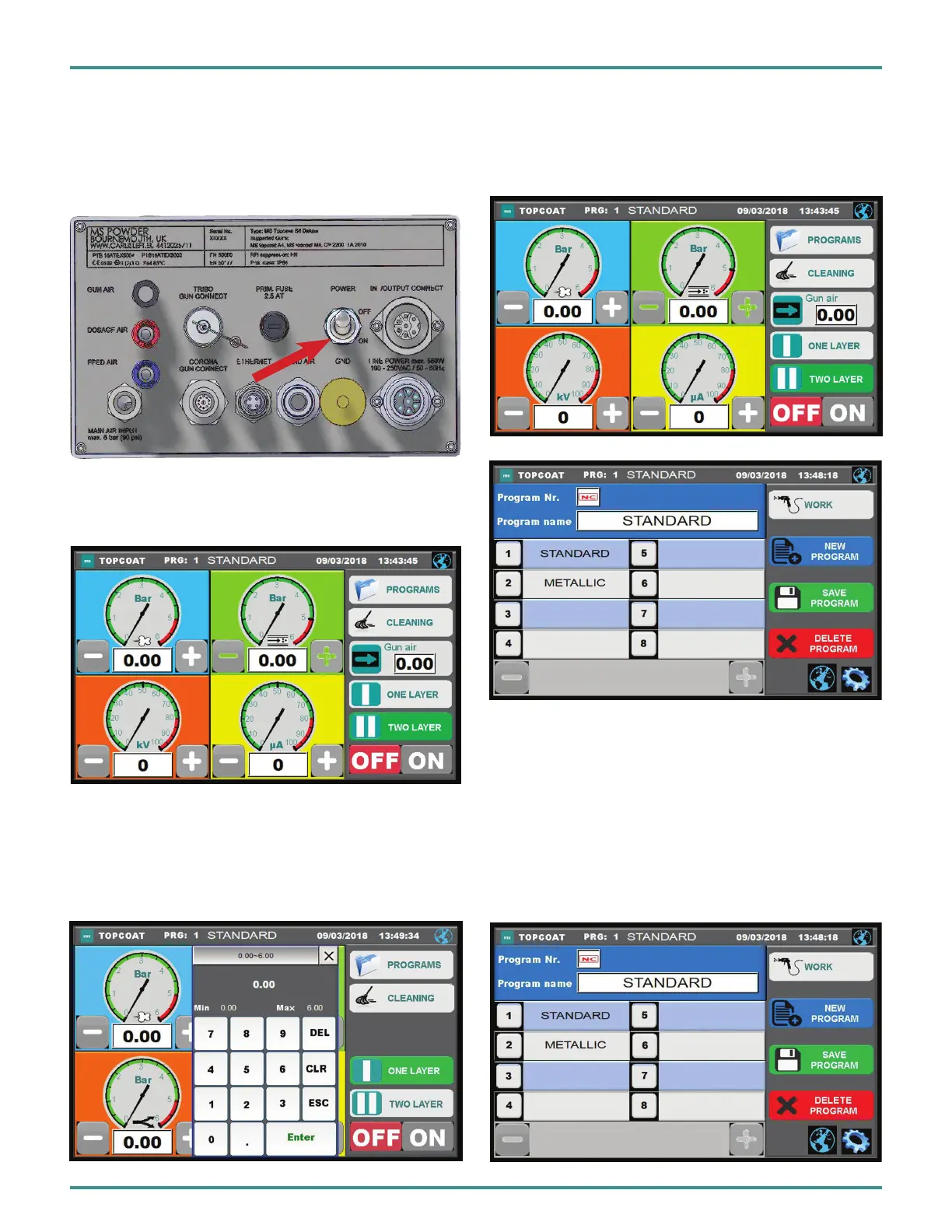
SWITCH ON THE TOPCASE
Main Switch
Switch on the Topcase control module with the lever switch
at the back. The touchscreen turns on.
Switch ON The Powder Applicator
The powder applicator turns on with the ON button. When
switchedon,theeldONwillturngreen.
Input Data
The setting of program parameters can be done in two ways:
1. Press the +/- buttons
2. Press on the digital display and manually enter the
number. The keyboard will be called automatically.
Select Program
After switching on, the desired program must be selected. For
this, press the button PROGRAMS. The program menu opens.
SelecttheProgrambypressingthenumberornameeld.
The display switches back to the working view. The control
unit is now ready.
Program Menu
In the Applications menu, new programs can be stored,
adapted, selected and deleted. T
he +/- buttons allow the
display to move forward or back; there are 999 programs for
selection.
Intheuppereldthecurrentlyselectedprogram
is displayed.
PA-18-02-R0 (08/2018) 33 / 52 www.carlisleft.com
EN
INSTALLATION


 To Next Page