5.2 Searching Overview
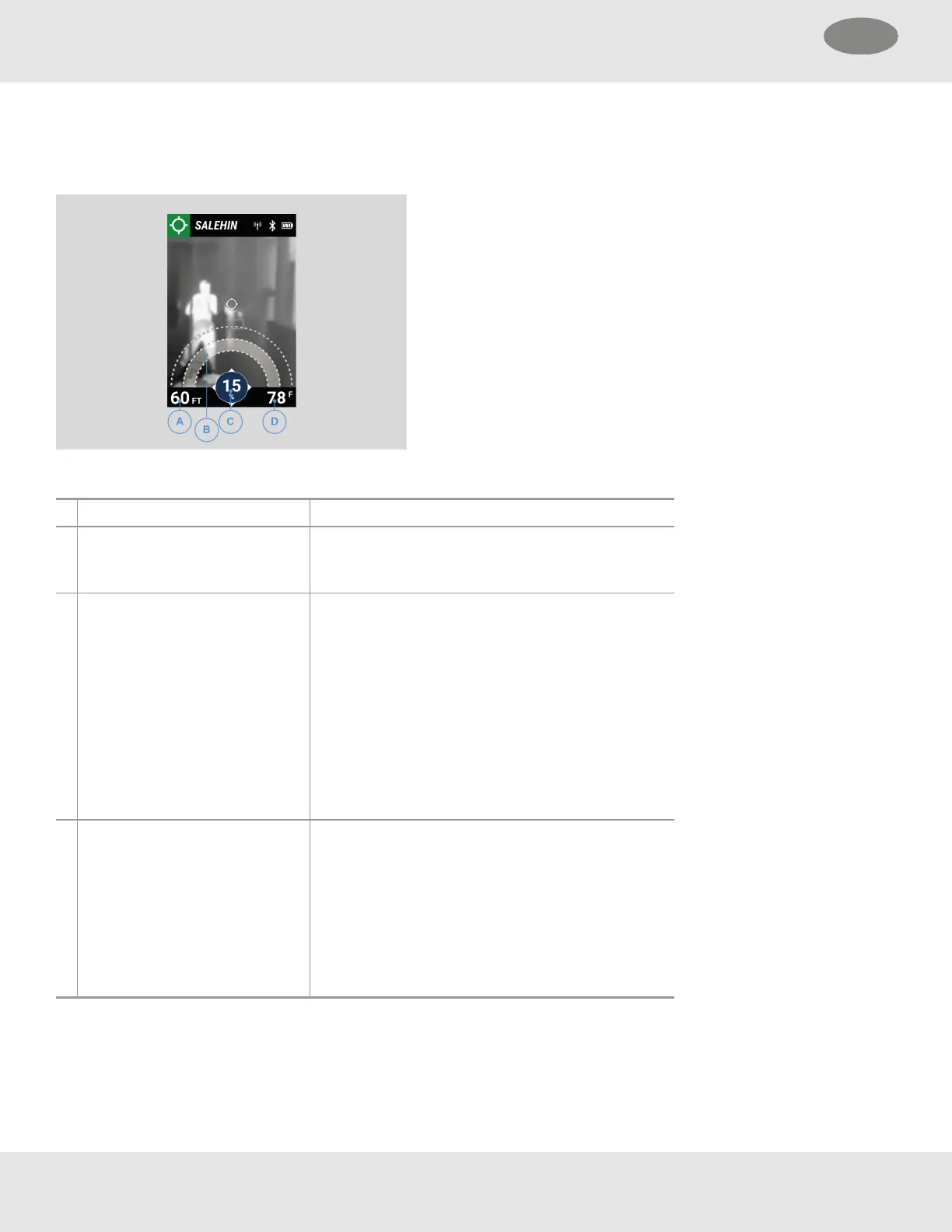
Once a search is started, LUNAR enters Search mode. Use the direction and distance indicators on the Display to help locate
the Target.
A Distance (measurement) Indicates distance, in feet or meters, from the Target.
B Distance
1
(visual indicator) Arcs are directly correlated to distance from the
Target. As the Searcher gets closer to the Target, the
inside arcs are indicated.
C Directional strength Indicates the direction of the Target using:
• Numbers - A scale from 0 to 100 with 100
representing the strongest source of signal.
• Colors - Directly correlated to the signal strength.
The lighter the color, the stronger the signal.
NOTE: At further distances or with more obstructions
between the searcher and Target, the directional
strength indicator will provide lower values. As the
Searcher gets closer and orients the device toward
the Target, these numbers will increase.
D Thermography Temperature of the surface or item at the center
indicator of the thermal image. (optional setting)
NOTE: Thermography cannot indicate the
temperatures of gases and is dependent on
properties of the surfaces measured. Shiny surfaces
such as glass, tile, polished metal, etc., will not
provide accurate thermography readings due to the
reflection of IR energy from these surfaces.
1
Distances are approximations and may vary based on environmental conditions.
NOTE: Indicators showing dashes instead of a number and no arcs indicate the signal is lost.
34 MSA LUNAR
5 Features US



 To Next Page