Alarm Types
Any full alarm, including the following alarms, continuously sound and are displayed in the notification banner while they
remain active.
MotionAlarm A search cannot be started and LUNAR cannot be powered off once a Motion,
Manual, or Hardware alarm is activated.
Manual Alarm
Hardware Alarm
NOTE: If there are one or more active alarms on the device or if a PAR Check is active, notifications can still be received. The
red alarm notification banner is briefly replaced with the blue notification banner.
4.4 Menus
4.4.1 Main Menu
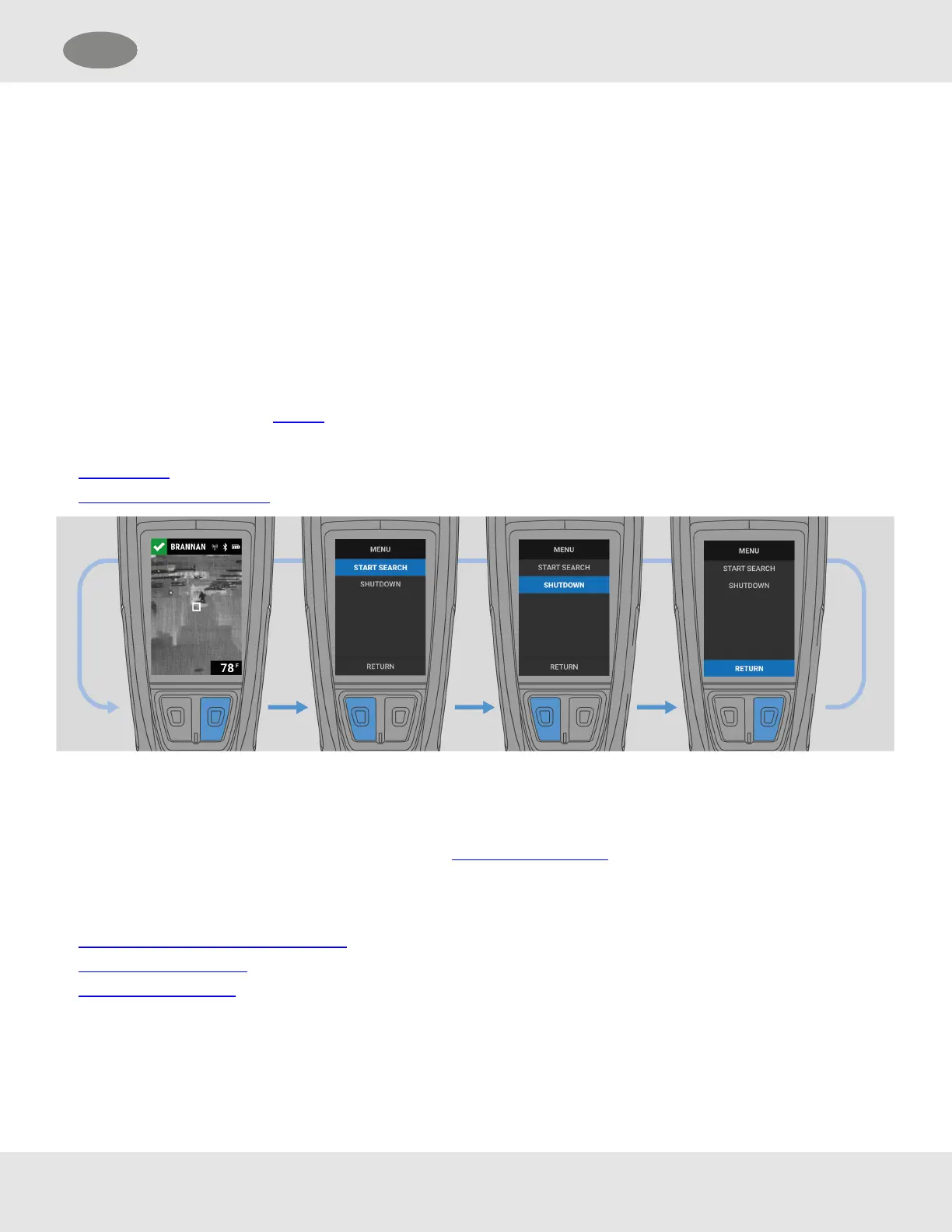
To open the main menu from the Display, press the Enter button.
From the main menu, the User can:
• start a search
• power off the LUNAR device
4.4.2 Maintenance Menu
To open theMaintenance menu:
(1) With the power off, press the Down or Enter button to activate a Quick Check.
(2) Long press both buttons together.
From the Maintenance menu, the User can:
• connect LUNAR with FireGrid Configure
• update firmware software
• view device information
MSA LUNAR 21
US 4 Basic Operation



 To Next Page