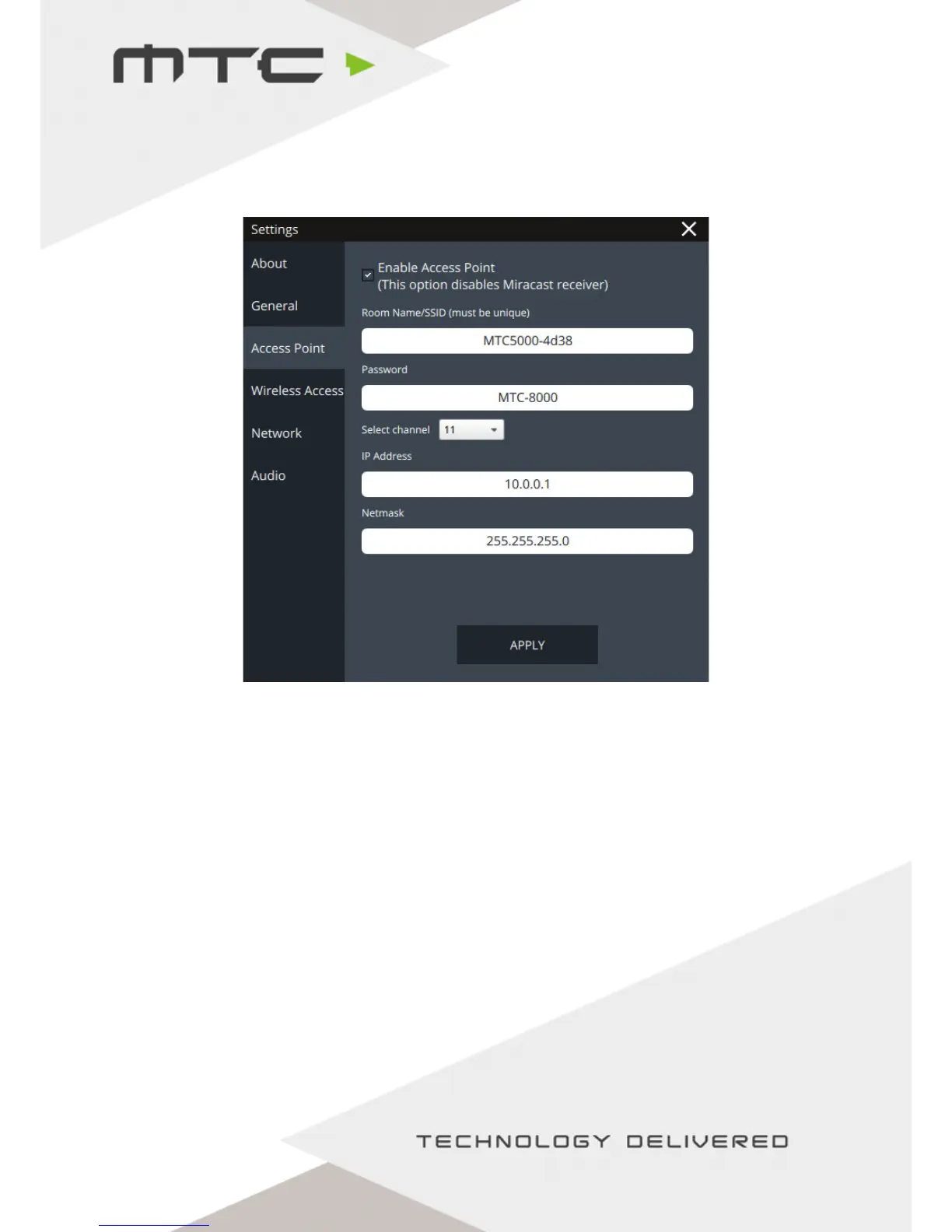
Changing Access Point settings
Settings relating to the Access Point can be modified in the Access Point tab of the settings screen.
Enable Access Point - This controls whether the MTC-5000 unit broadcasts a network for the attendees to
join. If an attendee wishes to connect an Android device using Miracast, this option
must be unchecked.
SSID - The name of the Access Point on the MTC-5000 unit. A USB keyboard can be plugged
in to amend this, if required.
Password - The password required to connect to the Access Point. A USB keyboard can be plugged
in to amend this, if required.
Select channel - Choose a different wireless channel if there are problems connecting to the Access
Point. A USB keyboard can be plugged in to amend this, if required.
IP Address - Set the IP address used by the MTC-5000 Access Point.
Netmask - Set the Netmask for the IP range used by the MTC-5000 Access Point.
www.mtc-technologies.com info@mtc-technologies.com
22


 To Next Page