Installation
Ultima Hooklift 01/2020
55
Camera and display connections
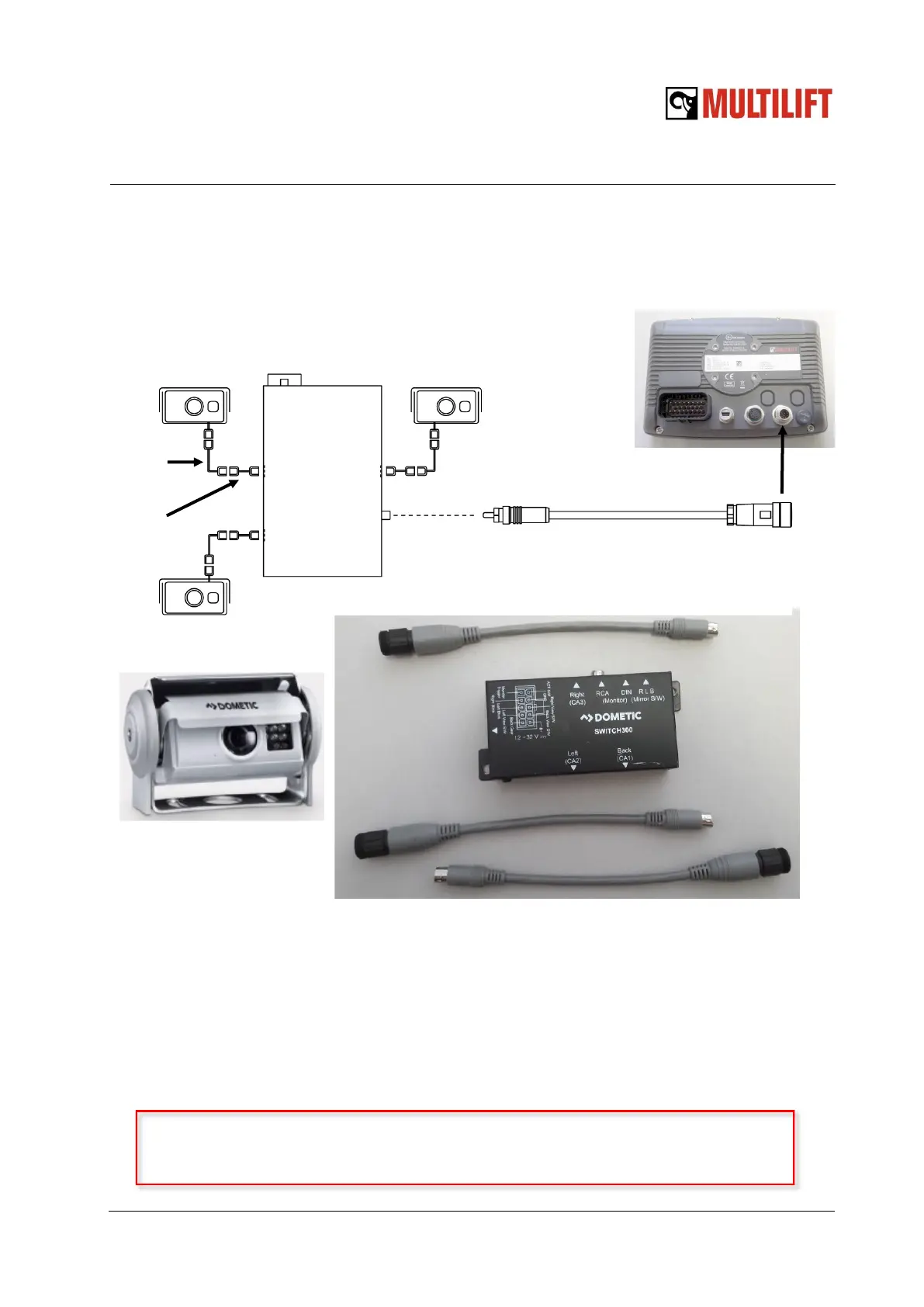
The cameras are connected to the camera switch box with the 65 ft extension cables and 8”
adapter cables as follows:
The camera locations and purpose
Cabin back wall camera (CA1): Overview of the environment when reversing the truck.
Rear rollers camera (CA2): Showing the roller contact when loading the container. Pos-
sible to show also the hydraulic locking:
Rear bumper camera (CA3): Detailed view when reversing truck closer to the container
and helping when attaching hook to the hookbar. Camera active when middle frame is >100
deg.
Camera adapter cable 3.2 ft to display
Rear bumper
camera
Cabin back wall
camera
Rear rollers
camera
Left
CA2
Back
CA1
Right
CA3
RCA
Monitor
Read the camera installation manual included in the packing box before
installation!
Extension
cable
Adapter
cable
MU113992701



 To Next Page