MT CELL SETUP MANUAL MT556XNB, MT556UNB AND MT557D | 15
4 BEFORE YOU START
Revision 3.0 www.multitaction.com
15.9.2020
P/N: MT2201012
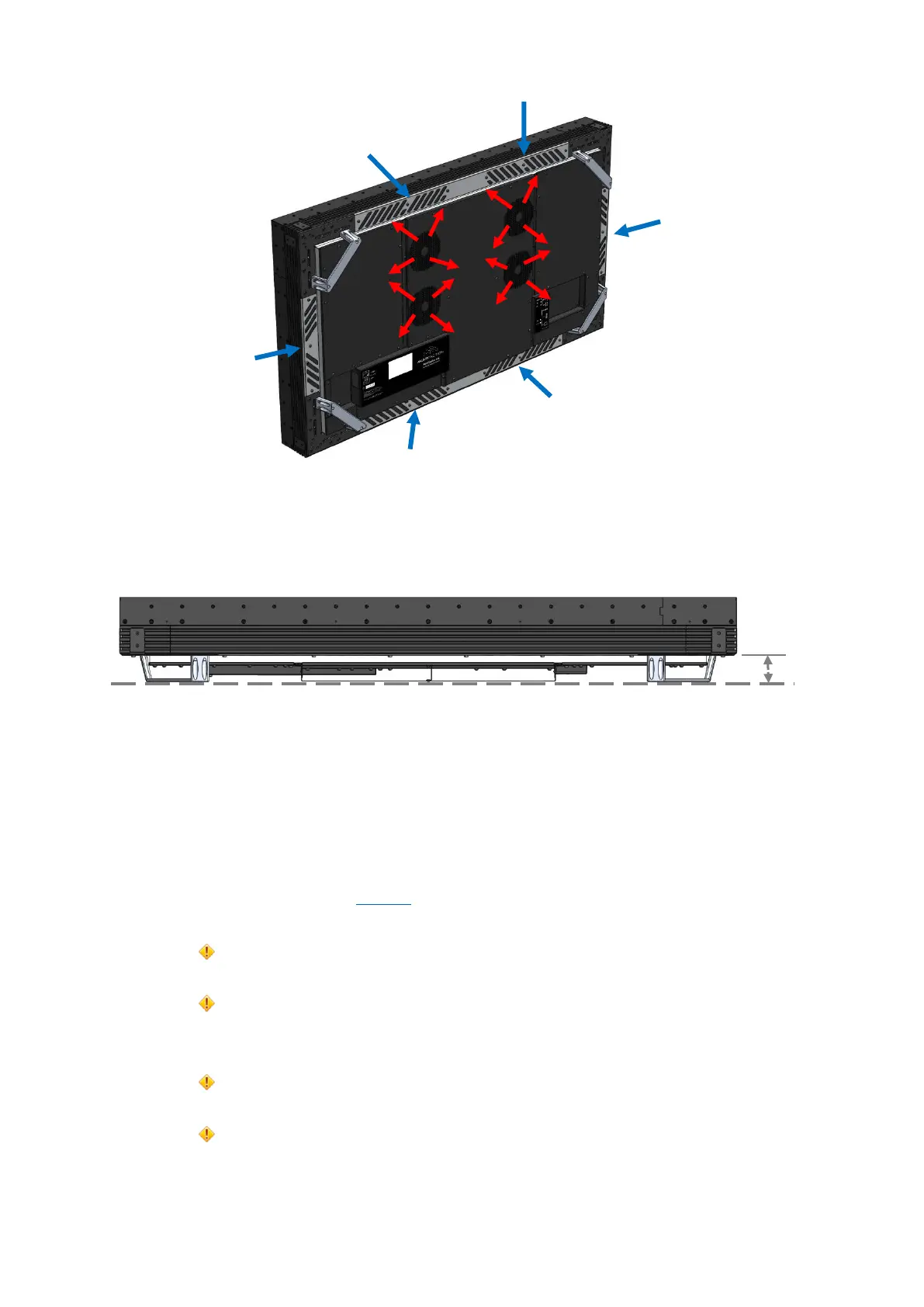
Ventilation slots and clearance. The clearance must match the minimum safe distance.
If you have specific installation requirements (for example, if your installation design requires a
reduced clearance), please contact MultiTaction Support for advice; see section 1.1.
See also the warnings on section 6.
Caution:
Make sure that the cooling and air ventilation properties of the installation location meet the
requirements of the Cell.
Keep the ventilation slots free of blockages at all times. Leave enough space around the Cell to
allow proper air circulation and cooling between the display and walls or panels:
Attention:
S’assurer que le refroidissement et la ventilation du local d’installation sont conformes aux
exigences de la Cellule.
Faire en sorte que les évents ne soient jamais obstrués. Laisser suffisamment d'espace autour
de la Cell, pour permettre à l'air de circuler et au refroidissement de se faire entre l'écran et les
murs ou panneaux:
VENTILATION:
COOL AIR IN from sides of cell
VENTILATION:
WARM AIR OUT from center of cell
CLEARANCE (minimum safe distance)


 To Next Page