MT CELL SETUP MANUAL MT556XNB, MT556UNB AND MT557D | 23
5 GET THE CELL INTO POSITION
Revision 3.0 www.multitaction.com
15.9.2020
P/N: MT2201012
5.3 Desk stand installation
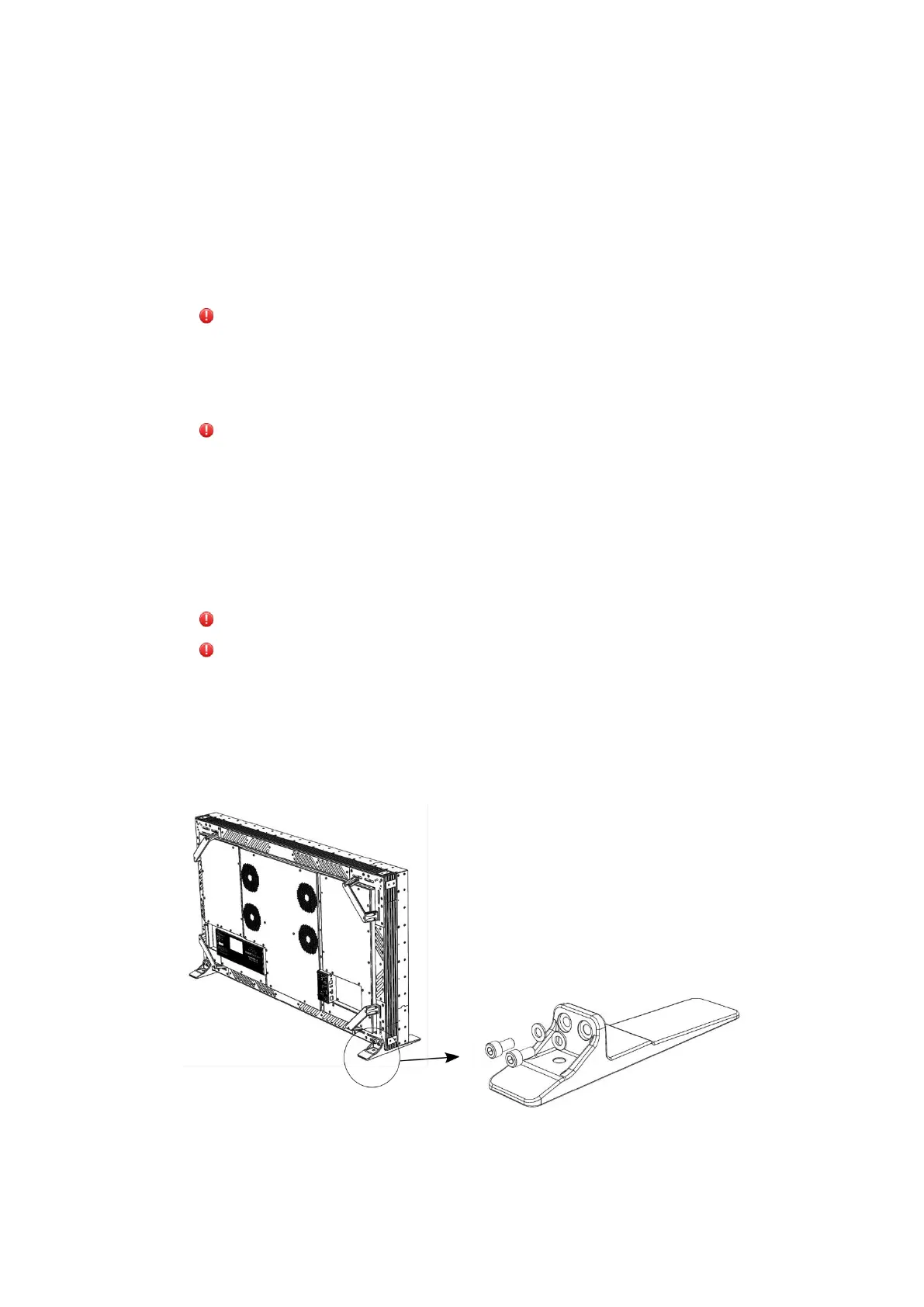
The MultiTaction Cell comes with a pair of desk stands. Desk stands ensure safe and stable
installation when the Cell is positioned horizontally or vertically on a sturdy desk or table.
1. Choose a sturdy desk for the installation and the surface of table is horizontal. Ensure the desk
can bear the weight load of the Cell (MT557D: 43kg / 95lbs, MT556XNB: 35kg / 77lbs,
MT556UNB: 40kg / 88lbs) and that the desk will not tip over when the Cell is installed.
Warning: Using a desk that is too weak, installing the desk stands incorrectly, or installing into
an incorrect position, causes a risk of the Cell tipping over, property damage and personal
injuries. To avoid this risk, choose a desk with a heavy enough structure for the installation,
install the desk stands according to this manual and ensure that desk will not tip after the
installation.
Advertissement: Si la table utilisée est d’une structure trop légère ou si celle-ci est mal
soutenue ou installée dans une mauvaise position, la Cellule risque de se renverser et de causer
des dommages matériels ou personnels. Pour éviter ce risque, choisir une table de structure
suffisamment solide pour l’installation, monter la table selon les instructions de ce manuel et
s’assurer que la table ne puisse pas s’incliner après l’installation.
2. Depending on the Cell orientation (horizontal or vertical), place the cell on the stands on the
desk and attach them with M8 screws to the rear of the display. Desk stands can be mounted
on the table with two screws.
Warning: To minimize the risk of tipping, do not place the stands on the edge of the desk.
Advertissement: Pour atténuer le risque de renversement, ne pas mettre les supports sur le
bord du bureau.
3. Lift the Cell on the desk stands (two people required) and attach it to the stands with M8
screws. Align the Cell.
4. Ensure that the desk will not tip when the Cell is installed on the desk stands.
Desk stands and M8 screws
M8x20 screw, 2 pcs
M8 washer, 2 pcs



 To Next Page