MT CELL SETUP MANUAL MT556XNB, MT556UNB AND MT557D | 24
5 GET THE CELL INTO POSITION
Revision 3.0 www.multitaction.com
15.9.2020
P/N: MT2201012
5.4 Multiple-Cell installation
Using the corner mounts and a custom sturdy metal frame, firmly and securely install two or more
Cells together to operate in a multiple-Cell configuration.
The weight of individual display should be supported completely by the installation frame. The
weight stacking over the under display is not allowed.
Use only the corner M8 mounting holes in multiple-cell installation. Use M8 screws with steel
grade 12.9 (Note maximum 14 mm screw depth in the corner M8 mounting holes, ref. chapter 5.).
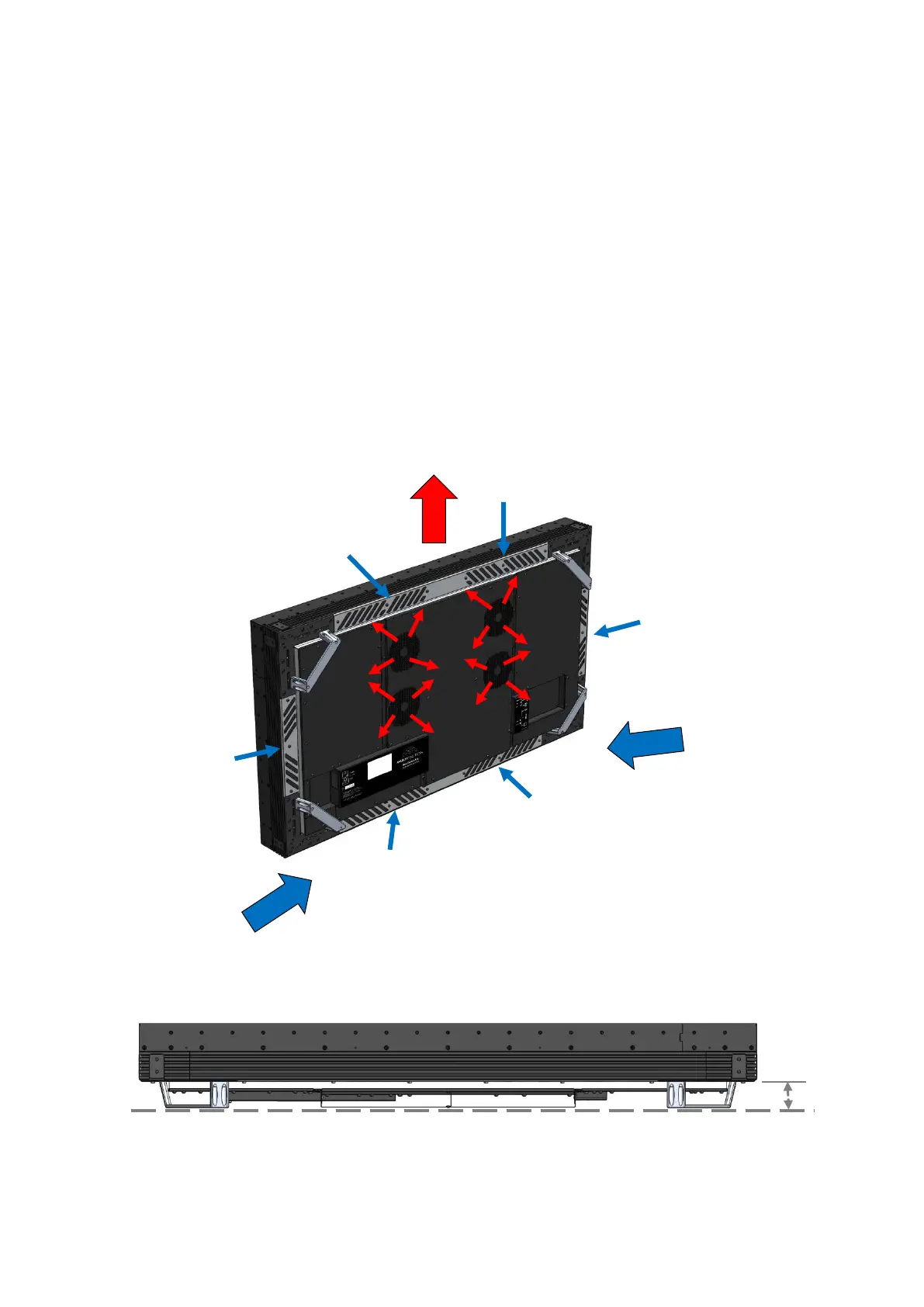
Ventilation and heat management are especially important in a multiple-Cell installation. You must
ensure there is adequate airflow (cool air in and hot air out) through the ventilation slots on each
Cell. Leave enough space between the Cells and the wall to allow proper air circulation and
cooling. Also, ensure that hot air vented from Cells is directed away from the cool air intakes of
adjacent Cells.
Near wall Installation of Multitaction Cell
CLEARANCE (minimum safe distance)


 To Next Page