MT CELL SETUP MANUAL MT556XNB, MT556UNB AND MT557D | 9
2 CELL OVERVIEW
Revision 3.0 www.multitaction.com
15.9.2020
P/N: MT2201012
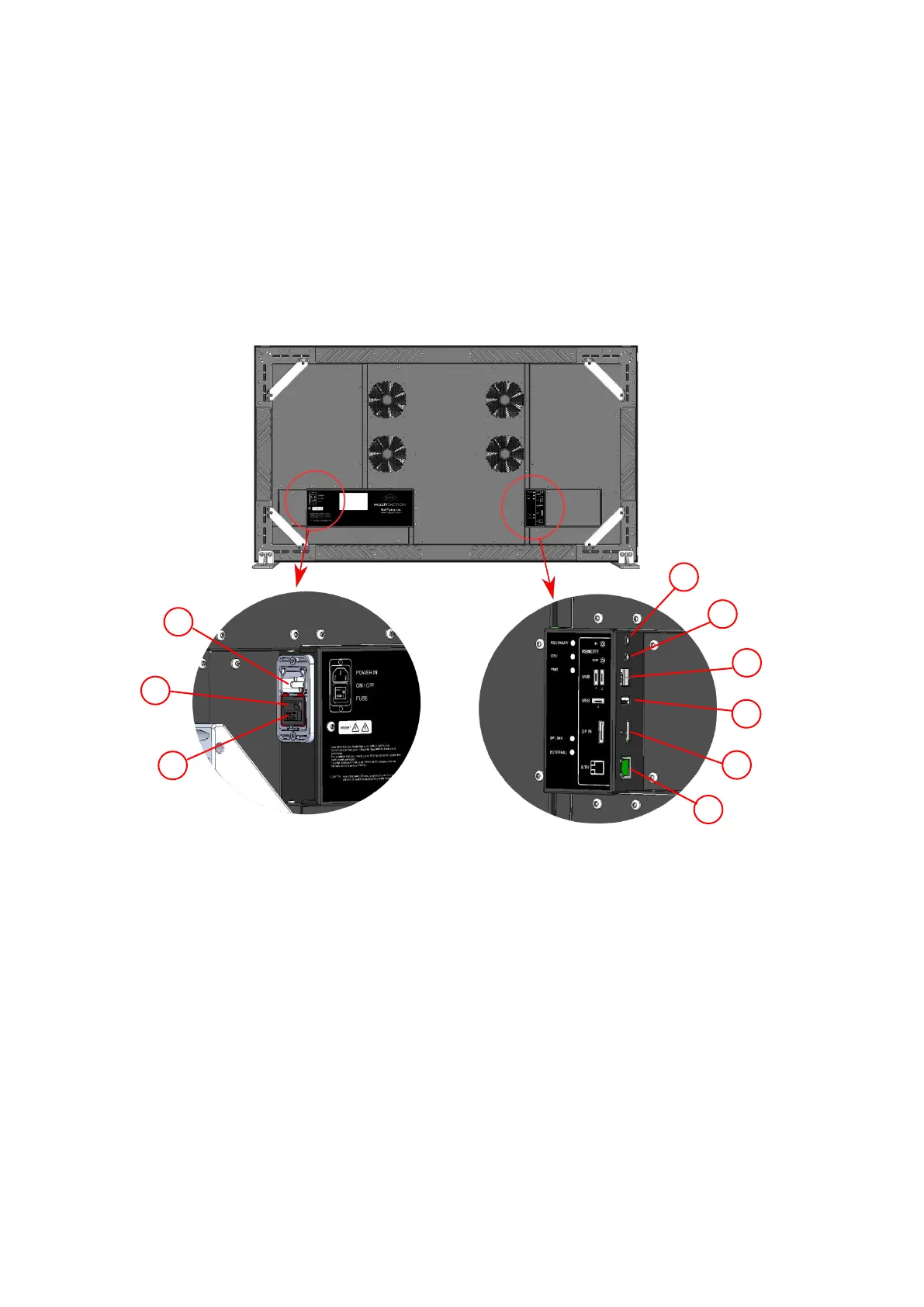
2.3 Connection panel
The Cell connection panel is located at the back of the device. It contains the power switch and
sockets for connecting the Cell to: your network or an external application computer; a power
supply; and a local mouse and keyboard.
2.3.1 MT557D, MT556XNB and MT556UNB
Cell connection panel. Includes the following sockets and controls
1 Mains Power connection to the mains supply.
2 Power switch Main on / off switch
3 Two fuses Mains voltage fuse
4 3.5mm socket Sync IN to control IR operation
5 3.5mm socket Sync OUT to control IR operation
6 2 x USB 2.0 Type A Two ports for peripheral devices, especially keyboard and mouse
7 USB 2.0 Type A Port for peripheral devices
8 DisplayPort Digital signal input
9 Ethernet For control input


 To Next Page