User Manual of VT1000
- 33 -
2.3 On the platform applications
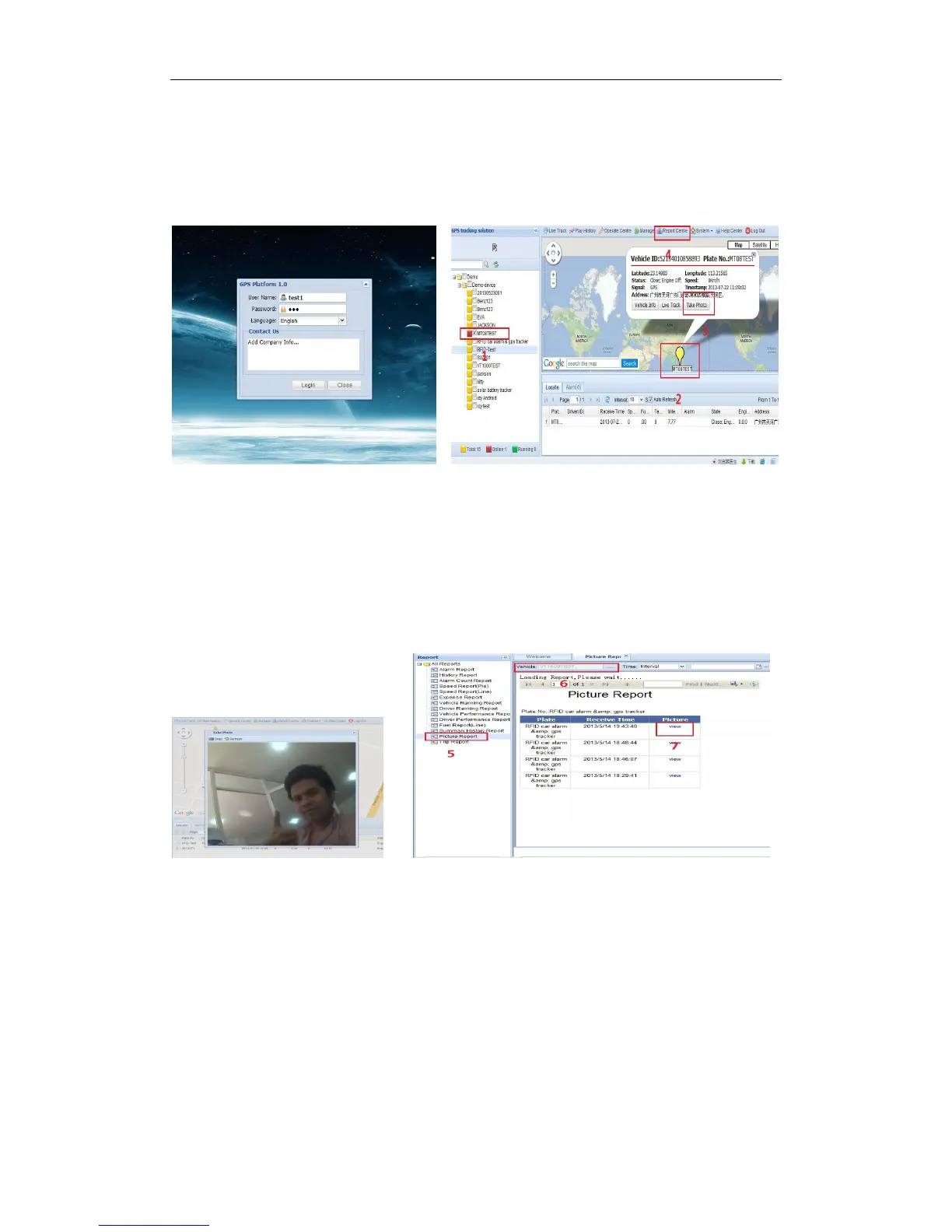
Into our GPS Tracking Platform: http;//www.global-track.net , (following picture P1),login
interface,(following picture P2)
P1 P2
Select your device, such as instructed 1; it will display your car’s the logo on the map(instructed).
Put the mouse on the logo, It will automatically pop up frame (instructed 3),you can click
the ”Take Photo” in the options (instructed 3),then it will taking photo down (following picture
P3).If you want to see photos record, please click “Report Centre”(instructed 4),then The Report
interface will pop up;(following picture P4)
P3 P4
In Reports options, there is a Picture Report, click it (instructed5), then it will display “Picture
Report” interface. Choose you want to choose the vehicle (instructed6), wait for few seconds, it
will display the Picture Report, click “view”, Will see you want to see pictures(instructed 7)


 To Next Page