User Manual of VT1000
- 36 -
several rings and hang off automatically, indicating the vehicle be armed.
4.5 If alert be triggered, the siren will sound for 10 seconds and shut or immediately shut when
disarm action is detected.
4.6 If illegal ignition be detected and oil/fuel supply cut off enabled, then the oil/fuel supply
will be cut off, and it will be immediately restored as soon as disarm action be detected.
4.7 If the oil/fuel supply is cut off by SMS or GPRS platform, it can not be restored by disarm
action.
5. RFID on the platform applications
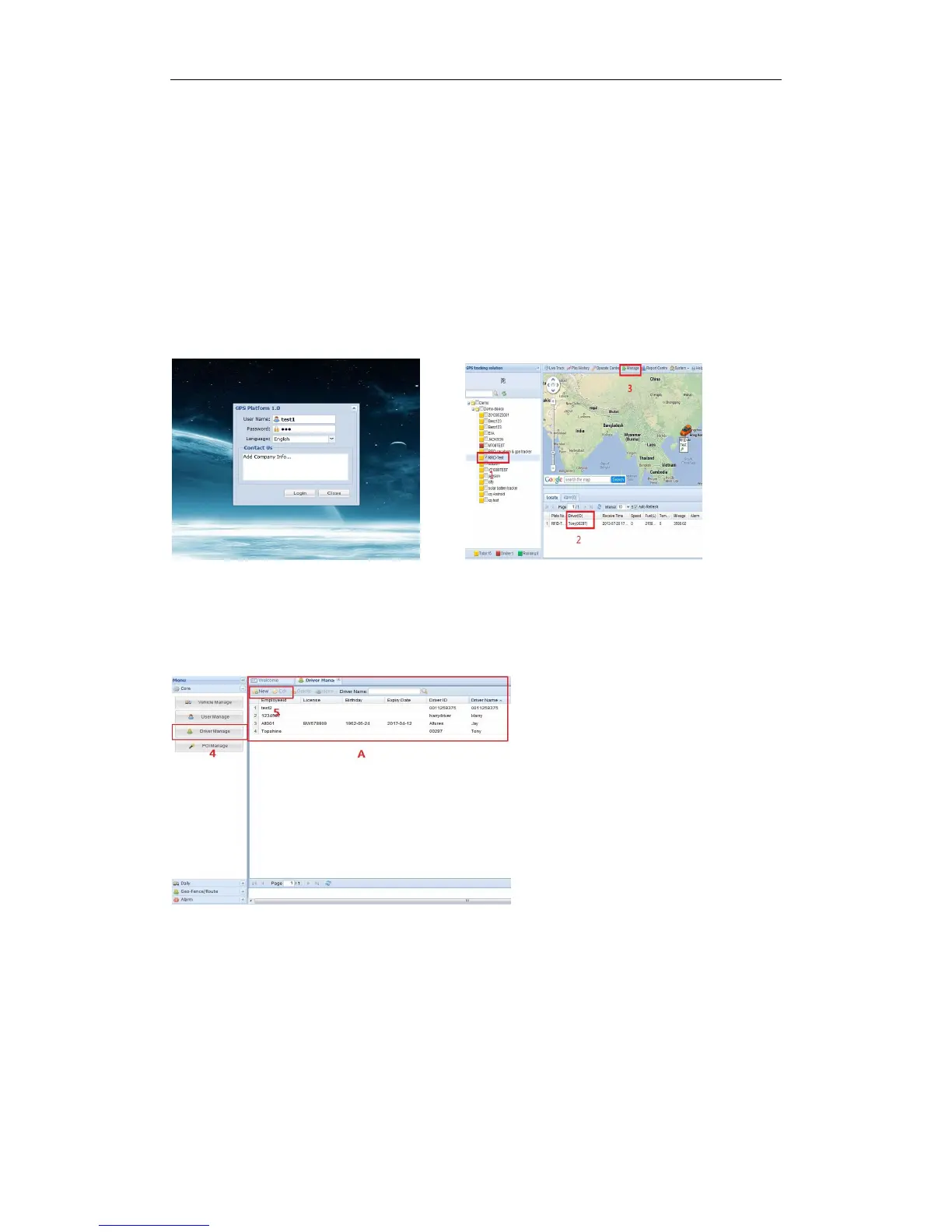
5.1 Into our GPS Tracking Platform: http;//www.global-track.net, as following picture P1,
login interface, as following picture P2
P1 P2
5.2 Select your device, such as instructed 1;it will display your car’s the current information,
Driver (ID) means the driver and his/her RFID tag number such as instructed 2;
5.3 If you want to edit the driver information, please click “manage” ,such as instructed 3, then
interface will into as following picture P3;
P3
5.4 Click Driver Manage , such as instructed 4;it will open such as instructed A;
You can click New, such as instructed 5, open as following picture P4; to add tag ID and the
driver’s information etc.


 To Next Page