14
Control Panel
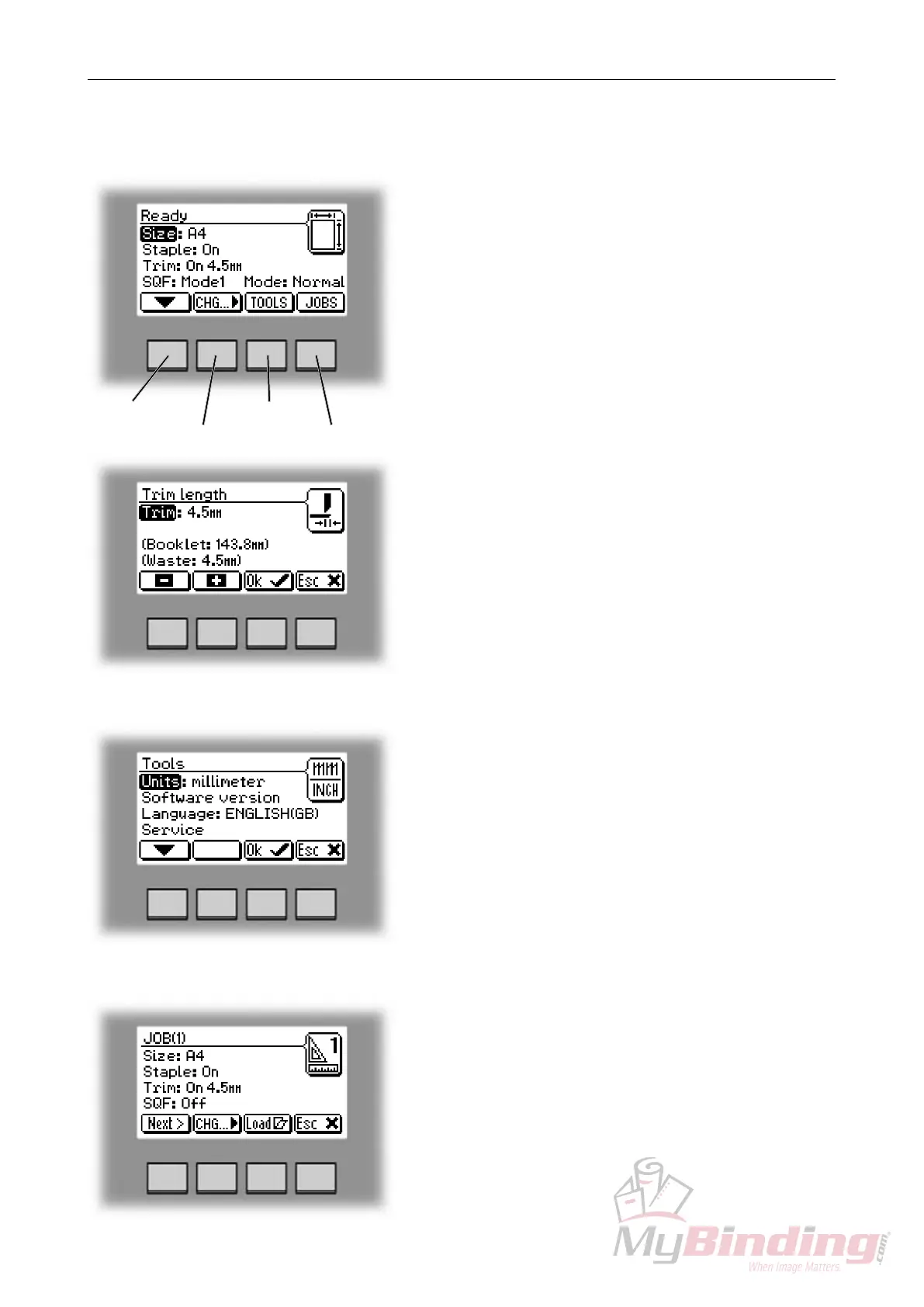
The Ready screen.
When the system power is switched on the Ready
screen will be shown. Here you will nd information
showing the actual set up. From this screen you can
also access other screens, that will help you operate
the complete BM 200 Booklet making system.
arrow button
change button
tools button
jobs button
The Jobs screen.
Pressing the [Jobs] button in the Ready screen opens
the Jobs screen. From here you can load, customize
and save job settings. These procedures are described
in section 4. Jobs.
The Tools screen.
Pressing the [Tools] button in the Ready screen takes
you to the tools screen. Here you will nd all the
necessary tools for a troublefree operation. From here
you can change the display language, set units from
millimeters to inches and more. See section 3. Tools.
for how to get around in the Tools screen.
Changing settings.
To change or adjust settings; Select an item in the Ready
screen with the [arrow] button and press the [Change]
button. For example you can ne adjust the trimming,
turn off the cover feeder or set the SquareFolder to the
correct mode. Explore all settings more thoroughly in
section 2. Making Booklets.


 To Next Page