17
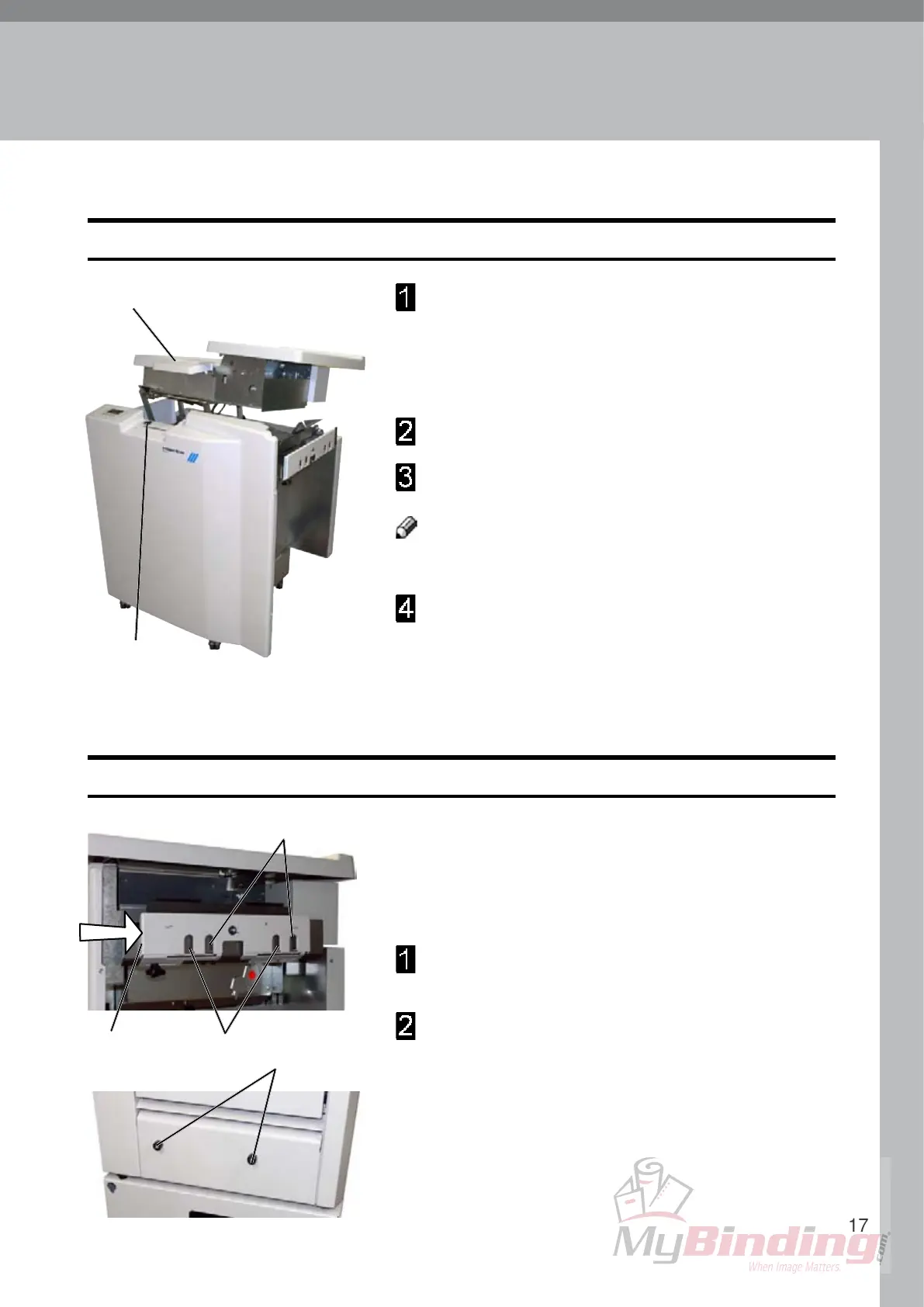
Plug the Booklet Maker power cord into the wall
outlet.
The trimmer (optional) and the SquareFolder
(optional) are powered from the Booklet Maker.
Open the Top cover (1).
Set main power switch (2) on Booklet Maker to ON
position.
Note
The main power switch also controls Trimmer (optional)
and SquareFolder (optional).
Close the Top cover.
Turning On / Off the Main Power
Booklet Maker, Trimmer and SquareFolder
2
1
1. Basics
Docking / Undocking
Docking the Booklet Maker to a Collator, standard paper sizes
When the Booklet Maker is docked to a collator it must
be correctly positioned in order to have the set fed
entering the infeed assembly correctly. The paper size
used determines which positioning holes to use.
Push the docking assembly (1) to the rear until it
locks.
The docking brackets (2) on the collator should enter
positioning holes:
(3) if you are using A4 / 8
1
/
2
” paper widths or sizes
nearby
or
(4) if you are using A3 / 11” paper widths or sizes
nearby
1 3 2
4


 To Next Page