23
2. Making Booklets
Setting Paper Size
Selecting standard paper sizes
Changing settings
Changing of settings can be performed in two ways. Temporary, which means that the changes
will remain until a new job is loaded or permanent, which means that the changes will be
stored as a job. This job can later be recalled.
Procedure for temporary changes:
From the Ready screen, select the option you wish to change and press the [Change] button.
Conrm changes by pressing the [OK] button.
Procedure for permanent changes:
From the Ready screen, press the [Jobs] button to reach the Jobs screen. Select the Job you
want to change by pressing the [Next] button and then press the [Change] button.
Note
Choose either of the above mentioned procedures when changing size, stapling, trimming,
covers or squarefolding as follows.
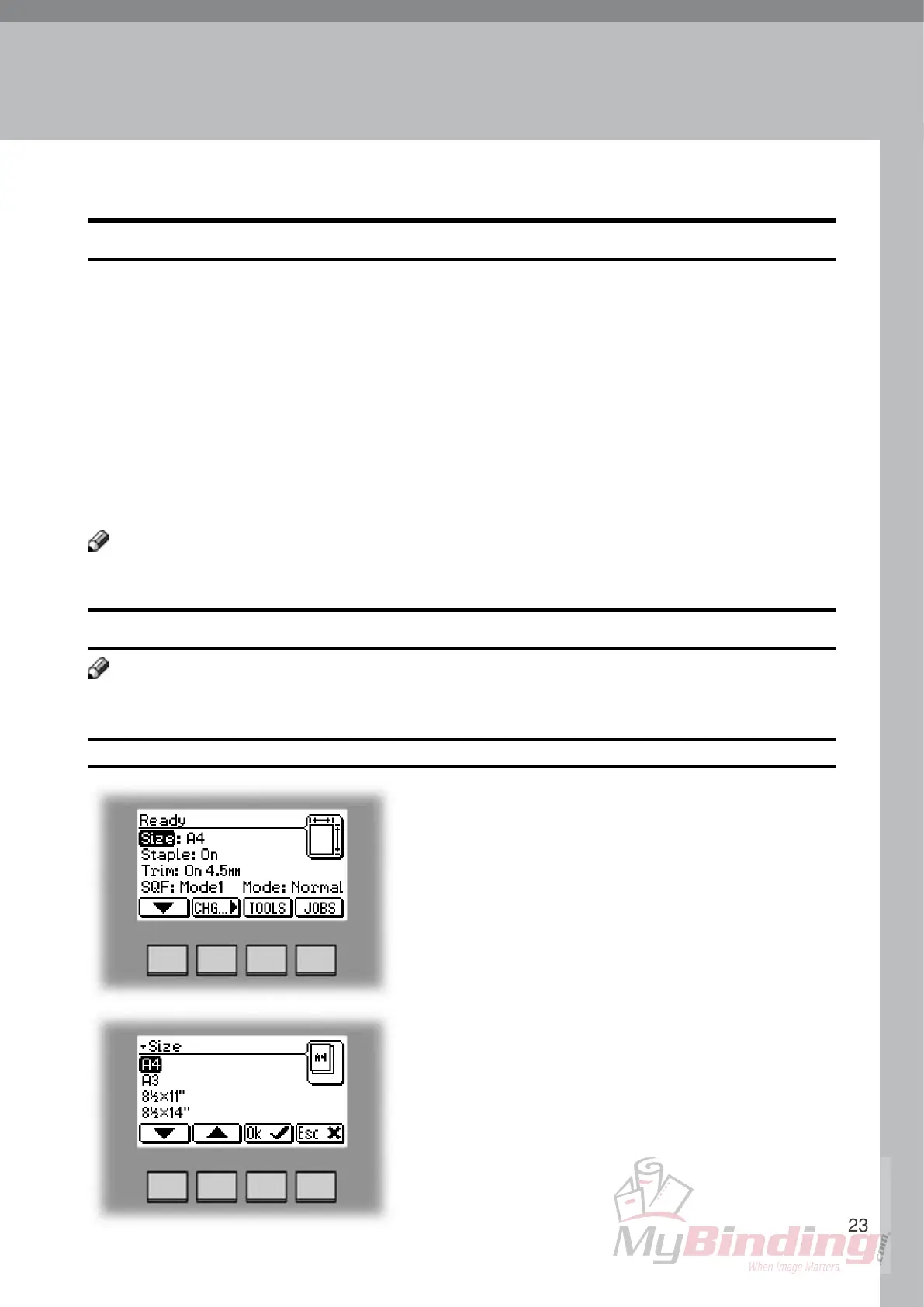
From the Ready screen, select Size and press the
[Change] button.
General procedure
Select any standard paper size with the [arrow] button
and press the [OK] button.
For other paper sizes, follow “Custom paper size” as
described on the next page.
Note
When docked to a collator, changing of paper size may also require repositioning of the Booklet
Maker. See 1. Basics for how to position the Booklet Maker correctly towards the collator.


 To Next Page