EasyManua.ls Logo

myPhone COMPACT - Notifications and Status Icons; Notification Panel and Indicator Meanings

myPhone COMPACT
40 pages
Print Icon
To Next Page IconTo Next Page
To Previous Page IconTo Previous Page
Loading...
© 2015 myPhone. All rights reserved myPhone COMPACT EN
19
If you pull down from the upper edge of the screen, a window extends. The notification
area is displayed. Pressing the button enables configuring and/or previewing basic
parameters, such as:
Backlight
Wi-Fi
Bluetooth
Date (data sharing)
Airplane mode
Auto-rotate
Flashlight
Location
Send the screen
When you press the Settings icon in upper right corner of the window, the [Settings]
menu opens, described in detail in section 5 of this User's Manual.
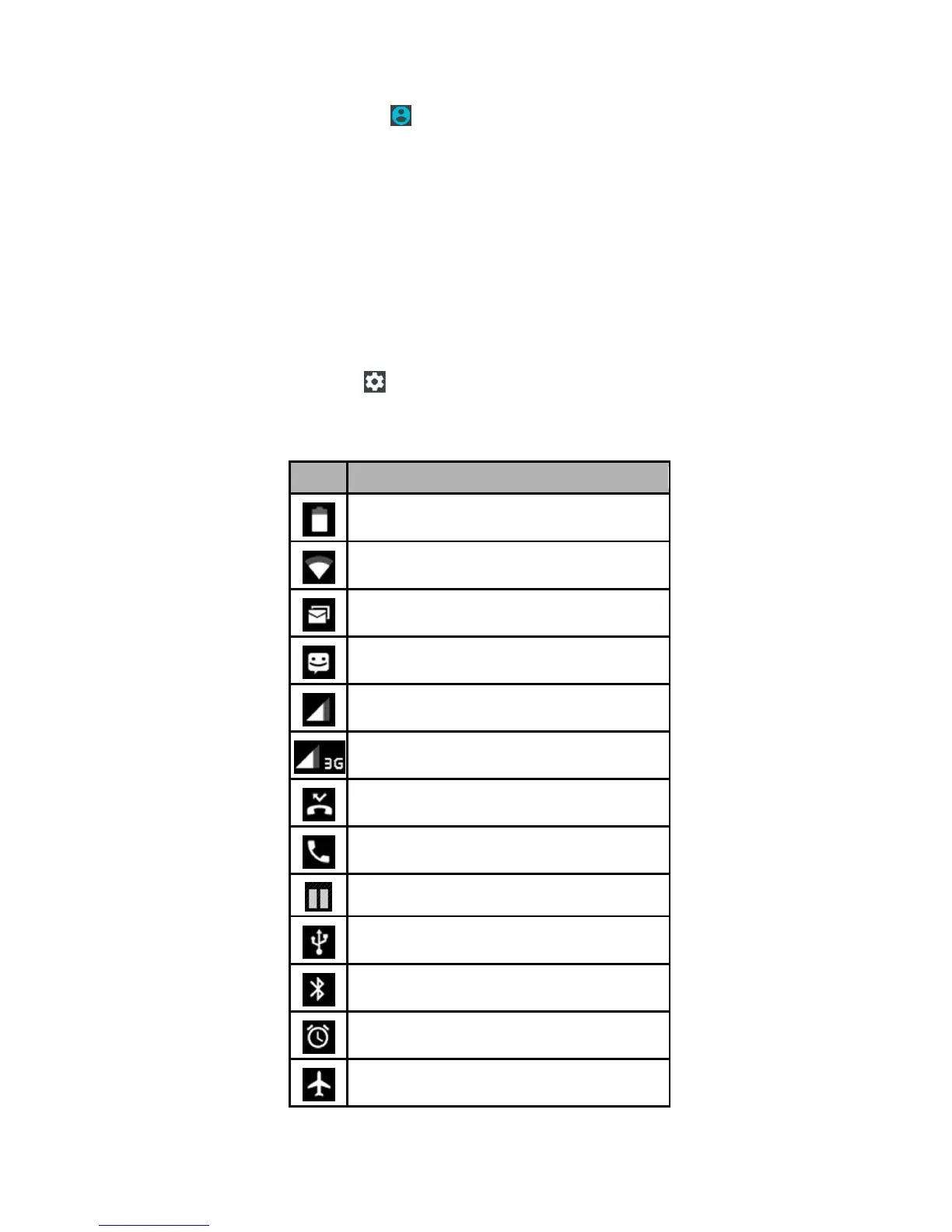
Indicator icons

Description
Battery charge level
Icon for active WiFi network connection
New e-mail message
New SMS message
Cellular network signal strength icon
Active 3G network icon
Unanswered call
Ongoing call
Call in hold
The device is connected to a PC
Active Bluetooth module icon
Active alarm
Airplane mode

Table of Contents

Related product manuals