4 About this device
RadMan 2LT/2XT 17
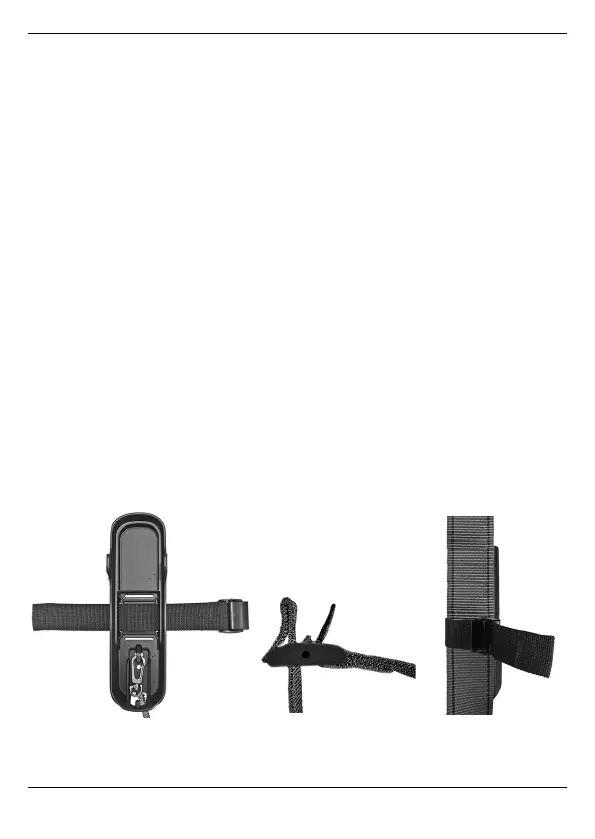
4.7.2 Fastening the monitor to the body
The mounting adapter is intended to be attached to a climbing harness or a
belt. For this purpose, the mounting adapter is secured to the desired position
with the supplied fastening strap. The buckle allows the mounting adapter to
be attached and released quickly.
Attaching the mounting adapter:
1. Guide the fastening strap through the two slots of the mounting adapter
(Figure 2, a):
– To fasten to a climbing harness: use longitudinal slots.
The buckle should be located to the right of the mounting adapter and
the fastening tab should point upward.
– To fasten to a belt: use horizontal slots.
The buckle should be located at the bottom and the fastening tab
should point upward.
2. Place the fastening strap around the climbing belt strap or the belt and
thread through the buckle.
The end of the strap is sewn down to prevent the device from accidentally
slipping out (Figure 2, b). When releasing the strap, press the sewn-down
part against the strap and pull out of the buckle.
3. Tighten the fastening strap and close the buckle (Figure 2, c).
Figure 2: Attaching the mounting adapter



 To Next Page