NComputing L-Series User Manual rev.05.07.12
Page 26 of 95
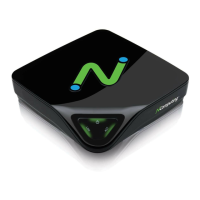
In the "Network" tab, select whether to use a dynamic IP address or a static IP address.
If you choose to use a dynamic IP address, click on the "Save" button.
If you choose to use a static IP address, you must enter the IP address and the default gateway.
Then click on the "Save" button.


 To Next Page