NComputing L-Series User Manual rev.05.07.12
Page 40 of 95
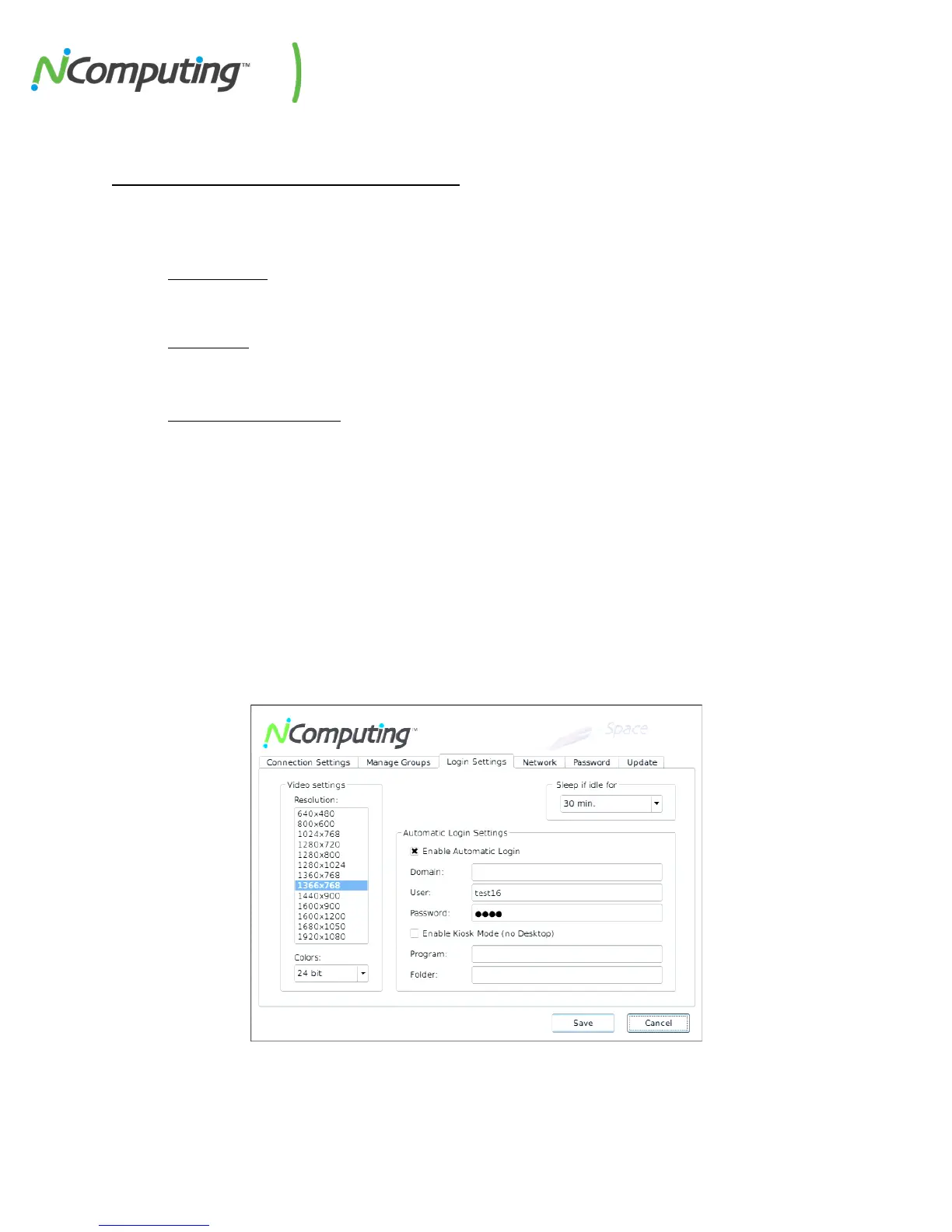
Device Setup - The “Login Settings” Tab
The Login Settings tab contains various device settings related to performance within Windows,
including:
• Video Settings
o Resolution
o Color Depth
• Sleep if Idle
(this setting operates within the device firmware to help prevent screen burn-in; within
Windows, the standard Windows screen saver must be used).
• Automatic Login Settings
o Domain
o User / Password
o Program (used for Kiosk mode)
o
Folder (used for Kiosk mode)
Kiosk Mode
To launch an application instead of going to the desktop (also known as kiosk mode), enter the
executable name in the “Program” field, and its drive/folder directory in the “Folder” field. For example,
launching Internet Explorer on login would require “iexplore.exe” in the Program field and “C:\Program
Files\Internet Explorer” in the Folder field.


 To Next Page