10
EDIT
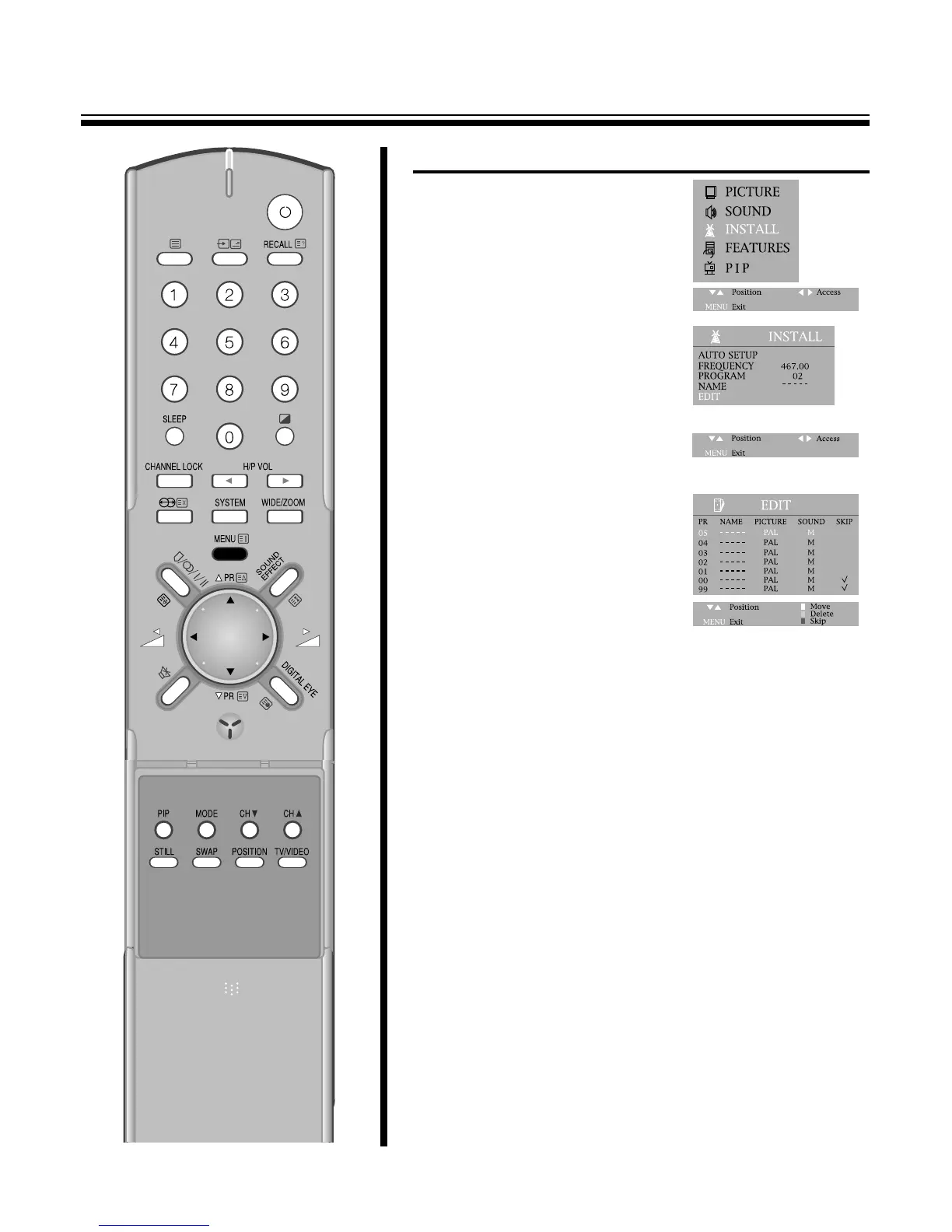
1. Press the menu button to select
INSTALL.
2. Press the C
/
B buttons and then
INSTALL SYSTEM.
3. Select EDIT with the PR y
/
x
buttons and press the C
/
B
buttons to start EDIT.
4. DELETE PROGRAM POSITION DATA.
Position the blue-line to the
program to delete with the PR
y
/
x buttons and the DELETE
button.
5. CHANGING THE ORDER OF THE CHANNELS
Position the blue-line to a program to move with the PR y
/
x
buttons and the move button.
Press the PR y
/
x buttons to position the blue-line to another
program to exchange.
By pressing the MOVE button again, selected two program will
be exchanged.
6. ENTER A STATION NAME
Locate the cursor to below NAME with the C
/
B buttons.
Using the PR y
/
x buttons, select the desired letter, number or
blank.
Press the B(right button) to select the next position.
7. SELECT THE PICTURE SYSTEM
Position the blue-line to the PICTURE to select with the C
/
B
buttons and change the picture (ex. PAL, SECAM, NTSC, ..) with
the PR y
/
x buttons or you can select the PICTURE mode with the
SYSTEM button on the remote controller.
8. SELECT THE SOUND SYSTEM
Position the blue-line to the SOUND to select with the C
/
B buttons
and change the SOUND (ex. BG, DK, I, M, ..) with the PR y
/
x
buttons.
9. SKIPPING THE CHANNELS
You can select SKIP with the SKIP button in EDIT mode or
locate in the cursor to below SKIP with the C
/
B buttons and then
press the PR y
/
x buttons to skip the desired program.
A program marked with skip “V” is skipped when changing
channel using the program UP
/
DOWN(on normal operation).
Press the NUMBER buttons 0~9 or the PR y
/
x buttons to select
program number you want. The screen will change according to
the selected program number.



 To Next Page