27
CONNECTING AT AV2(SCART)
L
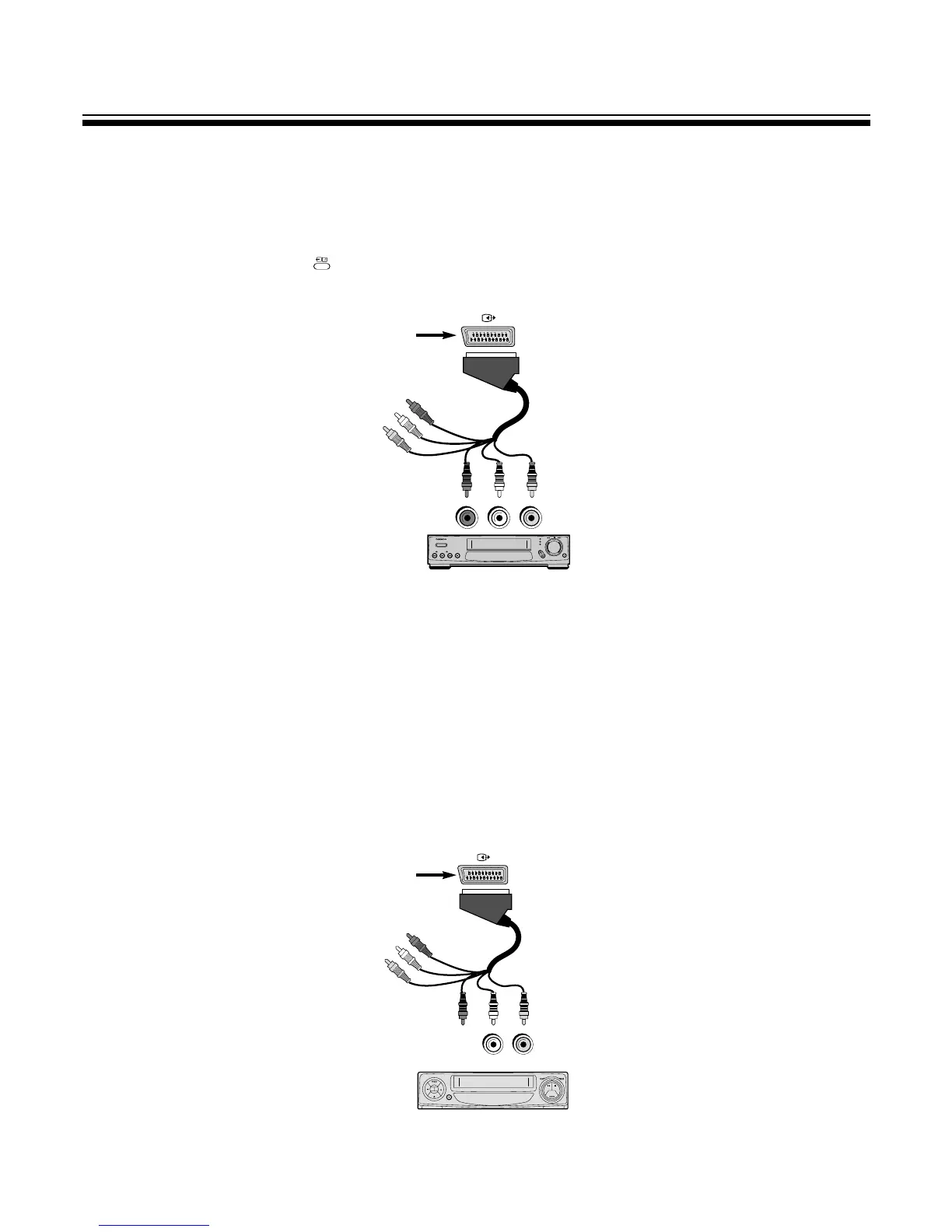
Connecting to a HI-FI STEREO VIDEO(STEREO mode is defaulted)
1. Prepare the connective plug for picture
/
sound.
2. Connect the VIDEO input/output terminal with the VIDEO2(AV2) terminal.
3. Press the TV
/
VIDEO
/
DVD( ) button on the Remote control and select AV2.
4. Select the STEREO mode with the STEREO/BILINGUAL SELECT button.
L
Connecting to a MONO VIDEO(STEREO mode is defaulted)
1. Use a two wire RCA cable to make a connection with a MONO VIDEO.
If L audio input of TV is connected to audio out of VIDEO, the sound will come from both speakers.
2. If L-INPUT of the TV is connected to the audio out of VIDEO, the mode will be
M STEREO : The sound will only come from one speaker.
M L-INPUT : The sound will come from both speaker.
M R-INPUT : The sound will not come at all.
3. If R-INPUT of the TV is connected to the audio out of VIDEO, the mode will be
M STEREO : The sound will only come from one speaker.
M L-INPUT : The sound will not come at all.
M R-INPUT : The sound will come from both speaker.
SOUND OUTPUT
REAR SCART TERMINAL
PICTURE OUTPUT
HI-FI STEREO VIDEO



 To Next Page