26
CONNECTING VIDEO
L
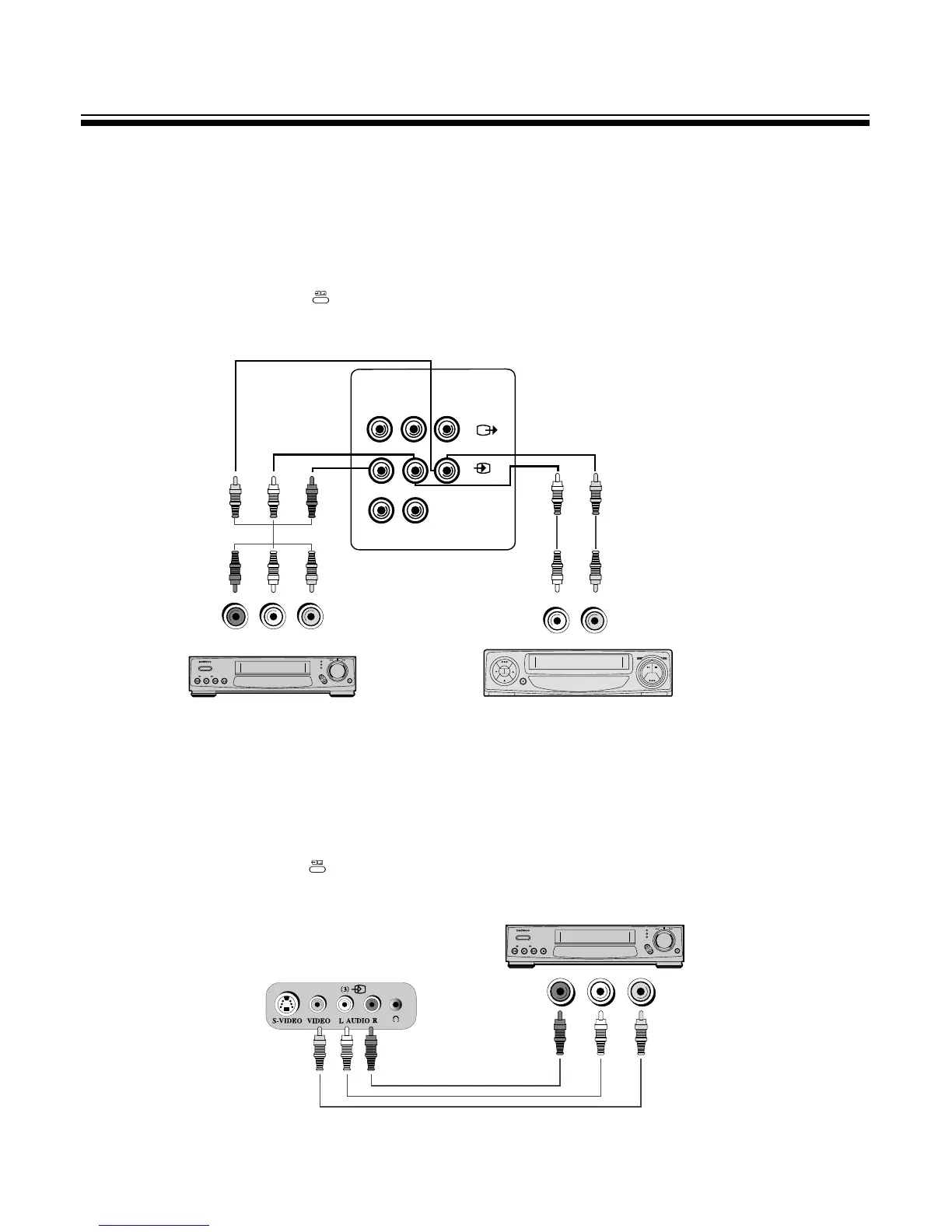
When connecting the VIDEO to the back of the TV
1. Prepare the connective plug for picture
/
sound.
2. Connect the VIDEO picture output terminal with the TV picture input terminal.
3. Connect the VIDEO sound output terminal with the TV sound input terminal.
4. Press the TV
/
VIDEO
/
DVD( ) button on the Remote control and select AV1.
M Both VIDEO1 and VIDEO2 are OK.
L
Front Connector
MThe connection method is as same as back.
MIn front connector, it’ better to connect the materials which are unusually used such like camcorder,
game player, etc.
MPress the TV
/
VIDEO
/
DVD( ) button on the Remote Control, and select AV3.
SOUND OUTPUT
PICTURE OUTPUT
PICTURE OUTPUT
HI-FI STEREO VIDEO
HI-FI STEREO VIDEO
M In case of mono VIDEO, connect the VIDEO sound output
terminal with right or left sound input one of TV.
SOUND OUTPUT
PICTURE OUTPUT
MONO
VIDEO
SOUND OUTPUT
M When connecting other equipment, please ensure you turn the main switch OFF to prevent any
damage to the equipment.



 To Next Page