28
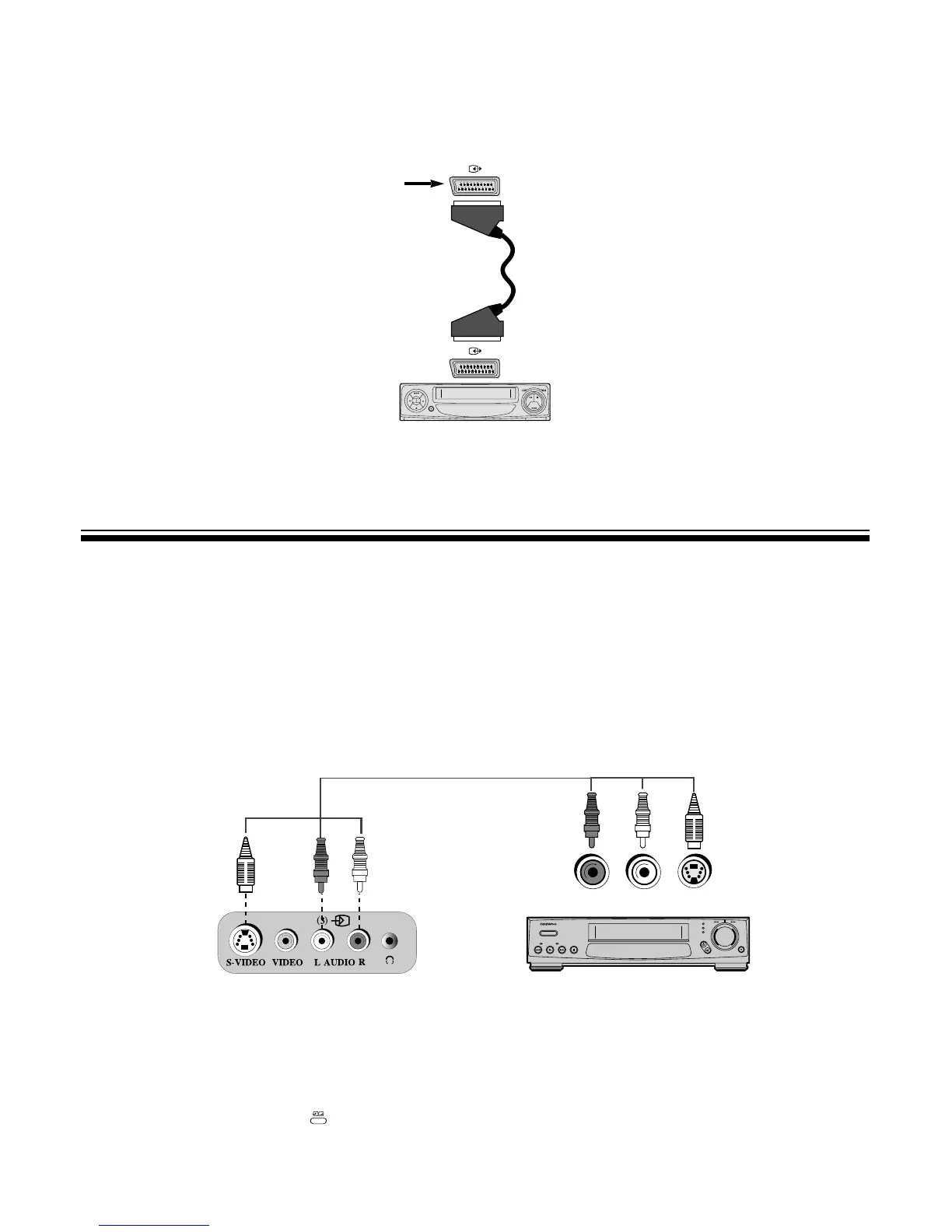
CONNECTING WITH S PICTURE VIDEO
SOUND
OUTPUT
S-PICTURE
OUTPUT
HI-FI STEREO VIDEO
L
Front Connector
M To watch TV in clear field by inputting S picture.
When repeating high-quality field VIDEO, you can enjoy clear and sharp picture by connecting it with TV S-VHS
terminal.
1. Connect S-VHS connective plug with S-VHS output terminal of VIDEO set and S-VIDEO picture input terminal of
TV set.
2. Connect sound connective plug with sound output terminal of VIDEO set and sound input terminal of TV set.
3. Press the TV
/
VIDEO
/
DVD( ) button on the Remote control, and select VIDEO 3(AV3).
M When connecting other equipment, please ensure you turn the main switch OFF to prevent any
damage to the equipment.
L
Connecting SCART to SCART(STEREO mode is defaulted)
1. Prepare the connective plug for picture
/
sound.
2. Connect the SCART input/output terminal of VIDEO with the SCART input/output terminal of TV.



 To Next Page