3-6 Using Common Features
ML440 End User Guide - Revision 1
Using an Optional Headset
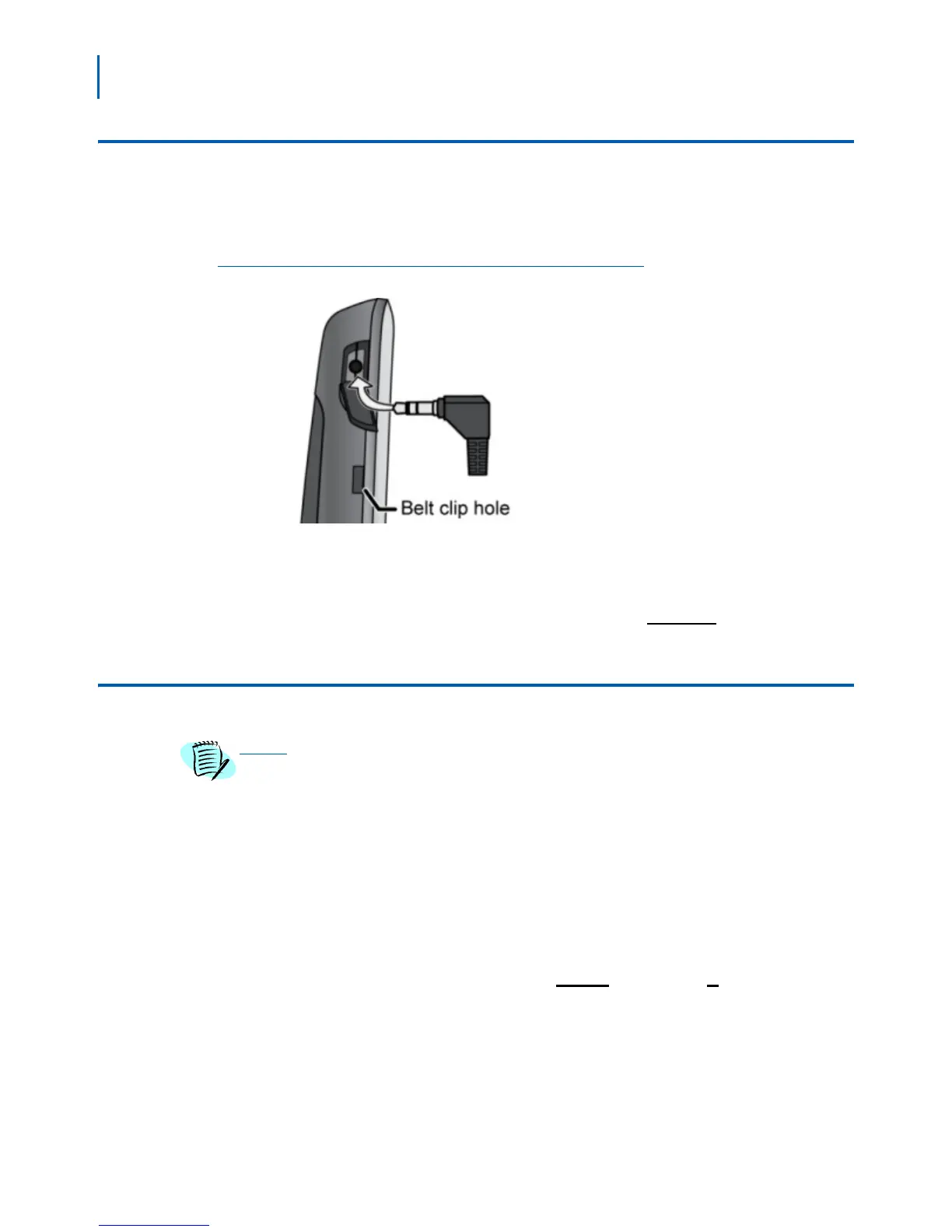
You can use a standard 2.5 mm telephone headset with your handset.
To install a headset, remove the headset jack cover and insert the
headset plug into the jack (Figure 3-1).
Figure 3-1
Installing a Headset
Make and receive calls as usual, and plug in your headset to talk to the
caller after the call connects.
When you connect a headset, the handset automaticall
y mutes the
earpiece and speaker. To re-activate the earpiece, just unplug the
headset. To switch to speaker handset, press
Speaker.
Locking the Keypad
While the keys are locked, you will not be able to use any handset functions that
require a key press, including making and receiving calls. You can still dial
emergency numbers (911) while the keys are locked.
Follow the steps below to lock the keypad.
Step 1 From the main menu screen, select the Settings icon.
Step 2 On the Settings screen, select Security, then select Automatic keylock.
Step 3 Select the amount of time (from 15 seconds to 5 minutes) you want the
handset to wait before it locks the keypad, or select Off to have the
handset never lock the keypad.
If the handset is idle for the amount
of
time you selected, it locks the
keys. To unlock the keypad, press
Select followed by *. The keypad will
remain unlocked until it remains inactive for the amount time selected
above.



 To Next Page