Getting Started 2-7
ML440 End User Guide - Revision 1
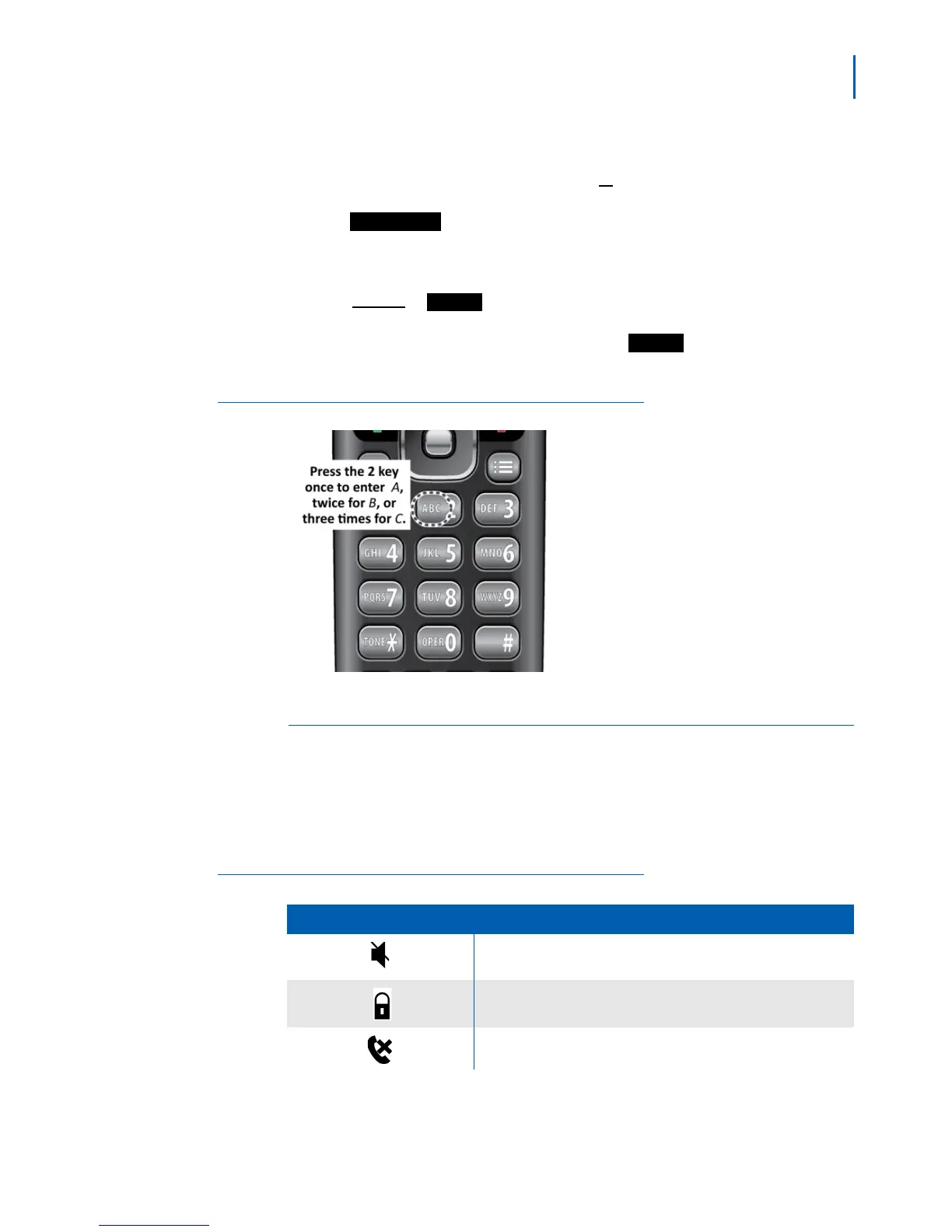
• The handset uses capital letters as the first character and lower case
letters after that. To switch between upper case characters, lower
case characters, and numbers, press
#.
• To enter a symbol, press 1 to cycle through the available symbols or
press
and select the symbol you want to enter.
• If two letters in a row use the same number key
, enter the first letter.
Wait for the cursor to move to the next position, then enter the
second letter.
•Press
Select or when you're finished.
• If you make a mistake while entering a name, move the cursor to
righ
t of the incorrect character and press .The handset deletes
the character to the left of the cursor (like the backspace key on a
keyboard).
Figure 2-8
Entering Text
Reading the Display and Status LEDs
Display Icons and Their Meaning
Since the icons appear based on what you are doing with handset, you
will never see all of the icons at one time. Tabl e 2 - 2 lists the icons and
their meaning.
Table 2-2 Icons
Icon Meaning
The ringer is turned off. This handset will not ring when a call comes
in.
The keys are locked. See “Locking the Keypad” on page 3-6".
The microphone is muted, and the caller can’t hear you.
Symbol
Save
Save
Clear



 To Next Page