2-8 Getting Started
ML440 End User Guide - Revision 1
LED States and Their Meaning
Tab le 2 - 3 lists the charger LEDs and provides a brief description of their
meaning.
Tab le 2 - 4 lists the handset LEDs and provides a brief description of their
meaning.
Table 2-3 Charger LEDs
Charger LEDs Meaning
HANDSET STATUS
-On: the handset is properly seated in the charger.
-Off: the handset is not in the charger or is not properly seated.
BATTERY STATUS
-On: the spare battery is charging.
-Off: the spare battery is completely charged.
Table 2-4 Handset LEDs
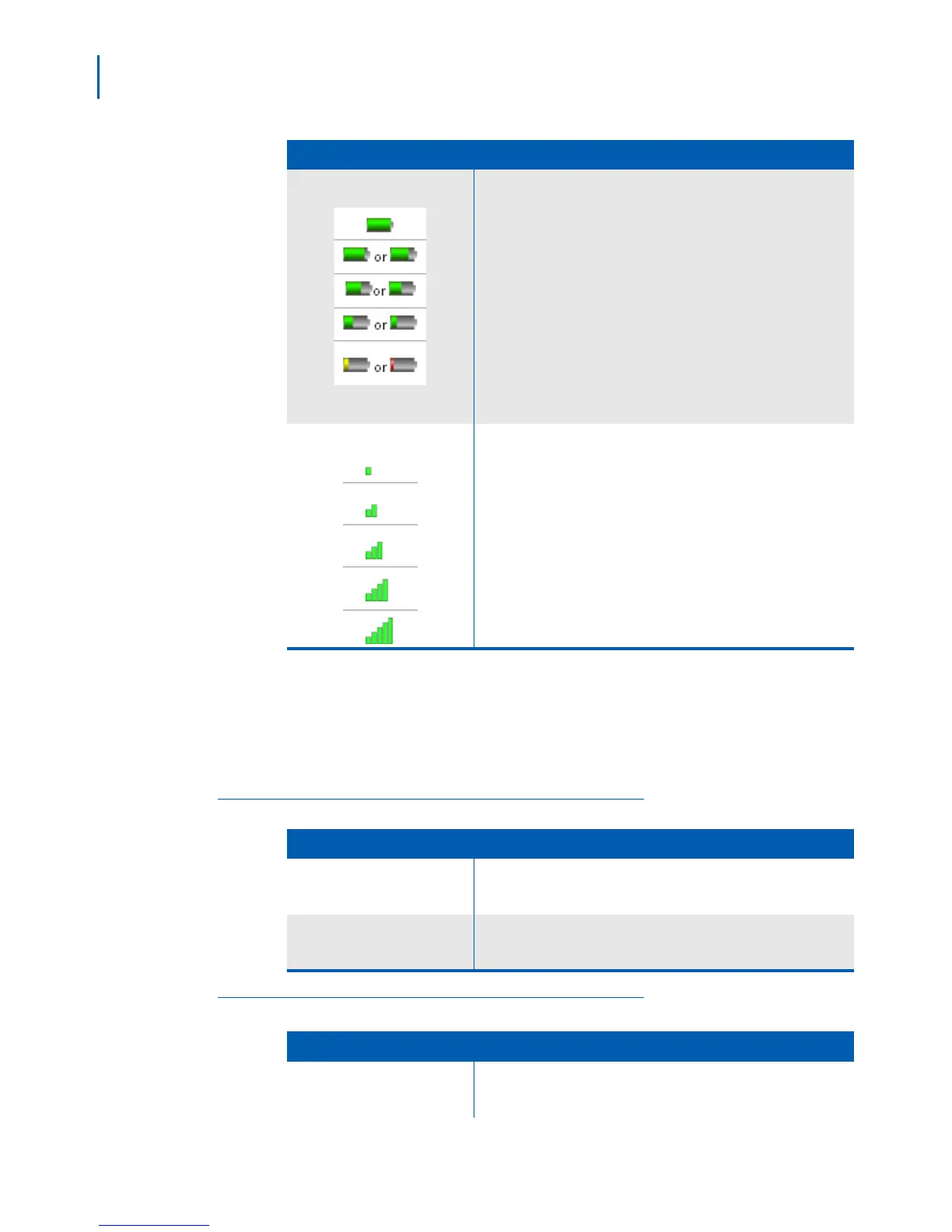
Battery Status
Rotating icons
The battery is fully charged.
The battery is more than half charged.
The battery is about half charged.
The battery is getting low.
The battery is very low. Change the battery or put the handset in the
charger
The battery is charging.
Signal Status
The signal from the base is very weak.
The signal from the base is weak.
The signal from the base is good.
The signal from the base is strong.
The signal from the base is excellent.
Icon Meaning
Handset LEDs Meaning
STATUS
-Slow Flashing (Red) - Voice Mail Message Waiting.
- Fast Flashing (Red) - Handset is ringing.



 To Next Page