8
1. Introduction
Remote Control Precautions
• Handletheremotecontrolcarefully.
• Iftheremotecontrolgetswet,wipeitdryimmediately.
• Avoidexcessiveheatandhumidity.
• Donotheat,takeapart,orthrowbatteriesintore.
• Ifyouwillnotbeusingtheremotecontrolforalongtime,removethebatteries.
• Ensurethatyouhavethebatteries’polarity(+/−)alignedcorrectly.
• Donotusenewandoldbatteriestogether,orusedifferenttypesofbatteriestogether.
• Disposeofusedbatteriesaccordingtoyourlocalregulations.
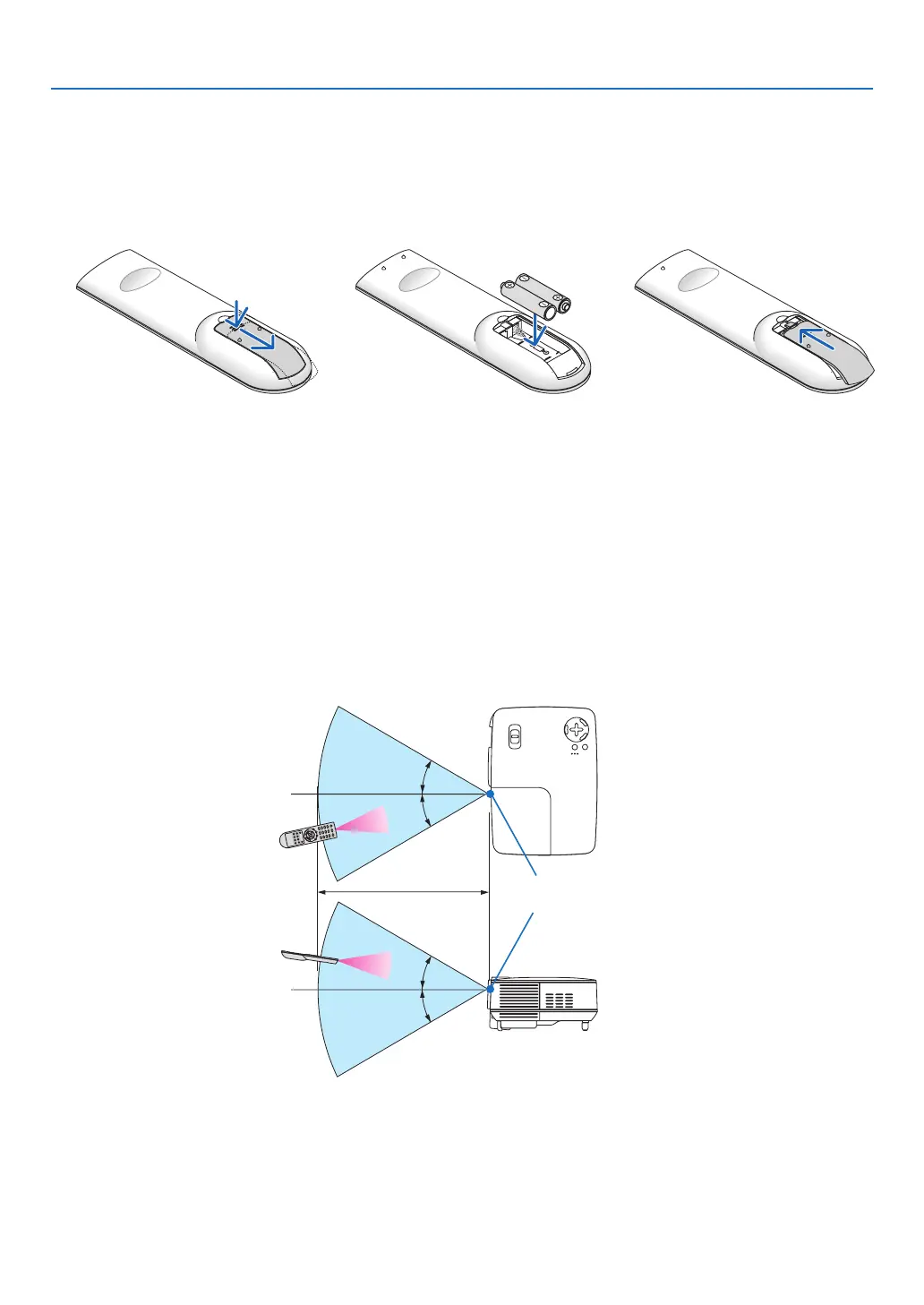
Operating Range for Wireless Remote Control
Battery Installation
Remote sensor on
projector cabinet
Remote control
22 feet / 7 m
• Theinfraredsignaloperatesbyline-of-sightuptoadistanceofabout22feet/7mandwithina60-degreeangle
oftheremotesensorontheprojectorcabinet.
• Theprojectorwillnotrespondifthereareobjectsbetweentheremotecontrolandthesensor,orifstronglight
fallsonthesensor.Weakbatterieswillalsopreventtheremotecontrolfromproperlyoperatingtheprojector.
Remote control
1
Pressrmlyandslidethebattery
coveroff.
2
Install new batteries (AAA).En-
surethatyouhavethebatteries’
polarity(+/−)alignedcorrectly.
3
Slipthecoverbackoverthebat-
teriesuntilitsnapsintoplace.Do
not mix differenttypesofbatter-
iesornewandoldbatteries.



 To Next Page