12
2. Installation and Connections
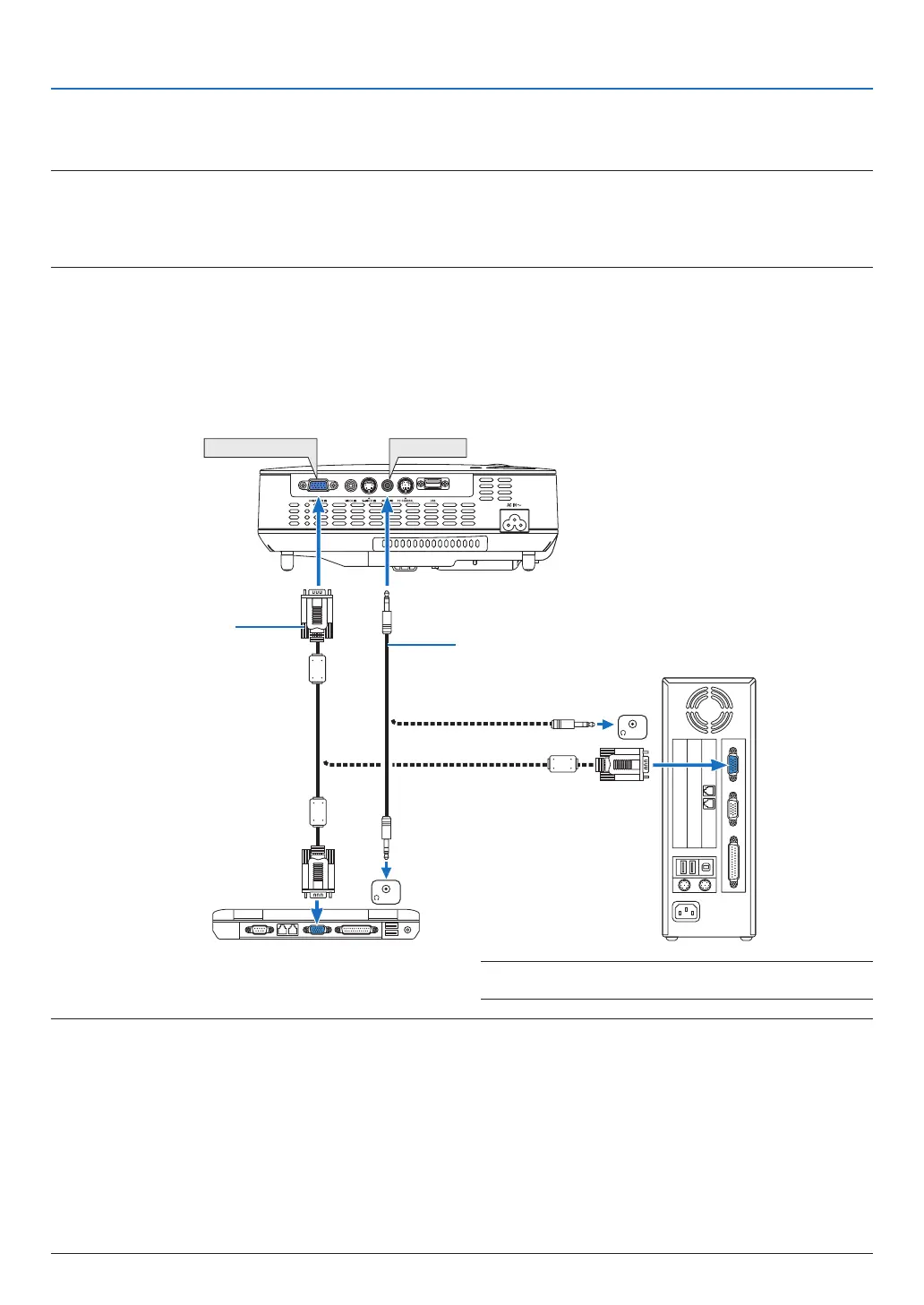
COMPUTER IN
PHONE
PHONE
AUDIO IN
➋
Making Connections
Connecting Your PC or Macintosh Computer
NOTE:WhenusingwithanotebookPC,besuretoconnecttheprojectorandnotebookPCwhiletheprojectorisinstandbymodeand
beforeturningonthepowertothenotebookPC.
InmostcasestheoutputsignalfromthenotebookPCisnotturnedonunlessconnectedtotheprojectorbeforebeingpoweredup.
* Ifthescreengoesblankwhileusingyourremotecontrol,itmaybetheresultofthecomputer’sscreen-saverorpowerman-
agementsoftware.
Enabling the computer’s external display
DisplayinganimageonthenotebookPC’sscreendoesnotnecessarilymeanitoutputsasignaltotheprojector.
WhenusingaPCcompatiblelaptop,acombinationoffunctionkeyswillenable/disabletheexternaldisplay.
Usually,thecombinationofthe“Fn”keyalongwithoneofthe12functionkeysgetstheexternaldisplaytocome
on or off. For example, NEC laptops use Fn + F3, while Dell laptops use Fn + F8 key combinations to toggle
throughexternaldisplayselections.
VGA signal cable (supplied)
To mini D-Sub 15-pin connector on
the projector. It is recommended
that you use a commercially avail-
able distribution amplier if con-
necting a signal cable longer than
the cable supplied.
IBM VGA or Compatibles (Notebook
type) or Macintosh (Notebook type)
NOTE:
• Beforeconnectinganaudiocabletotheheadphonejackofacomputer,adjustthecomputer’svolumeleveltolow.Aftercon-
nectingtheprojectortothecomputer,adjustthevolumeofbothprojectorandcomputertosuitablelevelasdesiredtoavoid
damagetoyourear.
• Ifanaudiooutputjackofyourcomputerisaminijacktype,connecttheaudiocabletoit.
• AnimagemaynotbedisplayedcorrectlywhenaVideoorS-Videosourceisplayedbackviaacommerciallyavailablescan
converter.
Thisisbecausetheprojectorwillprocessavideosignalasacomputersignalatthedefaultsetting.Inthatcase,dothefol-
lowing.
- Whenanimageisdisplayedwiththelowerandupperblackportionofthescreenoradarkimageisnotdisplayedcorrectly:
ProjectanimagetollthescreenandthenpresstheAUTOADJ.buttonontheremotecontrolortheprojectorcabinet.
- TheCOMPUTERINconnectorsupportsPlug&Play(DDC2B).
NOTE:ForolderMacintosh,useacommerciallyavailablepin
adapter(notsupplied)toconnecttoyourMac’svideoport.
Stereo mini-plug audio cable (not supplied)



 To Next Page