80
7. Maintenance
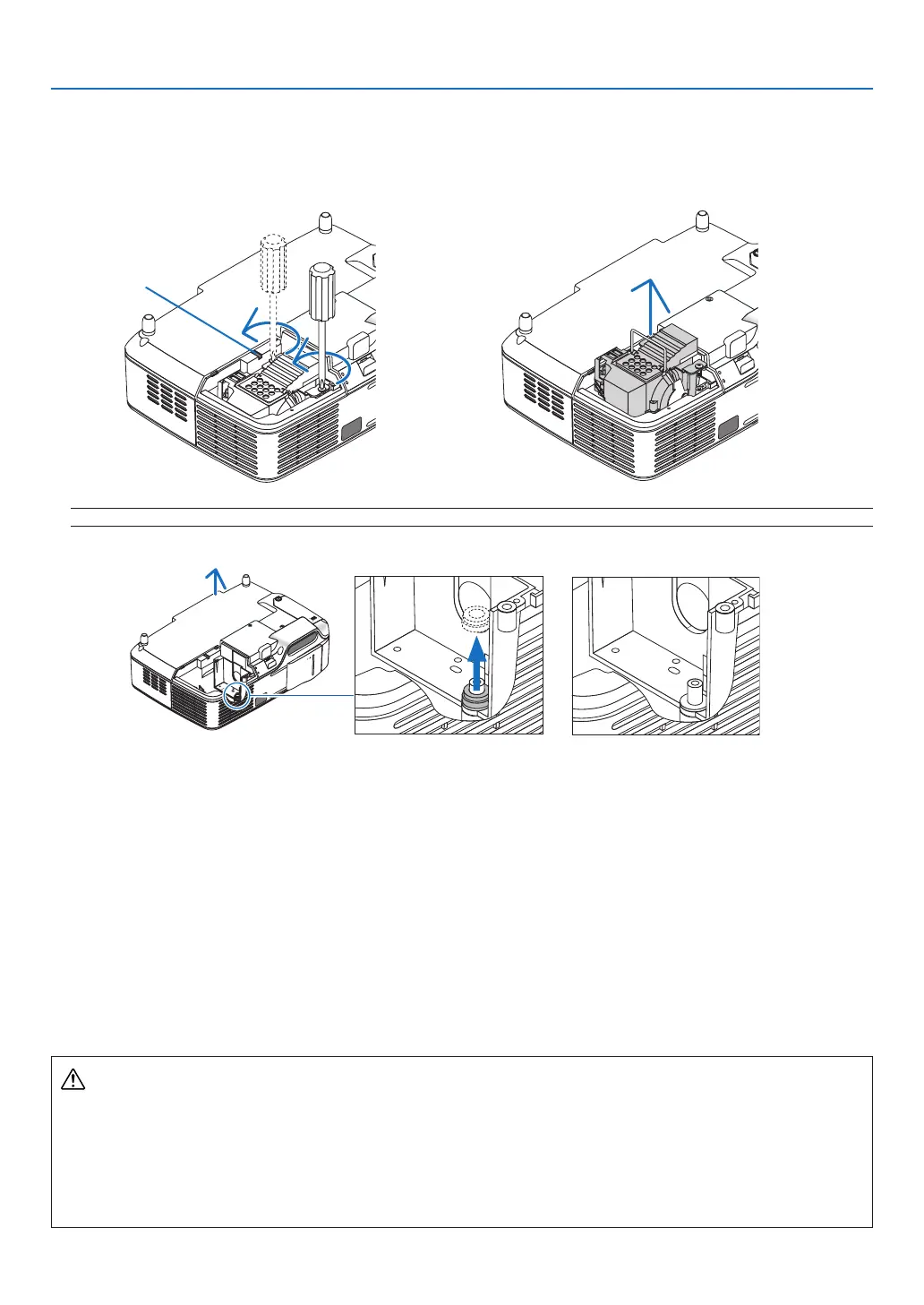
3. Loosen the two screws securing the lamp housing until the phillips screwdriver goes into a freewheeling
condition.
The two screws are not removable.
Remove the lamp housing by holding the handle.
Interlock
NOTE:Thereisaninterlockonthiscasetopreventtheriskofelectricalshock.Donotattempttocircumventthisinterlock.
Fig. A Fig. B Fig. C
Note: Removing or Inserting the Lamp (Sticking of Packing Ring)
Afterlampreplacement,ablackpackingringmaybestuckinsidetheprojector(Fig.AandFig.B).
Ifthishappens,dothefollowing:
• Iftheusedpackingringdoesnotremaininsidetheprojector(Fig.C),proceedwiththenewlamphousingin-
stallation.
• Iftheusedpackingringisstuckinsidetheprojector(Fig.B),removeitfrominsidetheprojectorbeforeinstall-
ingthenewlamphousing.Toremovethepackingring,simplypullitoffofthestud.
* Inothercaseswherethelampisremoved(otherthanlampreplacement),pullingoutthelamphousingmay
alsocausethepackingringtostaystuckinsidetheprojector.Ifthishappens,makesuretoinsertthelamp
housingbackinitsoriginalposition.
CAUTION
• Beforeremovingtheusedpackingring,besuretoturnofftheprojector,waitforthecoolingfantostop,dis-
connectthepowercable,andallowatleastonehourforthelamptocool.
Theprojectorcanbecomeveryhotwhenitisturnedonandstayhotimmediatelyafteritisturnedoff.
• Do not install a new lamp with the used packing ring stuck inside theprojector asit requires excessive
forcetoinstallthenewlampwhichthenmaycausedamagetotheprojector.



 To Next Page