Need help?
Do you have a question about the Nektar Aura and is the answer not in the manual?
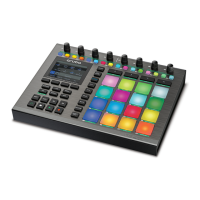
Eight 360-degree rotary pots used for parameter control across various modes.
Sixteen multi-purpose RGB illuminated buttons for sequencing, pattern triggering, and mixing.
Four buttons serving as Part selectors or navigation arrows.
Sixteen velocity and pressure-sensitive pads with RGB LED illumination.
How to program pads to send MIDI notes and set trigger/toggle behavior.
Configuring pad pressure for expressiveness and controlling MIDI messages.
Setting pad LED color and adjusting strike sensitivity.
Assigning MIDI functions to switches and footswitches.
Overview menu for adjusting parameters across Patterns, Parts, and Steps.
Methods for editing velocity for multiple Parts/Steps or Pattern/Parts/Steps.
Options for reverting parameters to Collection or Pattern settings.
Steps to reset the Aura unit to its original factory default settings.
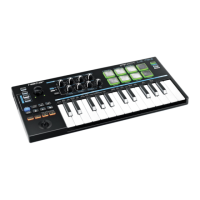
The Nektar Aura is a versatile beat composer designed for beat creation, offering a hands-on user interface for both composing and performing. It functions as a pad instrument with a drum machine-style step sequencer, allowing users to program patterns for each pad and trigger them in any combination. The Aura can be used as a standalone MIDI system or integrated with the Nektarine VST/VST3/AU and AAX plugin, transforming it into a powerful plugin control system. This integration enables users to combine sounds from various plugins with send and insert effects, and Nektar DAW integration helps capture pad performances or sequencer data for a complete beat composing experience.
The Aura's core functionality revolves around its 16 velocity and pressure-sensitive RGB illuminated pads, which are central to beat creation. These pads can be programmed to send any MIDI note, and their pressure component can be assigned to continuous MIDI messages like Pitchbend, AfterTouch, or any MIDI CC, adding expressiveness to performances. Each pad can also be assigned to a specific MIDI channel, allowing for split pad configurations across different MIDI devices or targets.
The device features an 8-rotary 360-degree pot section, extensively used across Internal, Sequencer, DAW, and Nektarine modes for controlling parameters. Sixteen RGB LED illuminated buttons are primarily used for step programming in Sequencer mode, pattern triggering in Internal mode, and Solo/Mute in Nektarine Mixer mode. Additionally, 27 dual-color LED illuminated buttons and 4 display buttons provide further control and feedback.
The Step Sequencer is a key feature, allowing users to program up to 16 patterns simultaneously. Each pattern can have 4 parts, and each part can contain up to 16 steps, making for a maximum of 64 steps per pattern. Sequencer parameters are programmable down to the step level, offering granular control over play rate, velocity, gate/length, and accents. The sequencer also supports various play modes like Loop, Reverse Loop, Ping-pong, and One-Shot, with restart and resume options. Trigger modes include Immediate, Snap to Start, Next 1/4, Next 1/8, and Next 1/16.
The Repeat feature enables the creation of steady beats, rolls, and flams, and can be used with external MIDI equipment or for recording repeated notes in a DAW. Repeat settings, including tempo, gate, accent offset, accent interval, repeat rate, and swing, are adjustable in real-time, making them suitable for performance. The device supports various trigger sync options (Beat 8/12/16, Key 1 & 2) to ensure tight synchronization or to allow for more expressive, unsynced performances.
For global control, the Aura offers a Global MIDI Channel setting, affecting presets 1-12. The MIDI Out jack can send MIDI messages directly from the Aura, act as a USB MIDI interface, or merge both internal and USB MIDI messages. LED dim settings allow users to adjust the illumination of dim LEDs, which indicate status for buttons and pads.
The Aura comes with factory presets that serve as examples for pad programming, covering GM drum kits, percussion, chromatic scales, major scales, and chord layouts. These presets provide a starting point for users to create their own configurations. Presets can be loaded, saved, and renamed, allowing for personalized setups. Quick-load functionality enables rapid switching between presets using the pads.
Programming pads and controls is done through the MIDI ASSIGN menu. Users can select a control (pads, switches, or pots) and assign its MIDI message type, channel, and data parameters. The pad pressure component can be configured for various assignment types, including MIDI CC, Pitch Bend, Poly AT, Channel AT, NRPNC/f, and Fixed Velocity, with adjustable maximum and minimum values. Pad LED colors and strike sensitivity are also configurable, allowing users to customize visual feedback and playability.
The Step Sequencer offers a quick start guide for programming patterns, involving selecting patterns, programming steps using RGB buttons, and activating/deactivating pattern playback. Deeper collection settings allow for real-time adjustments of parameters like play rate, velocity, gate/length, last step, accent offset, and swing, which can be applied at the collection, pattern, part, or step level. The hierarchical parameter system ensures that lower-level settings override higher-level ones.
The sequencer also includes power edit features for pattern/part/step editing, allowing users to view and adjust parameters across multiple patterns, parts, or steps simultaneously. This includes changing velocity values for multiple parts or steps in one move while maintaining their relative relationships. Users can also revert parameters to higher-level settings or reset lower-level settings to match a higher level.
The Collection Menu provides options for setting tempo, clock source (Internal, MIDI Clock, Auto), and time signature, which are crucial for synchronizing the sequencer with other devices or DAWs. The "Perform" display button swaps select and play functions, streamlining live performance by eliminating the need for the Shift button when activating patterns or parts. Sequencer collections can be saved, renamed, and loaded, with quick-load options available via the pads.
The Aura supports firmware updates, which can be downloaded from the Nektar website after product registration. Users can check their current firmware version by pressing [Internal]+[Menu] to access the 'About' page. Instructions for updating firmware are provided in PDF guides.
For troubleshooting or resetting the device, a factory restore function is available. By pressing and holding the [Shift]+[Click] buttons while switching the Aura on, users can restore the device to its default factory settings. This ensures that any configuration issues can be resolved by reverting to a known good state.
 General
| Power | USB bus-powered |
|---|---|
| Type | Pad Controller |
| Connectivity | USB, MIDI In/Out |
| Software | Nektarine software |
| Fader | 1 motorized fader |
| Software Integration | Nektarine plugin host software for VST, VST3, AU plugins |
| Encoders | 8 x endless encoders |
| DAW Integration | Supports major DAWs like Ableton Live, Logic Pro, Cubase, etc. |


 To Next Page