N720 Hardware User Guide
Copyright © Neoway Technology Co., Ltd 19
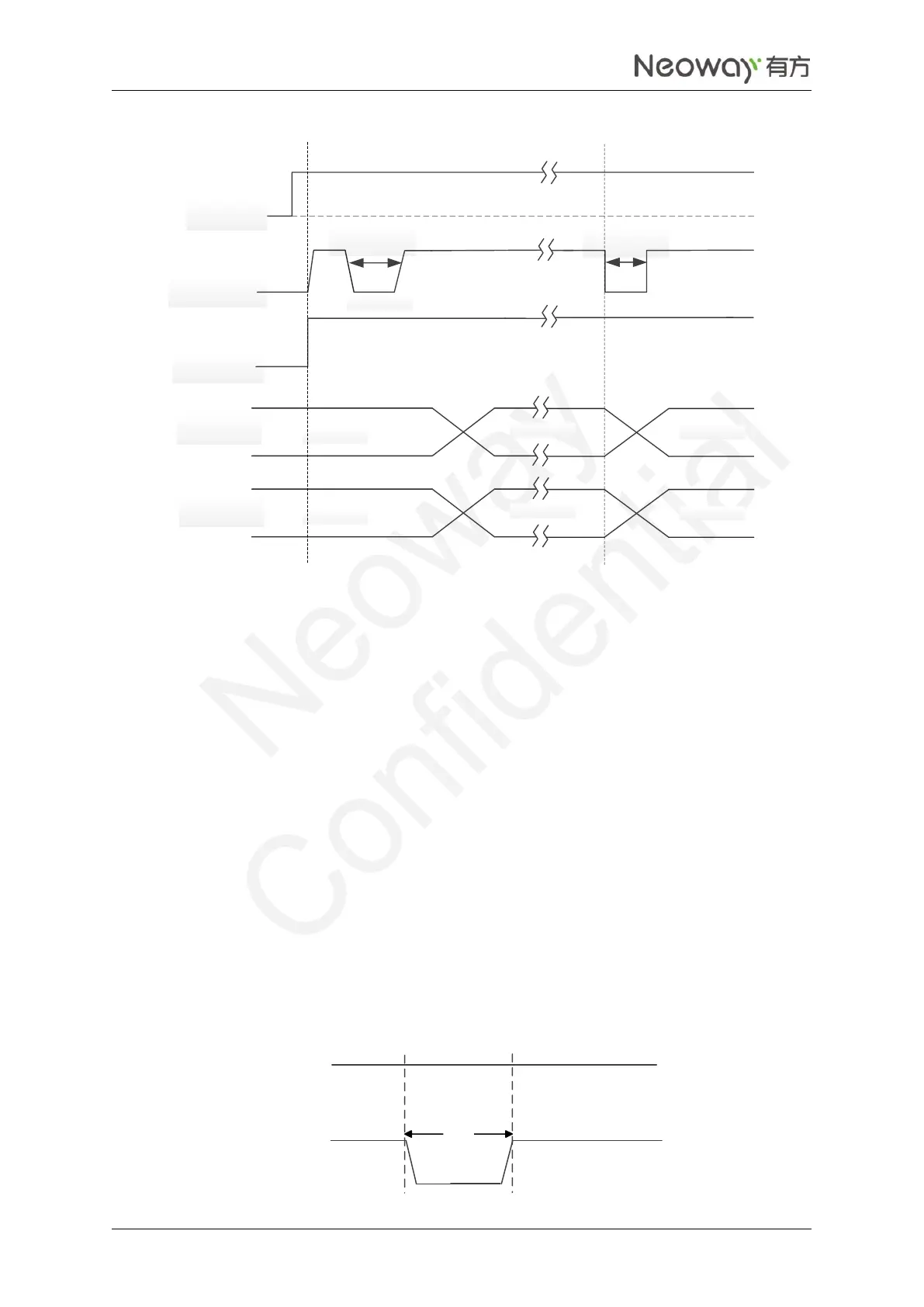
Figure 2-9 N720 power-on/off sequence
VBAT
PWRKEY
RESET_N
t >200ms
V
L
<0.6V
USB
t >2s
Inactive
Active
Inactive
Inactive
Active
Inactive
UART
If application does not require power-on control, pull the PWRKEY pin down to GND through 1.5 kΩ
resistor. Then the module can start automatically after it is powered on. Leave the PWRKEY pin
unconnected if it is not used. The PON_TRIG pin can trigger the ON status of the module by high level.
Power-off
The module can be powered off in two ways: hardware power off and software power off.
Low-level pulse for 2 seconds on PWRKEY can trigger the power-off status of the module. Leave this pin
unconnected if it is not used.
For how to power off the module through software, please refer to the AT command manual.
If 2.8V/3.3V IO system is adopted, use external triode isolation. For details, refer to 2.3.4 RESET. Figure
2-10 shows the hard power-off sequence.
Figure 2-10 N720 power-off sequence


 To Next Page