Unpacking
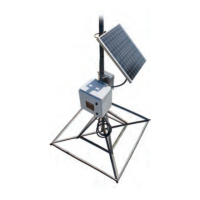
As with all precision electronic instruments, handle the gateway with care. However, no
special handling is required.
After unpacking the gateway, inspect it for damage. If any parts of the gateway appear
damaged or prove defective upon installation, notify your Neptune representative.
If you are returning a damaged or defective item, use the original cardboard box and
packing material.
Tools and Materials
Table 14 shows the recommended tools and materials needed to successfully install the
gateway.
Some items may not apply to your specific installation or the list may not contain all
required tools or materials.
Item Description/Recommendation Use
Took Kit Contains standard tools including:
l
Assorted screwdrivers (medium, flat
head, Phillips).
l
Cordless electric drill / assorted bits.
l
Crescent wrench.
l
Standard socket wrench set.
l
Compass.
l
Protractor or Johnson Magnetic Angle
Locator (Model: 700).
l
Hammer.
l
Channel locks.
l
T27 Torx Pin-Head Tool (Wiha Part No.
36283).
Various installation
procedures performed by
the installer.
Ultraviolet (UV) -stable
cable ties
8" and 12" (20 cm and 30 cm). Securing coaxial cable.
Coaxial ground kits See Figure 28 on page 27 Grounding cable.
Table 14 – Recommended Tools and Materials
R900
®
Gateway Installation and Maintenance Guide 25
Chapter 3: General Installation Information



 To Next Page