Attaching the Power Cable
To attach the power plug to the gateway:
l
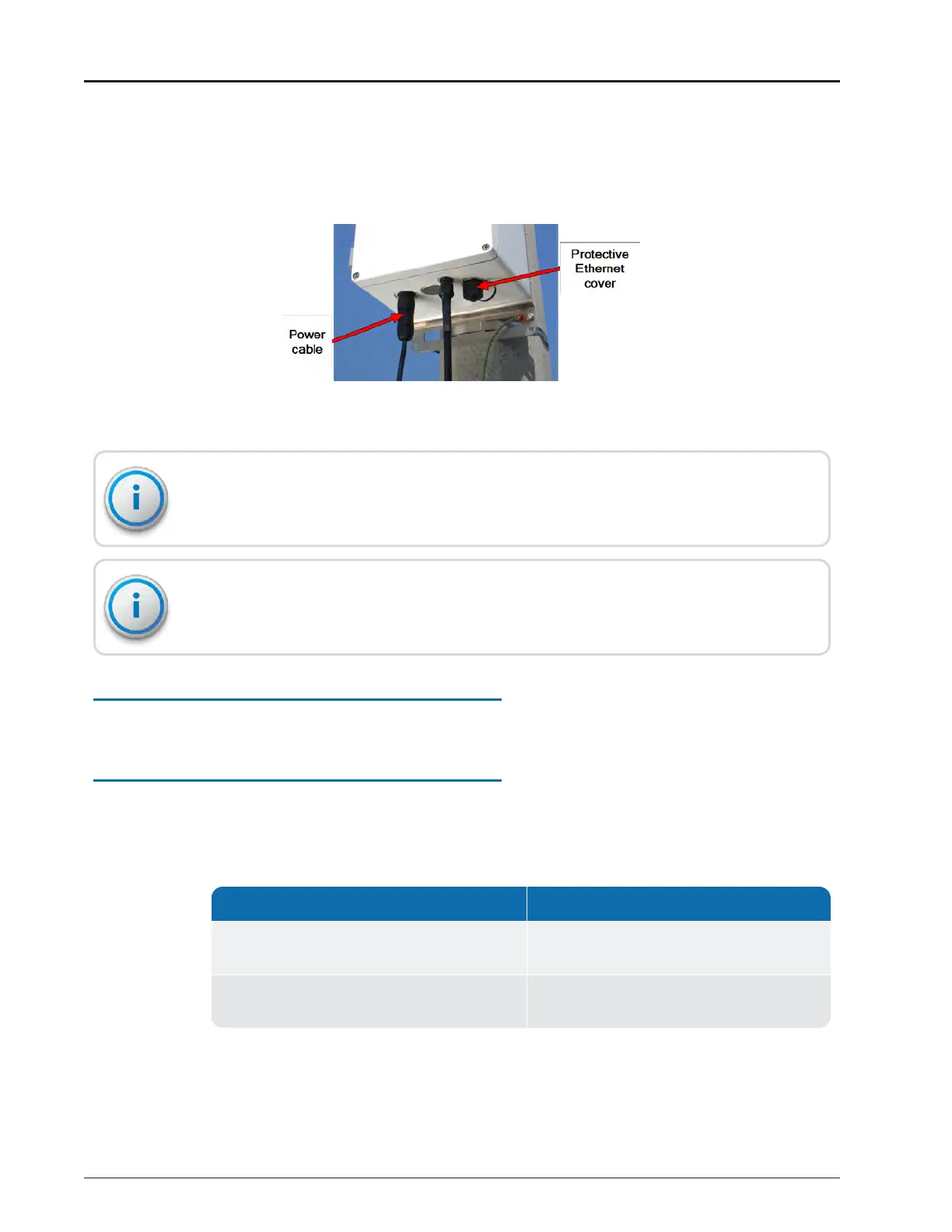
Push and rotate the circular power connector clockwise to engage it.
Figure 66 – Power Cable
Do not weatherize the power connection. The power connector is IP68-rated and does
not require weatherization wrap.
When the port is not in use, the protective cover (CONEC P/N: 17-10002) included with
the unit should always cover the Ethernet port.
Configuring the Cellular Modem
See "Configuring the Cellular Modem" on page107 of Appendix D.
Configuring the Gateway
Using a USB flash drive or the N_SIGHTPLUS host software, configure the gateway as
delineated in Table 16 .
If you have ... Configure the gateway using....
No internet access from the installation site
prior to installing the gateway,
A USB flash drive. See the following section.
Internet access readily available at the
installation site prior to installing the gateway,
Web services.
Table 16 – Determining the Configuration Options
Configuring the Gateway with theUSBFlash Drive
Complete the following steps to configure the gateway using a USB flash drive.
52 R900
®
Gateway Installation and Maintenance Guide
Chapter 4: Install the Gateway



 To Next Page