Report Now Function
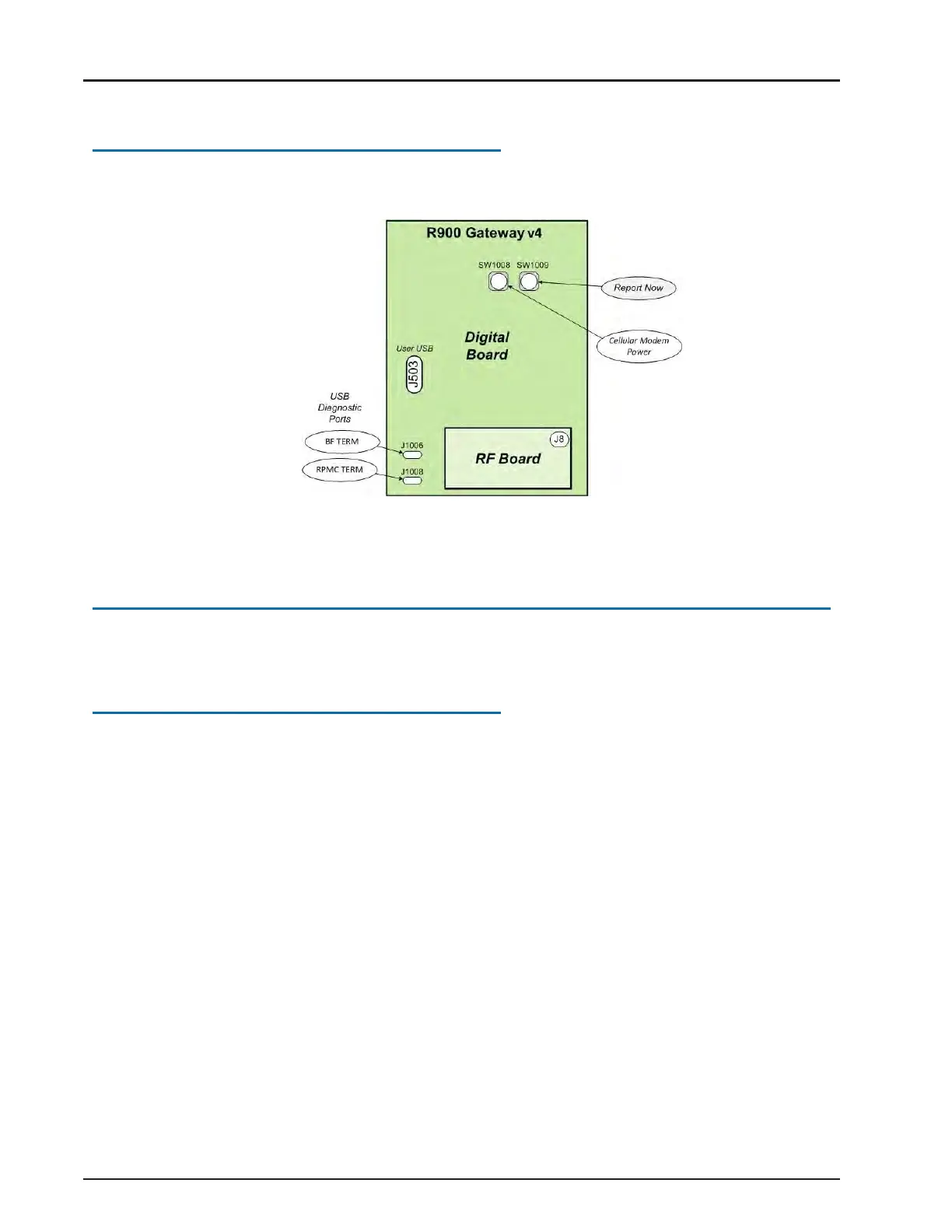
The gateway can be forced to report back by momentarily pressing the SW1009 switch.
See Figure 97.
Figure 97 – Report Now Button
Contacting Customer Support
Within North America, Neptune Customer Support is available Monday through Friday,
7:00 A.M. to 5:00 P.M.Central Standard Time by telephone or email.
By Phone
To contact Neptune Customer Support by phone, complete the following steps.
1. Call (800) 647-4832.
2. Select one of the following options.
l
Press 1 if you have a Technical Support Personal Identification Number (PIN).
l
Press 2 if you do not have a Technical Support PIN number.
3. Enter the six-digit PIN number and press #.
4. Select one of the following options.
l
Press 2 for Technical Support.
l
Press 3 for maintenance contracts or renewals.
l
Press 4 for Return Material Authorization (RMA) for Canadian accounts.
R900
®
Gateway Installation and Maintenance Guide 77
Chapter 6: Troubleshooting



 To Next Page