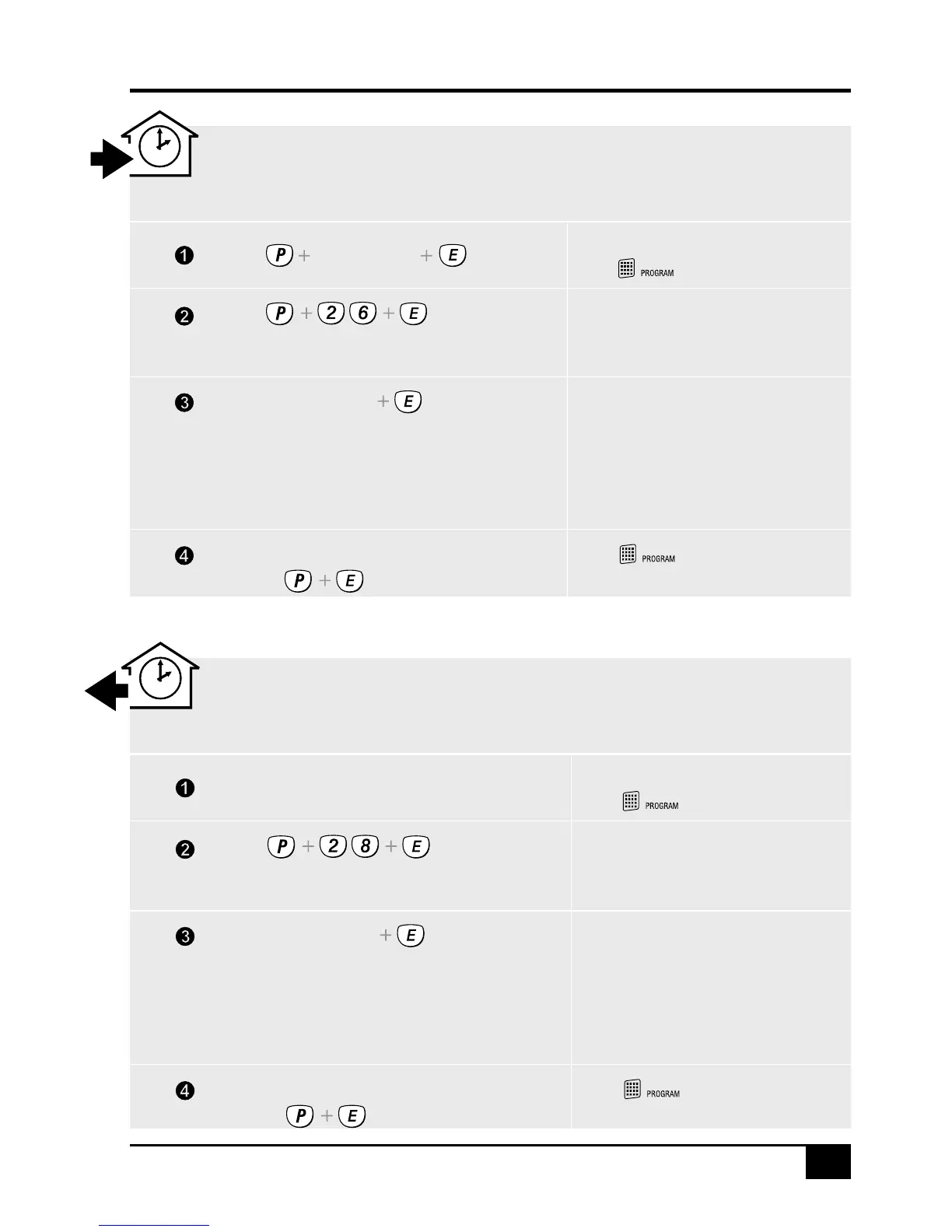
TO PROGRAM ENTRY DELAY TIME
P26E is the option number for Entry Delay Time.
Enter a new entry delay time from 1 to 99 seconds.
The existing time will be displayed one
digit at a time.
The factory default time is 20 seconds.
The new time will be displayed one
digit at a time.
Press...
Press... P26E 25E
EXAMPLE: To make the entry delay time 25 seconds:
Press...
ACTION NOTE
Enters Program Mode.
The icon will turn on.
[Master Code]
Press...
Go to step 2 of any other programming option
or press... to exit program
mode.
The icon will turn off when.
you exit program mode.
(NEW TIME)
TO PROGRAM EXIT DELAY TIME
P28E is the option number for Exit Delay Time.
Enter a new exit delay time from 1 to 99 seconds.
The existing time will be displayed one
digit at a time.
The factory default time is 60 seconds.
The new time will be displayed one
digit at a time.
Press...
Press... P28E 50E
EXAMPLE: To make the exit delay time 50 seconds:
Press...
ACTION NOTE
When in Program Mode.
The icon is on.
Go to step 2 of any other programming option
or press... to exit program
mode.
The icon will turn off when.
you exit program mode.
(NEW TIME)
See step 1 of Entry Delay programming,
or if already in program mode, continue to step 2.



 To Next Page