EasyManua.ls Logo

Netech UPM 2000 - User Manual

Netech UPM 2000
50 pages
Print Icon
To Next Page IconTo Next Page
Loading...
UPM 2000
Ultrasound Power Meter
User Manual
Manual P/N 1200-User-Manual
Initial Release-3/12/2008

Questions and Answers

  • A
    Anthony CummingsAug 2, 2025
    What to do if Netech UPM 2000 displays 'oL' error?
    • M
      Michael BrooksAug 2, 2025
      If your Netech Measuring Instruments displays an 'oL' error, it could indicate defective electronics or a damaged load cell. Immediately remove any excessive load from the load cell. Then, turn the unit off and back on to see if the error clears. If the error repeats, the unit must be returned to the factory for service. If this error occurs during a calibration check with the 100 gram check weight but the unit seems to read normally without the weight on, this indicates that the unit needs to be recalibrated.
  • K
    Kimberly MichaelAug 6, 2025
    What causes 'E-54' error on Netech UPM 2000 Measuring Instruments?
    • J
      Joshua WellsAug 6, 2025
      The 'E-54' error on your Netech Measuring Instruments is likely due to one of the following reasons: an object was dropped onto the load cell, the unit was dropped, or the load cell was damaged while the cone was being removed or placed on the cone-mounting pin. In this case, return the unit to the factory service center.
  • J
    Jordan AlvarezAug 10, 2025
    Why does my Netech Measuring Instruments show 'SYS.Err'?
    • B
      Brenda YoungAug 10, 2025
      The 'SYS.Err' error on Netech Measuring Instruments can occur due to several reasons: the load cell is functioning outside of its specifications, the unit experienced rough or improper handling, or liquids/other materials spilled onto the electronics. Return the unit to the factory service center for evaluation and repair.
  • K
    kelsey23Aug 15, 2025
    How to fix 'uL' error on Netech UPM 2000 Measuring Instruments?
    • C
      Christina CollinsAug 15, 2025
      The 'uL' error on your Netech Measuring Instruments usually appears when neither the cone nor the calibration weight adapter pedestal is in place on the load cell. Replace the cone, or if calibrating, place the calibration weight adapter on the cone-mounting pin. The condition may also indicate defective electronic or load cell. If the condition cannot be cleared, return the unit to the factory for service.
  • T
    toddthompsonAug 19, 2025
    What to do if Netech Measuring Instruments displays 'E-02'?
    • K
      Kristina LoweAug 19, 2025
      If your Netech Measuring Instruments displays 'E-02', move to a more stable work surface and/or improve environmental conditions. Before initiating the calibration process, wait until a stable zero is displayed.
  • H
    Heidi PorterAug 23, 2025
    How to clear 'E-10' error on Netech UPM 2000 Measuring Instruments?
    • J
      James TaylorAug 23, 2025
      To clear the 'E-10' error on your Netech Measuring Instruments, press and hold the ON button until you hear a beep. Then, momentarily press the ZERO/PRINT button. This will clear the memory and display, restoring normal function.
  • R
    rtaylorAug 28, 2025
    How to restore normal function after 'E-11' error on Netech UPM 2000?
    • M
      Michelle WashingtonAug 28, 2025
      To restore normal function after an 'E-11' error on your Netech Measuring Instruments, turn the unit off and then back on.

Summary

General Information about the UPM 2000

Summary of UPM 2000 Features

Provides an accurate means of verifying and calibrating the output of therapeutic ultrasound devices.

Ultrasound and Its Applications

Explains human perception of sound waves and how ultrasound is used in therapy.

Patient Treatment with Therapeutic Ultrasound

Details the benefits of ultrasound therapy and how clinicians ensure successful treatment.

UPM 2000 Product Description and Components

UPM 2000 Specifications

Lists measurement range, input power, frequency, resolution, accuracy, repeatability, and operating conditions.

Overall Unit Layout

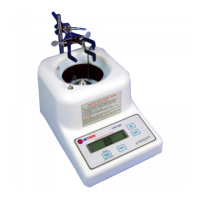
Details the main components of the UPM 2000, including transducer cone, sound tank, and front/rear panels.

Front Panel Description

Describes the components of the front panel, including the LCD display, power switch, and buttons.

Back Panel Description

Details the back panel components, including battery compartment, RS-232 port, and transformer jack.

Bottom Panel Description

Explains the bottom panel components such as leveling jacks, drain hose, and overflow drain slots.

Standard Accessories Included

Lists standard accessories like transducer clamp, centering rings, power transformer, calibration weight, and carrying bag.

Optional Accessories Available

Details optional accessories such as the Dissolved Oxygen Test Kit and RS-232 cable.

Installation and Operation of the UPM 2000

Unpacking and Initial Inspection

Provides instructions on how to unpack the UPM 2000 and check for shipping damage and included accessories.

Operation and Environment Guidelines

Covers general operation, operating environment, and safety precautions for using the UPM 2000.

UPM 2000 Systems Check and Setup

Outlines the steps to perform a systems check, including leveling, connections, and temperature adjustment.

Performing Ultrasound Power Measurements

Details how to set up the transducer and initiate power measurements in Watts mode.

Using Transducer Clamp and Centering Rings

Explains how to use the clamp assembly and centering rings for proper transducer positioning and stable readings.

Ultrasound Unit Testing Procedures

Describes two methods for testing ultrasound units: Discrete Values and Exact Meter Settings.

Connecting via RS232 Port

Explains how to connect the UPM 2000 to a computer via the RS232 port for data transfer.

Safety, Maintenance, and Storage

Safety Procedures and Precautions

Lists essential safety precautions for operating the UPM 2000 and testing ultrasound devices.

Calibration Check Procedures

Details how to verify the UPM 2000's calibration using a 100 gram weight.

Unit Maintenance

Provides instructions on keeping the UPM 2000 clean.

Service and Calibration Returns

Outlines factory service requirements and procedures for returning the unit for calibration.

Battery Replacement and Storage

Guides on battery replacement and provides environmental conditions for storing the UPM 2000.

Repackaging and Shipping for Service

Details the procedures for safely repackaging the UPM 2000 for service or repair.

Troubleshooting Guide

UPM 2000 Error Code Reference

Lists UPM 2000 error codes, their probable causes, and corrective actions for detection.

Common Operational Problems and Solutions

Addresses common issues like readings not returning to zero, unstable readings, power failure, and display anomalies.

Netech UPM 2000 Specifications

General IconGeneral
Harmonic AnalysisUp to 50th harmonic
Weight1.5 kg
Measurement RangeVoltage, Current, Power, Energy, Harmonics
DisplayLCD
Data LoggingInternal memory
Communication InterfaceRS-232
Dimensions240 x 180 mm
Accuracy±0.2% (Voltage/Current), ±0.5% (Power)

Related product manuals