R emote Keypads
Your alarm system can be operated from one or more remote keypads, which will have been
strategically located within the protected premises. The remote keypads may be one of four
types.
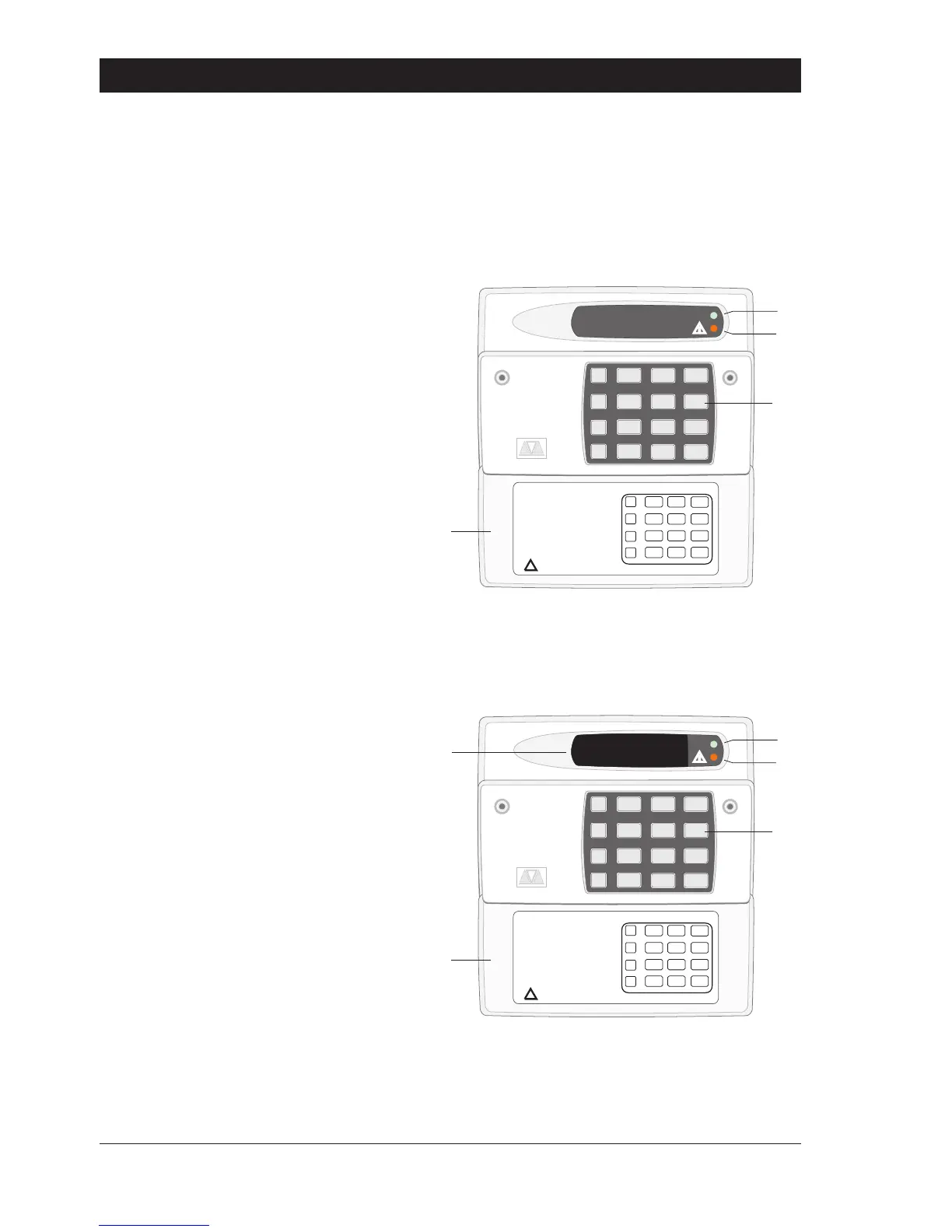
Arming Station
The remote arming station can only be used to full set, part set and unset your alarm system.
Gre en P owe r Indicator - Flashes if no
mains power is present. Steady when
mains power is present.
Red Function Indicator - Can be
programmed by the alarm company,
to indicate a fault, set or part-set etc.
Keyboard - Used for operating your
alarm system.
Cover - Fold-down cover with quick
guide operating instructions.
LED Keypad
The LED remote keypad can be used to full set, part set and unset the alarm system. It also can
be used for limited programming functions.
LED Disp lay - Used to show the system
time along with other system
messages.
Gre en Power Indicator - Flashes if no
mains power is present. Steady when
mains power is present.
Red Function Indicator - Can be
programmed by the alarm company,
to indicate a fault, set or part-set etc.
Keyboard - Used for operating your
alarm system.
Cover - Fold-down cover with quick
guide operating instructions.
2
Overvi ew TS 790/TS900 User Ma nual
1A
D
C
B
2
3
7
6
5
4
8 9
0
ENT
ESC
_
~
SILENTZONE OMIT
CH IMENE W CODE 24 Hr OMIT
WALK TESTB ELL TES TPar t Set
Part Set
Part Set
RE SET
1
A
B
C
D
2 3
4 5 6
7
ENT ESC
8
0
9
Sett ing the System
Ent er your pa s scode XX XX
th en lea v e th e pro tec t ed a re a.
Unse tting the System
Go dire ct ly to the ke yp ad and
en ter you r p asscod e XXXX .
Rese tting
Ent er your pa s scode XX XX f ollow ed
by EN T the n 3. Te leph on e y ou r a l ar m
com pan y and follow th eir instruct io ns .
!
See U ser Manual
FULL S ET
1A
D
C
B
2
3
7
6
5
4
8 9
0
ENT
ESC
_
~
OPEN
SILENTZONE OMIT
CH IMENE W CODE 24 Hr OMIT
WALK TESTB ELL TES TPar t Set
Part Set
Part Set
RE SET
1
A
B
C
D
2 3
4 5 6
7
ENT ESC
8
0
9
Sett ing the System
Ent er your pa s scode XX XX
th en lea v e th e pro tec t ed a re a.
Unse tting the System
Go dire ct ly to the ke yp ad and
en ter you r p asscod e XXXX .
Rese tting
Ent er your pa s scode XX XX f ollow ed
by EN T the n 3. Te leph on e y ou r a l ar m
com pan y and follow th eir instruct io ns .
!
See U ser Manual
FULL S ET



 To Next Page